

Create JMeter test plans with the Java API and experimental Kotlin/Java DSL in 5.6: ListedHashTree, Copy Code, and programmatic builders.
Building a Test Plan Programmatically
Section titled “Building a Test Plan Programmatically”In this section, you will learn how to create a Test Plan with JMeter APIs.
The Test Plan is a collection of elements arranged in a tree-like manner. However, in JMeter APIs, the elements do not form a tree.
Parent-child relationships are stored in a separate structure: ListedHashTree.
Creating a plan with low-level APIs
Section titled “Creating a plan with low-level APIs”Let us create Test Plan => Thread Group => Debug Sampler plan
ListedHashTree root = new ListedHashTree(); // (1)TestPlan testPlan = new TestPlan();ListedHashTree testPlanSubtree = root.add(testPlan); // (2)TestPlan threadGroup = new ThreadGroup();threadGroup.setName("Search Order Thread Group");ListedHashTree threadGroupSubtree = testPlanSubtree.add(threadGroup); // (3)DebugSampler debugSampler = new DebugSampler();threadGroupSubtree.add(debugSampler);- Firstly, we create the tree at
(1) - Then we create elements, and add them to the tree in
(2) - Note how adding element returns the subtree, so we add
threadGroupundertestPlanin(2)
Generating code from UI
Section titled “Generating code from UI”To aid with creating code, JMeter implements Copy Code context action, so you could
generate code for any element in the plan. It would generate code for the element and its children.
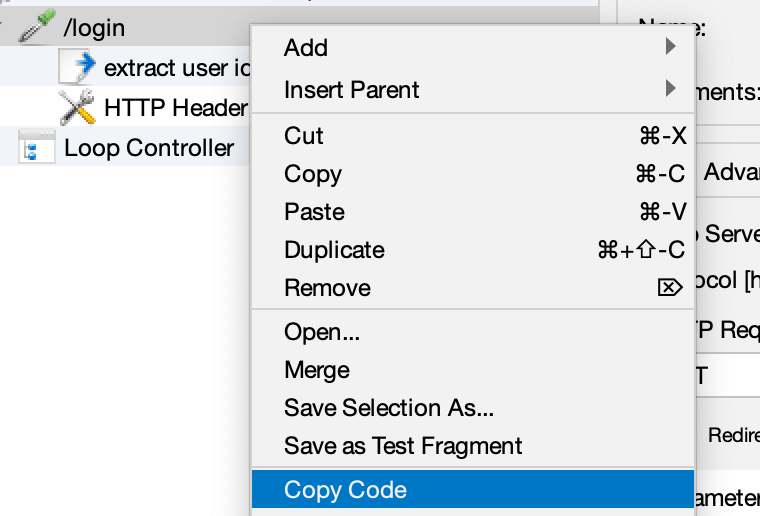 Copy Code context action
Here’s the generated code (Kotlin DSL):
org.apache.jmeter.protocol.http.sampler.HTTPSamplerProxy::class {    props {        it[arguments] = org.apache.jmeter.config.Arguments().apply {            props {                it[arguments] = listOf(                    org.apache.jmeter.protocol.http.util.HTTPArgument().apply {                        props {                            it = "World"                            it[metadata] = "="                            it[useEquals] = true                            it[argumentName] = "user"                        }                    },                    org.apache.jmeter.protocol.http.util.HTTPArgument().apply {                        props {                            it[alwaysEncode] = true                            it = "test_value"                            it[metadata] = "="                            it[useEquals] = true                            it[argumentName] = "test"                        }                    },                )                it[name] = "User Defined Variables"                it[guiClass] = "org.apache.jmeter.protocol.http.gui.HTTPArgumentsPanel"                it[testClass] = "org.apache.jmeter.config.Arguments"            }        }        it[domain] = "example.com"        it[path] = "/api/v1/login"        it[method] = "GET"        it[followRedirects] = true        it[useKeepalive] = true        it[proxy.scheme] = "https"        it[proxy.host] = "localhost"        it[proxy.port] = "8080"        it[proxy.username] = "secret"        it[proxy.password] = "password1"        it[name] = "/login"        it[guiClass] = "org.apache.jmeter.protocol.http.control.gui.HttpTestSampleGui"    }
    org.apache.jmeter.extractor.RegexExtractor::class {        props {            it[guiClass] = "org.apache.jmeter.extractor.gui.RegexExtractorGui"            it[name] = "extract user id"            it[referenceName] = "regexVar"            it[regularExpression] = "hello\\s+?world"            it[template] = "\$1\$"        }    }
    org.apache.jmeter.protocol.http.control.HeaderManager::class {        props {            it[headers] = listOf(                org.apache.jmeter.protocol.http.control.Header().apply {                    props {                        it[headerName] = "Accept"                        it = "text/plain"                    }                },                org.apache.jmeter.protocol.http.control.Header().apply {                    props {                        it[headerName] = "User-Agent"                        it = "JMeter"                    }                },                org.apache.jmeter.protocol.http.control.Header().apply {                    props {                        it[headerName] = "X-JMeter-Thread"                        it = "Thread \\${__threadNum}"                    }                },            )            it[guiClass] = "org.apache.jmeter.protocol.http.gui.HeaderPanel"            it[name] = "HTTP Header Manager"        }    }}
Creating a plan with Kotlin DSL
Section titled “Creating a plan with Kotlin DSL”JMeter 5.6 introduces Kotlin DSL which might make it easier to create and maintain test plans as the structure of the code would resemble the structure of the generated test plan tree
import org.apache.jmeter.sampler.DebugSamplerimport org.apache.jmeter.testelement.TestPlanimport org.apache.jmeter.threads.ThreadGroupimport org.apache.jmeter.treebuilder.dsl.testTree
val root = testTree { // (1) TestPlan::class { // (2) ThreadGroup::class { name = "Search Order Thread Group" +DebugSampler::class // (3) +DebugSampler() // (4) } }}- Firstly, we create a
TreeBuilderat(1) - Then we add elements to the tree in
(2), and populate its children - Note how adding element returns the subtree, so we add
threadGroupundertestPlanin(2) - If no children needed, the element can be appended to the tree with a unary plus operator as in
(3) - By default, JMeter uses no-argument constructors to create elements, however, you can add
TestElementinstances to the tree as well, see(4)
Extending Kotlin DSL
Section titled “Extending Kotlin DSL”As you use the DSL for test plan generation, you might want to factor out the common patterns.
For instance, imagine you want factor out Thread Group creation so it always has a Summariser element.
import kotlin.time.Duration.Companion.secondsimport org.apache.jmeter.sampler.DebugSamplerimport org.apache.jmeter.testelement.TestPlanimport org.apache.jmeter.threads.ThreadGroupimport org.apache.jmeter.treebuilder.dsl.testTree
fun TreeBuilder.threadGroup( // (1)    name: String,    numThreads: Int = 10,    rampUp: Duration = 3.seconds,    body: Action<ThreadGroup>) {    ThreadGroup::class { // (2)        this.name = name        this.numThreads = numThreads        this.rampUp = rampUp.inWholeSeconds.toInt()        +Summariser::class        body(this) // (3)    }}
fun buildTree() { val root = testTree { TestPlan::class { threadGroup(name = "Search Order Thread Group", rampUp = 1.seconds) { // (4) +DebugSampler::class } } }- Firstly, you can factor test element creation logic as an extension function for
TreeBuilderas in(1). It uses regular DSL to add an element (see(2)), and then it calls the lambda body in(3)to fill thread group children. - You can use the extension by calling it when you need it in the test plan, see
(4) - Note how named parameters, and default values keep the code readable
Creating a plan with Java DSL
Section titled “Creating a plan with Java DSL”JMeter 5.6 introduces Java DSL which might make it easier to create and maintain test plans as the structure of the code would resemble the structure of the generated test plan tree
import org.apache.jmeter.sampler.DebugSamplerimport org.apache.jmeter.testelement.TestPlanimport org.apache.jmeter.threads.ThreadGroupimport static org.apache.jmeter.treebuilder.dsl.TreeBuilders.testTree
ListedHashTree root = testTree(b -> { // (1) b.add(TestPlan.class, tp -> { // (2) b.add(ThreadGroup.class, tg -> { tg.setName("Search Order Thread Group"); b.add(DebugSampler.class); // (3) b.add(new DebugSampler()); // (4) }); });});- Firstly, we create a
TreeBuilderat(1). Note how this builder reference should be used to append all the elements - Then we add elements to the tree in
(2), and populate its children. The lambda parameters correspond to the added elements, so you can configure their properties - Note how adding element returns the subtree, so we add
threadGroupundertestPlanin(2) - If no children needed, you could omit the lambda parameter as in
(3) - By default, JMeter uses no-argument constructors to create elements, however, you can add
TestElementinstances to the tree as well, see(4)