

Configure the JMeter Access Log Sampler samplers: properties, defaults, and practical usage notes for building reliable load tests.
Part of the Samplers category. Also documented in context in the full Component Reference.
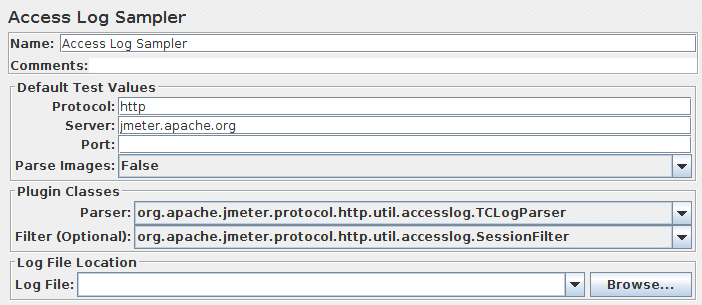
(Beta Code)
Section titled “(Beta Code)”AccessLogSampler was designed to read access logs and generate http requests. For those not familiar with the access log, it is the log the webserver maintains of every request it accepted. This means every image, CSS file, JavaScript file, html file, …
Tomcat uses the common format for access logs. This means any webserver that uses the common log format can use the AccessLogSampler. Server that use common log format include: Tomcat, Resin, Weblogic, and SunOne. Common log format looks like this:
127.0.0.1 - - [21/Oct/2003:05:37:21 -0500] "GET /index.jsp?%2Findex.jsp= HTTP/1.1" 200 8343For the future, it might be nice to filter out entries that
do not have a response code of 200. Extending the sampler should be fairly simple. There
are two interfaces you have to implement:
org.apache.jmeter.protocol.http.util.accesslog.LogParserorg.apache.jmeter.protocol.http.util.accesslog.Generator
The current implementation of AccessLogSampler uses the generator to create a new
HTTPSampler. The servername, port and get images are set by AccessLogSampler. Next,
the parser is called with integer 1, telling it to parse one entry. After that,
HTTPSampler.sample() is called to make the request.
samp = (HTTPSampler) GENERATOR.generateRequest();samp.setDomain(this.getDomain());samp.setPort(this.getPort());samp.setImageParser(this.isImageParser());PARSER.parse(1);res = samp.sample();res.setSampleLabel(samp.toString());The required methods in LogParser are:
setGenerator(Generator)parse(int)
Classes implementing Generator interface should provide concrete implementation
for all the methods. For an example of how to implement either interface, refer to
StandardGenerator and TCLogParser.
| Name | Required | Description |
|---|---|---|
| Name | No | Descriptive name for this sampler that is shown in the tree. |
| Server | Yes | Domain name or IP address of the web server. |
| Protocol | No (defaults to http | Scheme |
| Port | No (defaults to 80) | Port the web server is listening to. |
| Log parser class | Yes (default provided) | The log parser class is responsible for parsing the logs. |
| Filter | No | The filter class is used to filter out certain lines. |
| Location of log file | Yes | The location of the access log file. |
The TCLogParser processes the access log independently for each thread.
The SharedTCLogParser and OrderPreservingLogParser share access to the file,
i.e. each thread gets the next entry in the log.
The SessionFilter is intended to handle Cookies across threads.
It does not filter out any entries, but modifies the cookie manager so that the cookies for a given IP are
processed by a single thread at a time. If two threads try to process samples from the same client IP address,
then one will be forced to wait until the other has completed.
The LogFilter is intended to allow access log entries to be filtered by filename and regex,
as well as allowing for the replacement of file extensions. However, it is not currently possible
to configure this via the GUI, so it cannot really be used.