

Configure the JMeter HTTP Header Manager configuration elements: properties, defaults, and practical usage notes for building reliable load tests.
Part of the Configuration Elements category. Also documented in context in the full Component Reference.
TL;DR: the HTTP Header Manager sets custom HTTP headers (Authorization, Content-Type, custom API keys) on every request in its scope — the standard place to inject a bearer token or API key without repeating it on every sampler.
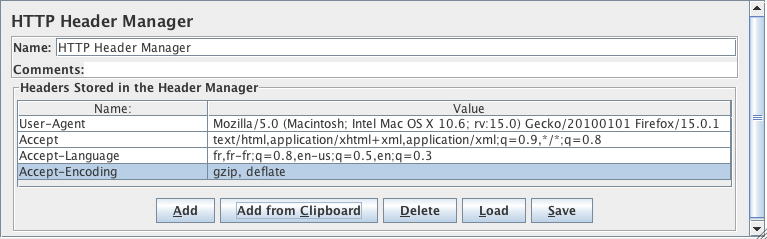
The Header Manager lets you add or override HTTP request headers.
JMeter now supports multiple Header Managers. The header entries are merged to form the list for the sampler. If an entry to be merged matches an existing header name, it replaces the previous entry. This allows one to set up a default set of headers, and apply adjustments to particular samplers. Note that an empty value for a header does not remove an existing header, it justs replace its value.
| Name | Required | Description |
|---|---|---|
| Name | No | Descriptive name for this element that is shown in the tree. |
| Name (Header) | No (You should have at least one, however) | Name of the request header. Two common request headers you may want to experiment with are “User-Agent” and “Referer”. |
| Value | No (You should have at least one, however) | Request header value. |
| Add Button | N/A | Add an entry to the header table. |
| Delete Button | N/A | Delete the currently selected table entry. |
| Load Button | N/A | Load a previously saved header table and add the entries to the existing header table entries. |
| Save As Button | N/A | Save the current header table to a file. |
Header Manager example
Section titled “Header Manager example”Download this example. In this example, we created a Test Plan
that tells JMeter to override the default “User-Agent” request header and use a particular Internet Explorer agent string
instead. (see figures 12 and 13).
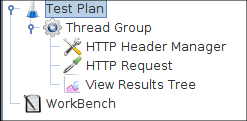 Figure 12 - Test Plan
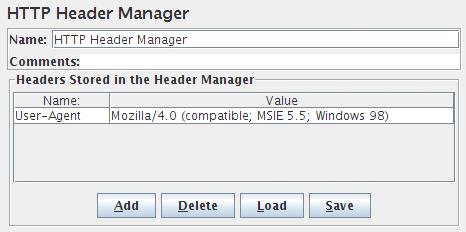 Figure 13 - Header Manager Control Panel
Common gotchas
Section titled “Common gotchas”- Scope it at the right level: a Header Manager on the Thread Group applies to every request underneath; one on a single sampler overrides just that request — duplicate/conflicting headers at different scopes is a common source of confusing behavior.
- Content-Type set here can be silently overridden by JMeter itself for some body types (e.g. multipart) — if a header isn’t appearing as expected, check whether the sampler is auto-setting it.
- For dynamic values (a token that changes per iteration), reference a variable in the header value (
Bearer ${authToken}) rather than hardcoding it — see JWT, OAuth & SSO Authentication. - If requests return 401/403 only in JMeter, compare the actual sent headers (View Results Tree → Request tab) against a working browser request — see HTTP 401/403 after recording.