

Configure the JMeter Sample Result Save Configuration listeners: properties, defaults, and practical usage notes for building reliable load tests.
Part of the Listeners category. Also documented in context in the full Component Reference.
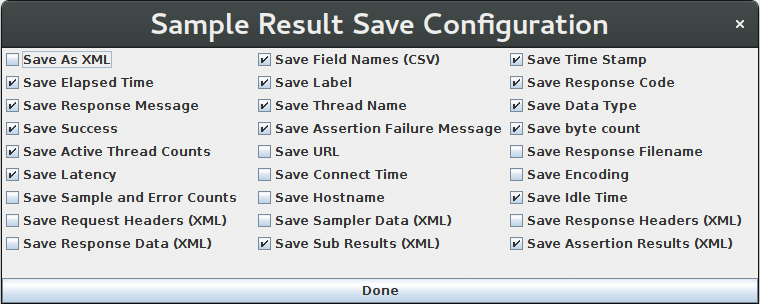
Listeners can be configured to save different items to the result log files (JTL) by using the Config popup as shown below.
The defaults are defined as described in the Listener Default Configuration documentation.
Items with (CSV) after the name only apply to the CSV format; items with (XML) only apply to XML format.
CSV format cannot currently be used to save any items that include line-breaks.
Note that cookies, method and the query string are saved as part of the “Sampler Data” option.
Related
Section titled “Related”Was this page helpful?
Thanks for the feedback!Tell us what's missing on GitHub