

Configure the JMeter Flow Control Action samplers: properties, defaults, and practical usage notes for building reliable load tests.
Part of the Samplers category — formerly called Test Action. Also documented in context in the full Component Reference.
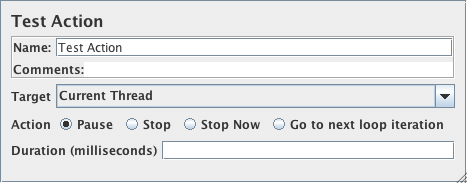
The Flow Control Action sampler is a sampler that is intended for use in a conditional controller. Rather than generate a sample, the test element either pauses or stops the selected target. This sampler can also be useful in conjunction with the Transaction Controller, as it allows pauses to be included without needing to generate a sample. For variable delays, set the pause time to zero, and add a Timer as a child.
The “Stop” action stops the thread or test after completing any samples that are in progress.
The “Stop Now” action stops the test without waiting for samples to complete; it will interrupt any active samples.
If some threads fail to stop within the 5 second time-limit, a message will be displayed in GUI mode.
You can try using the Stop command to see if this will stop the threads, but if not, you should exit JMeter.
In CLI mode, JMeter will exit if some threads fail to stop within the 5 second time limit.
| Name | Required | Description |
|---|---|---|
| Name | No | Descriptive name for this element that is shown in the tree. |
| Target | Yes | Current Thread / All Threads (ignored for Pause and Go to next loop iteration) |
| Action | Yes | Pause / Stop / Stop Now / Go to next loop iteration |
| Duration | Yes, if Pause is selected | How long to pause for (milliseconds) |