

Configure the JMeter HTTP Cookie Manager configuration elements: properties, defaults, and practical usage notes for building reliable load tests.
Part of the Configuration Elements category. Also documented in context in the full Component Reference.
TL;DR: the HTTP Cookie Manager stores and replays cookies automatically across requests in a thread, simulating a real browser’s cookie jar (session cookies, CSRF tokens set via Set-Cookie). Add one per test plan unless you’re deliberately testing cookie-less/API clients.
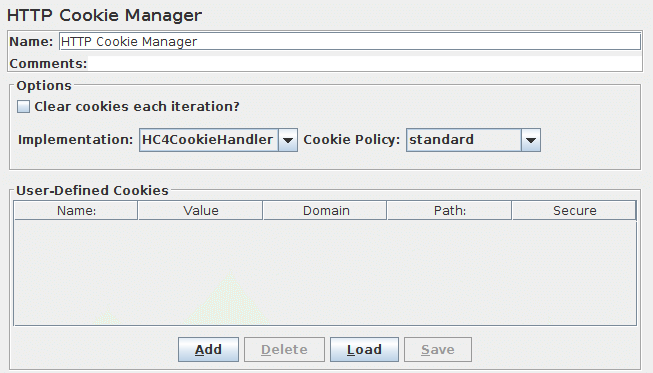
The Cookie Manager element has two functions:
First, it stores and sends cookies just like a web browser. If you have an HTTP Request and the response contains a cookie, the Cookie Manager automatically stores that cookie and will use it for all future requests to that particular web site. Each JMeter thread has its own “cookie storage area”. So, if you are testing a web site that uses a cookie for storing session information, each JMeter thread will have its own session. Note that such cookies do not appear on the Cookie Manager display, but they can be seen using the View Results Tree Listener.
JMeter checks that received cookies are valid for the URL.
This means that cross-domain cookies are not stored.
If you have bugged behaviour or want Cross-Domain cookies to be used, define the JMeter property “CookieManager.check.cookies=false”.
Received Cookies can be stored as JMeter thread variables.
To save cookies as variables, define the property “CookieManager.save.cookies=true”.
Also, cookies names are prefixed with “COOKIE_” before they are stored (this avoids accidental corruption of local variables)
To revert to the original behaviour, define the property “CookieManager.name.prefix= ” (one or more spaces).
If enabled, the value of a cookie with the name TEST can be referred to as \${COOKIE_TEST}.
Second, you can manually add a cookie to the Cookie Manager. However, if you do this, the cookie will be shared by all JMeter threads.
Note that such Cookies are created with an Expiration time far in the future
Cookies with null values are ignored by default.
This can be changed by setting the JMeter property: CookieManager.delete_null_cookies=false.
Note that this also applies to manually defined cookies - any such cookies will be removed from the display when it is updated.
Note also that the cookie name must be unique - if a second cookie is defined with the same name, it will replace the first.
| Name | Required | Description |
|---|---|---|
| Name | No | Descriptive name for this element that is shown in the tree. |
| Clear Cookies each Iteration | Yes | If selected, all server-defined cookies are cleared each time the main Thread Group loop is executed. Any cookie defined in the GUI are not cleared. |
| Cookie Policy | Yes | The cookie policy that will be used to manage the cookies. “standard” is the default since 3.0, and should work in most cases. See Cookie specifications and CookieSpec implementations [Note: “ignoreCookies” is equivalent to omitting the CookieManager.] |
| Implementation | Yes | HC4CookieHandler (HttpClient 4.5.X API). Default is HC4CookieHandler since 3.0. [Note: If you have a website to test with IPv6 address, choose HC4CookieHandler (IPv6 compliant)] |
| User-Defined Cookies | No (discouraged, unless you know what you’re doing) | This gives you the opportunity to use hardcoded cookies that will be used by all threads during the test execution. The “domain” is the hostname of the server (without http://); the port is currently ignored. |
| Add Button | N/A | Add an entry to the cookie table. |
| Delete Button | N/A | Delete the currently selected table entry. |
| Load Button | N/A | Load a previously saved cookie table and add the entries to the existing cookie table entries. |
| Save As Button | N/A | Save the current cookie table to a file (does not save any cookies extracted from HTTP Responses). |
Common gotchas
Section titled “Common gotchas”- Cookie Policy should almost always stay at the modern default (
standard) — older RFC2109-style policies exist for legacy compatibility testing only. - Cookies are stored per thread by default; if you need to share a session cookie across threads (rare, and usually a sign your test design should extract the session ID as a variable instead), that requires extra configuration.
- If a request works from a real browser but fails in JMeter with an auth/session error, a missing or misconfigured Cookie Manager is one of the first things to check — see Works in Browser, Fails in JMeter.
- Recorded test plans from the HTTP(S) Test Script Recorder include a Cookie Manager automatically.