

Configure the JMeter Counter configuration elements: properties, defaults, and practical usage notes for building reliable load tests.
Part of the Configuration Elements category. Also documented in context in the full Component Reference.
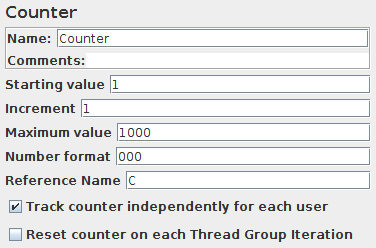
Allows the user to create a counter that can be referenced anywhere in the Thread Group. The counter config lets the user configure a starting point, a maximum, and the increment. The counter will loop from the start to the max, and then start over with the start, continuing on like that until the test is ended.
The counter uses a long to store the value, so the range is from -2^63 to 2^63-1.
| Name | Required | Description |
|---|---|---|
| Name | No | Descriptive name for this element that is shown in the tree. |
| Starting value | No | The starting value for the counter. The counter will equal this value during the first iteration (defaults to 0). |
| Increment | Yes | How much to increment the counter by after each iteration (defaults to 0, meaning no increment). |
| Maximum value | No | If the counter exceeds the maximum, then it is reset to the Starting value. Default is Long.MAX_VALUE |
| Format | No | Optional format, e.g. 000 will format as 001, 002, etc. This is passed to DecimalFormat, so any valid formats can be used. If there is a problem interpreting the format, then it is ignored. [The default format is generated using Long.toString()] |
| Exported Variable Name | No | This will be the variable name under which the counter value is available. If you name it counterA, you can then access it using \${counterA} as explained in user-defined values (By default, it creates an empty string variable that can be accessed using \${} but this is highly discouraged) |
| Track Counter Independently for each User | No | In other words, is this a global counter, or does each user get their own counter? If unchecked, the counter is global (i.e., user #1 will get value “1”, and user #2 will get value “2” on the first iteration). If checked, each user has an independent counter. |
| Reset counter on each Thread Group Iteration | No | This option is only available when counter is tracked per User, if checked, counter will be reset to Start value on each Thread Group iteration. This can be useful when Counter is inside a Loop Controller. |
Related
Section titled “Related”Was this page helpful?
Thanks for the feedback!Tell us what's missing on GitHub