

Configure the JMeter BeanShell Sampler samplers: properties, defaults, and practical usage notes for building reliable load tests.
Part of the Samplers category. Also documented in context in the full Component Reference.
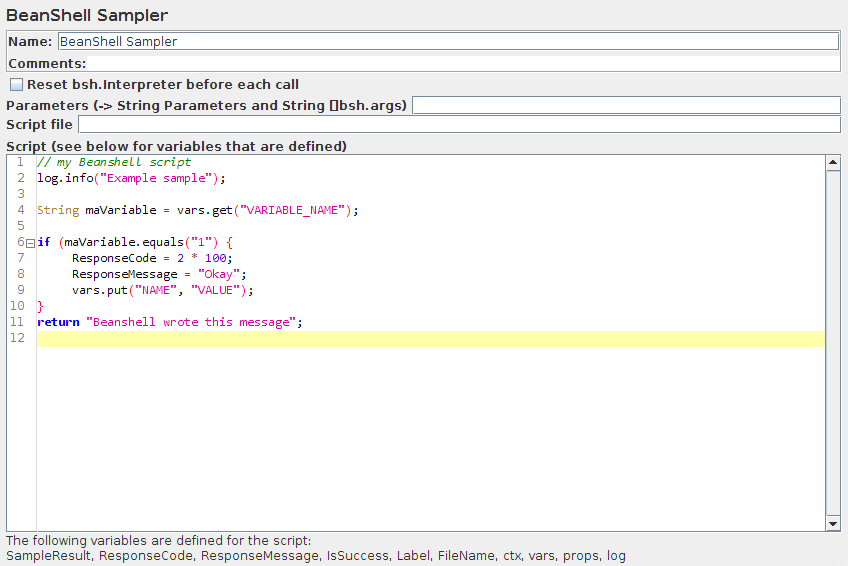
This sampler allows you to write a sampler using the BeanShell scripting language.
For full details on using BeanShell, please see the BeanShell website.
The test element supports the ThreadListener and TestListener interface methods.
These must be defined in the initialisation file.
See the file BeanShellListeners.bshrc for example definitions.
The BeanShell sampler also supports the Interruptible interface.
The interrupt() method can be defined in the script or the init file.
| Name | Required | Description |
|---|---|---|
| Name | No | Descriptive name for this sampler that is shown in the tree. The name is stored in the script variable Label |
| Reset bsh.Interpreter before each call | Yes | If this option is selected, then the interpreter will be recreated for each sample. This may be necessary for some long running scripts. For further information, see Best Practices - BeanShell scripting. |
| Parameters | No | Parameters to pass to the BeanShell script. This is intended for use with script files; for scripts defined in the GUI, you can use whatever variable and function references you need within the script itself. The parameters are stored in the following variables: Parameters : string containing the parameters as a single variable bsh.args : String array containing parameters, split on white-space |
| Script file | No | A file containing the BeanShell script to run. The file name is stored in the script variable FileName |
| Script | Yes (unless script file is provided) | The BeanShell script to run. The return value (if not null) is stored as the sampler result. |
If the property “beanshell.sampler.init” is defined, it is passed to the Interpreter
as the name of a sourced file.
This can be used to define common methods and variables.
There is a sample init file in the bin directory: BeanShellSampler.bshrc.
If a script file is supplied, that will be used, otherwise the script will be used.
Before invoking the script, some variables are set up in the BeanShell interpreter:
The contents of the Parameters field is put into the variable “Parameters”.
The string is also split into separate tokens using a single space as the separator, and the resulting list
is stored in the String array bsh.args.
The full list of BeanShell variables that is set up is as follows:
-
log- the Logger -
Label- the Sampler label -
FileName- the file name, if any -
Parameters- text from the Parameters field -
bsh.args- the parameters, split as described above -
SampleResult- pointer to the currentSampleResult -
ResponseCodedefaults to200 -
ResponseMessagedefaults to “OK” -
IsSuccessdefaults totrue -
ctx- JMeterContext -
vars- JMeterVariables - e.g.vars.get("VAR1"); vars.put("VAR2","value"); vars.remove("VAR3"); vars.putObject("OBJ1",new Object()); -
props- JMeterProperties (classjava.util.Properties) - e.g.props.get("START.HMS"); props.put("PROP1","1234");When the script completes, control is returned to the Sampler, and it copies the contents of the following script variables into the corresponding variables in the
SampleResult: -
ResponseCode- for example200 -
ResponseMessage- for example “OK” -
IsSuccess-trueorfalseThe SampleResult ResponseData is set from the return value of the script. If the script returns null, it can set the response directly, by using the method
SampleResult.setResponseData(data), where data is either a String or a byte array. The data type defaults to “text”, but can be set to binary by using the methodSampleResult.setDataType(SampleResult.BINARY).The
SampleResultvariable gives the script full access to all the fields and methods in theSampleResult. For example, the script has access to the methodssetStopThread(boolean)andsetStopTest(boolean).Here is a simple (not very useful!) example script:
if (bsh.args[0].equalsIgnoreCase("StopThread")) { log.info("Stop Thread detected!"); SampleResult.setStopThread(true);}return "Data from sample with Label "+Label;//orSampleResult.setResponseData("My data");return null;Another example:
ensure that the property beanshell.sampler.init=BeanShellSampler.bshrc is defined in jmeter.properties.
The following script will show the values of all the variables in the ResponseData field:
return getVariables();For details on the methods available for the various classes (JMeterVariables, SampleResult etc.) please check the Javadoc or the source code.
Beware however that misuse of any methods can cause subtle faults that may be difficult to find.