

Configure the JMeter Thread Group miscellaneous features: properties, defaults, and practical usage notes for building reliable load tests.
Part of the Miscellaneous Features category. Also documented in context in the full Component Reference.
TL;DR: the Thread Group is the container that defines how many virtual users run, how fast they ramp up, and for how long. Every test plan needs at least one; how you size it decides whether your test actually models real load or just floods the server.
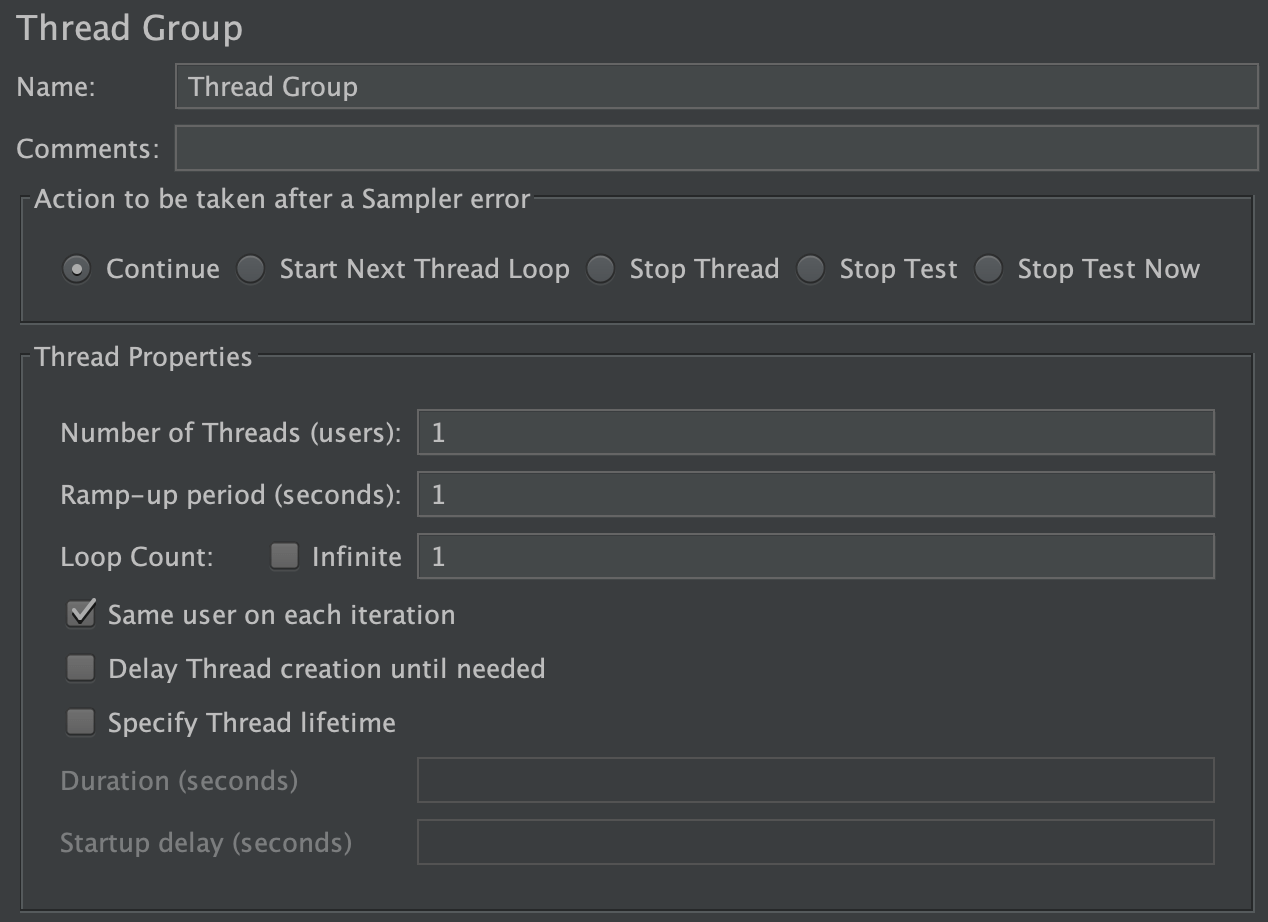
A Thread Group defines a pool of users that will execute a particular test case against your server. In the Thread Group GUI, you can control the number of users simulated (number of threads), the ramp up time (how long it takes to start all the threads), the number of times to perform the test, and optionally, a start and stop time for the test.
See also tearDown Thread Group and setUp Thread Group.
When using the scheduler, JMeter runs the thread group until either the number of loops is reached or the duration/end-time is reached - whichever occurs first. Note that the condition is only checked between samples; when the end condition is reached, that thread will stop. JMeter does not interrupt samplers which are waiting for a response, so the end time may be delayed arbitrarily.
Since JMeter 3.0, you can run a selection of Thread Group by selecting them and right clicking. A popup menu will appear:
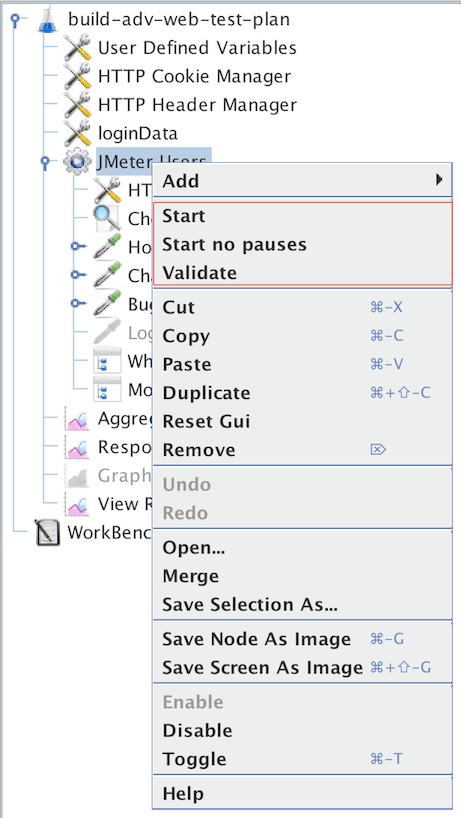 Popup menu to start a selection of Thread Groups
Notice you have three options to run the selection of Thread Groups:
Start
: Start the selected thread groups only
Start no pauses
: Start the selected thread groups only but without running the timers
Validate
: Start the selected thread groups only using validation mode. Per default this runs the Thread Group in validation mode (see below)
Validation Mode:
This mode enables rapid validation of a Thread Group by running it with one thread, one iteration, no timers and no Startup delay set to 0.
Behaviour can be modified with some properties by setting in user.properties:
testplan_validation.nb_threads_per_thread_group
: Number of threads to use to validate a Thread Group, by default 1
testplan_validation.ignore_timers
: Ignore timers when validating the thread group of plan, by default 1
testplan_validation.number_iterations
: Number of iterations to use to validate a Thread Group
testplan_validation.tpc_force_100_pct
: Whether to force Throughput Controller in percentage mode to run as if percentage was 100 %. Defaults to false
| Name | Required | Description |
|---|---|---|
| Name | No | Descriptive name for this element that is shown in the tree. |
| Action to be taken after a Sampler error | No | Determines what happens if a sampler error occurs, either because the sample itself failed or an assertion failed. The possible choices are: - Continue - ignore the error and continue with the test - Start Next Thread Loop - ignore the error, start next loop and continue with the test - Stop Thread - current thread exits - Stop Test - the entire test is stopped at the end of any current samples. - Stop Test Now - the entire test is stopped abruptly. Any current samplers are interrupted if possible. |
| Number of Threads | Yes | Number of users to simulate. |
| Ramp-up Period | Yes | How long JMeter should take to get all the threads started. If there are 10 threads and a ramp-up time of 100 seconds, then each thread will begin 10 seconds after the previous thread started, for a total time of 100 seconds to get the test fully up to speed. :::note The first thread will always start directly, so if you configured one thread, the ramp-up time is effectively zero. For the same reason, the tenth thread in the above example will actually be started after 90 seconds and not 100 seconds. ::: |
| Same user on each iteration | Yes | If selected, cookie and cache data from the first sampler response are used in subsequent requests (requires a global Cookie and Cache Manager respectively). If not selected, cookie and cache data from the first sampler response are not used in subsequent requests. :::note If not selected, a new connection will be opened between iterations which will result in increased response times and consume more resources (memory and cpu). ::: |
| Loop Count | Yes, unless Infinite is selected | Number of times to perform the test case. Alternatively, “infinite” can be selected causing the test to run until manually stopped or end of the thread lifetime is reached. |
| Same user on each iteration | Yes | If selected, cookie and cache data from the first sampler response are used in subsequent requests (requires a global Cookie and Cache Manager respectively). If not selected, cookie and cache data from the first sampler response are not used in subsequent requests. :::note If not selected, a new connection will be opened between iterations which will result in increased response times and consume more resources (memory and cpu). ::: |
| Delay Thread creation until needed | Yes | If selected, threads are created only when the appropriate proportion of the ramp-up time has elapsed. This is most appropriate for tests with a ramp-up time that is significantly longer than the time to execute a single thread. I.e. where earlier threads finish before later ones start. If not selected, all threads are created when the test starts (they then pause for the appropriate proportion of the ramp-up time). This is the original default, and is appropriate for tests where threads are active throughout most of the test. |
| Specify Thread lifetime | Yes | If selected, confines Thread operation time to the given bounds |
| Duration (seconds) | No | If the scheduler checkbox is selected, one can choose a relative end time. JMeter will use this to calculate the End Time. |
| Startup delay (seconds) | No | If the scheduler checkbox is selected, one can choose a relative startup delay. JMeter will use this to calculate the Start Time. |
Common gotchas
Section titled “Common gotchas”- Number of Threads ≠ concurrent requests. With think time and non-trivial response times, threads spend most of their time waiting, not requesting — use the Thread Calculator to size threads from a target RPS.
- Ramp-up period of 0 starts every thread at once — a thundering-herd spike, rarely what you want for realistic load. A ramp-up roughly equal to the thread count (in seconds) is a reasonable starting point.
- Prefer the Concurrency Thread Group (plugin) or Ultimate Thread Group over the classic one when you need staged/variable load profiles — the classic group can only ramp up once.
- For distributed runs, each injector’s Thread Group count is per injector, not total — see Distributed Load Testing.