

Configure the JMeter Mail Reader Sampler samplers: properties, defaults, and practical usage notes for building reliable load tests.
Part of the Samplers category. Also documented in context in the full Component Reference.
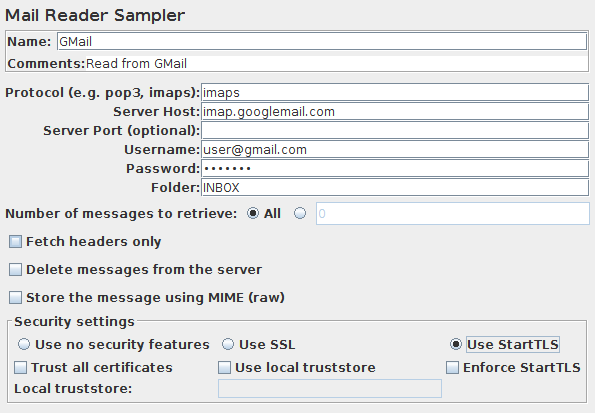
The Mail Reader Sampler can read (and optionally delete) mail messages using POP3(S) or IMAP(S) protocols.
| Name | Required | Description |
|---|---|---|
| Name | No | Descriptive name for this element that is shown in the tree. |
| Server Type | Yes | The protocol used by the provider: e.g. pop3, pop3s, imap, imaps. or another string representing the server protocol. For example file for use with the read-only mail file provider. The actual provider names for POP3 and IMAP are pop3 and imap |
| Server | Yes | Hostname or IP address of the server. See below for use with file protocol. |
| Port | No | Port to be used to connect to the server (optional) |
| Username | No | User login name |
| Password | No | User login password (N.B. this is stored unencrypted in the test plan) |
| Folder | Yes, if using IMAP(S) | The IMAP(S) folder to use. See below for use with file protocol. |
| Number of messages to retrieve | Yes | Set this to retrieve all or some messages |
| Fetch headers only | Yes | If selected, only the message headers will be retrieved. |
| Delete messages from the server | Yes | If set, messages will be deleted after retrieval |
| Store the message using MIME | Yes | Whether to store the message as MIME. If so, then the entire raw message is stored in the Response Data; the headers are not stored as they are available in the data. If not, the message headers are stored as Response Headers. A few headers are stored (Date, To, From, Subject) in the body. |
| Use no security features | No | Indicates that the connection to the server does not use any security protocol. |
| Use SSL | No | Indicates that the connection to the server must use the SSL protocol. |
| Use StartTLS | No | Indicates that the connection to the server should attempt to start the TLS protocol. |
| Enforce StartTLS | No | If the server does not start the TLS protocol the connection will be terminated. |
| Trust All Certificates | No | When selected it will accept all certificates independent of the CA. |
| Use local truststore | No | When selected it will only accept certificates that are locally trusted. |
| Local truststore | No | Path to file containing the trusted certificates. Relative paths are resolved against the current directory. Failing that, against the directory containing the test script (JMX file). |
Messages are stored as subsamples of the main sampler. Multipart message parts are stored as subsamples of the message.
Special handling for “file” protocol:
The file JavaMail provider can be used to read raw messages from files.
The server field is used to specify the path to the parent of the folder.
Individual message files should be stored with the name n.msg,
where n is the message number.
Alternatively, the server field can be the name of a file which contains a single message.
The current implementation is quite basic, and is mainly intended for debugging purposes.