

Configure the JMeter Test Plan miscellaneous features: properties, defaults, and practical usage notes for building reliable load tests.
Part of the Miscellaneous Features category. Also documented in context in the full Component Reference.
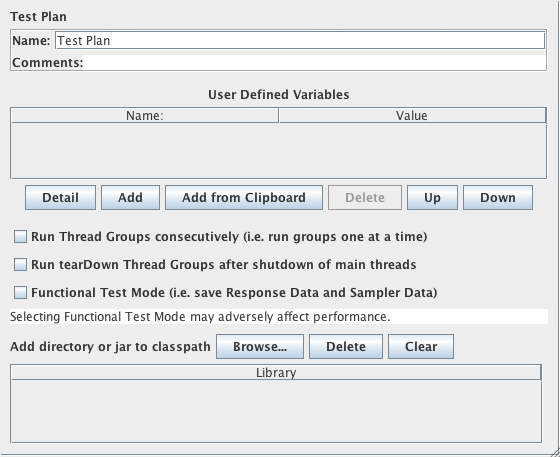
The Test Plan is where the overall settings for a test are specified.
Static variables can be defined for values that are repeated throughout a test, such as server names.
For example the variable SERVER could be defined as www.example.com, and the rest of the test plan
could refer to it as \${SERVER}. This simplifies changing the name later.
If the same variable name is reused on one of more User Defined Variables Configuration elements, the value is set to the last definition in the test plan (reading from top to bottom). Such variables should be used for items that may change between test runs, but which remain the same during a test run.
If you need to construct other variables from the Test Plan variables, use a User Defined Variables test element.
Selecting Functional Testing instructs JMeter to save the additional sample information
- Response Data and Sampler Data - to all result files. This increases the resources needed to run a test, and may adversely impact JMeter performance. If more data is required for a particular sampler only, then add a Listener to it, and configure the fields as required.
Also, an option exists here to instruct JMeter to run the Thread Group serially rather than in parallel.
Run tearDown Thread Groups after shutdown of main threads: if selected, the tearDown groups (if any) will be run after graceful shutdown of the main threads. The tearDown threads won’t be run if the test is forcibly stopped.
Test plan now provides an easy way to add classpath setting to a specific test plan. The feature is additive, meaning that you can add jar files or directories, but removing an entry requires restarting JMeter.
However it can be useful for utility jars such as JDBC drivers. The jars are only added to the search path for the JMeter loader, not for the system class loader.
JMeter properties also provides an entry for loading additional classpaths.
In jmeter.properties, edit “user.classpath” or “plugin_dependency_paths” to include additional libraries.
See JMeter’s Classpath and
Configuring JMeter for details.