

Configure the JMeter HTML Link Parser pre processors: properties, defaults, and practical usage notes for building reliable load tests.
Part of the Pre Processors category. Also documented in context in the full Component Reference.
This modifier parses HTML response from the server and extracts links and forms. A URL test sample that passes through this modifier will be examined to see if it “matches” any of the links or forms extracted from the immediately previous response. It would then replace the values in the URL test sample with appropriate values from the matching link or form. Perl-type regular expressions are used to find matches.
Spidering Example
Section titled “Spidering Example”Consider a simple example: let’s say you wanted JMeter to “spider” through your site,
hitting link after link parsed from the HTML returned from your server (this is not
actually the most useful thing to do, but it serves as a good example). You would create
a Simple Controller, and add the “HTML Link Parser” to it. Then, create an
HTTP Request, and set the domain to “.*”, and the path likewise. This will
cause your test sample to match with any link found on the returned pages. If you wanted to
restrict the spidering to a particular domain, then change the domain value
to the one you want. Then, only links to that domain will be followed.
Poll Example
Section titled “Poll Example”A more useful example: given a web polling application, you might have a page with
several poll options as radio buttons for the user to select. Let’s say the values
of the poll options are very dynamic - maybe user generated. If you wanted JMeter to
test the poll, you could either create test samples with hardcoded values chosen, or you
could let the HTML Link Parser parse the form, and insert a random poll option into
your URL test sample. To do this, follow the above example, except, when configuring
your Web Test controller’s URL options, be sure to choose “POST” as the
method. Put in hard-coded values for the domain, path, and any additional form parameters.
Then, for the actual radio button parameter, put in the name (let’s say it’s called “poll_choice”),
and then “.*” for the value of that parameter. When the modifier examines
this URL test sample, it will find that it “matches” the poll form (and
it shouldn’t match any other form, given that you’ve specified all the other aspects of
the URL test sample), and it will replace your form parameters with the matching
parameters from the form. Since the regular expression “.*” will match with
anything, the modifier will probably have a list of radio buttons to choose from. It
will choose at random, and replace the value in your URL test sample. Each time through
the test, a new random value will be chosen.
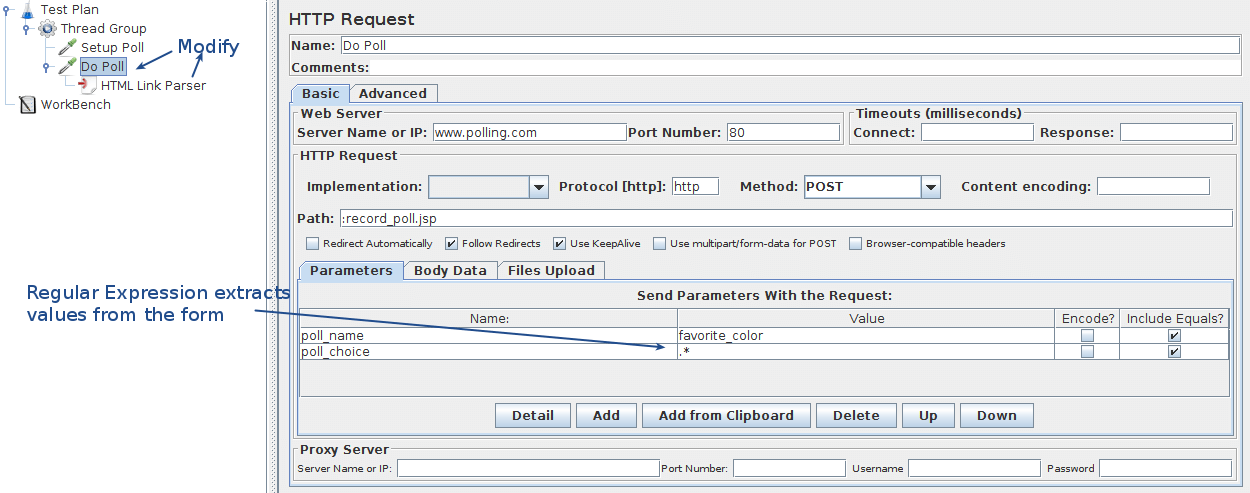 Figure 18 - Online Poll Example