

Configure the JMeter Precise Throughput Timer timers: properties, defaults, and practical usage notes for building reliable load tests.
Part of the Timers category. Also documented in context in the full Component Reference.
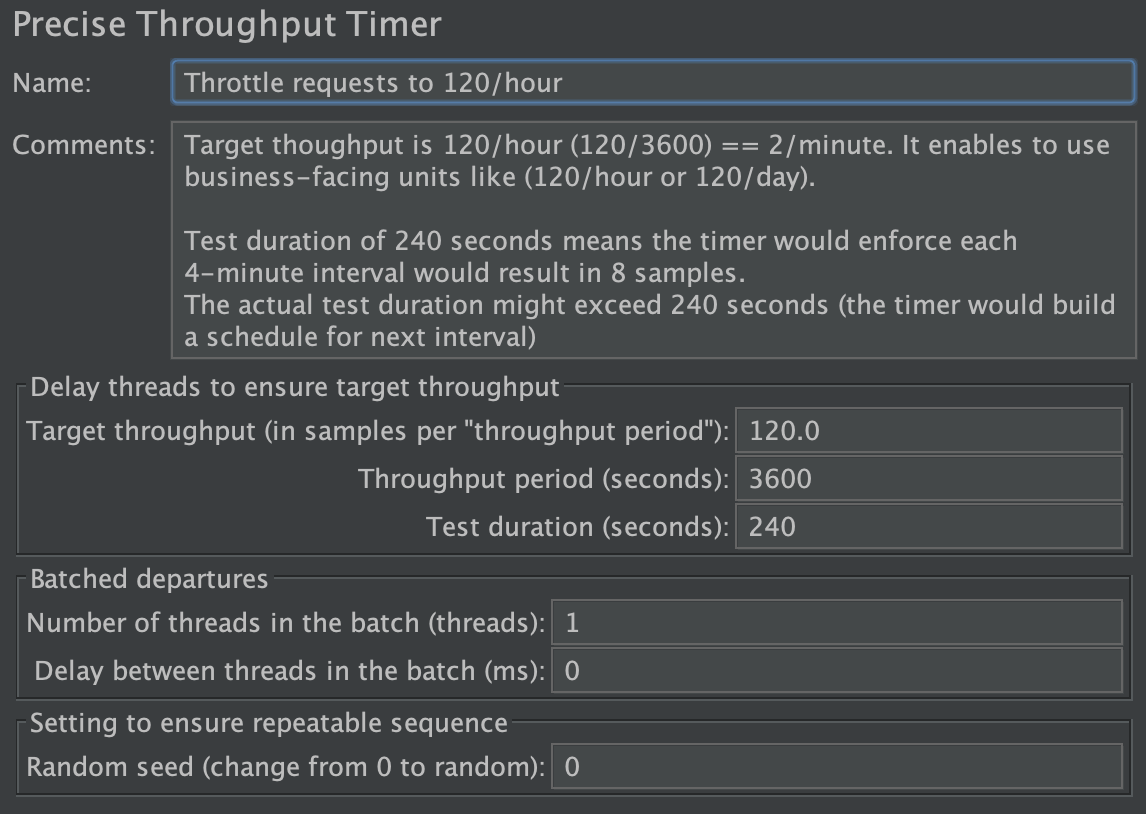
This timer introduces variable pauses, calculated to keep the total throughput (e.g. in terms of samples per minute) as close as possible to a given figure. The timer does not generate threads, so the resulting throughput will be lower if the server is not capable of handling it, or if other timers add too big delays, or if there’s not enough threads, or time-consuming test elements prevent it.
Although the Timer is called Precise Throughput Timer, it does not aim to produce precisely the same number of samples over one-second intervals during the test.
The timer works best for rates under 36000 requests/hour, however your mileage might vary (see monitoring section below if your goals are vastly different).
Best location of a Precise Throughput Timer in a Test Plan
Section titled “Best location of a Precise Throughput Timer in a Test Plan”As you might know, the timers are inherited by all the siblings and their child elements. That is why one of the best places for
Precise Throughput Timer is under the first element in a test loop. For instance, you might add a dummy sampler at the beginning,
and place the timer under that dummy sampler
Produced schedule
Section titled “Produced schedule”Precise Throughput Timer models Poisson arrivals schedule. That schedule often happens in a real-life, so it makes sense to use that for load testing.
For instance, it naturally might generate samples that are close together thus it might reveal concurrency issues. Even if you manage to generate Poisson arrivals
with Poisson Random Timer, it would be susceptible to the issues listed below. For instance, true Poisson arrivals might have indefinitely long
pause, and that is not practical for load testing. For instance, “regular” Poisson arrivals with 1 per second rate might end up with 50 samples over 60 second long test.
Constant Throughput Timer converges to the specified rate, however it tends to produce samples at even intervals.
Ramp-up and startup spike
Section titled “Ramp-up and startup spike”You might used “ramp-up” or similar approaches to avoid a spike at the test start. For instance, if you configure Thread Group to have
100 threads, and set Ramp-up Period to 0 (or to a small number), then all the threads would start at the same time, and it would produce an unwanted spike of the load. On top of that, if you set Ramp-up Period too high, it might result in “too few” threads being available at the very beginning to achieve
the required load.
Precise Throughput Timer schedules executions in a random way, so it can be used to generate constant load, and it is recommended to set both
Ramp-up Period and Delay to 0.
Multiple thread groups starting at the same time
Section titled “Multiple thread groups starting at the same time”A variation of Ramp-up issue might appear when Test Plan includes multiple Thread Groups. To mitigate that issue
one typically adds “random” delay to each Thread Group so threads start at different times.
Precise Throughput Timer avoids that issue since it schedules executions in a random way. You do not need to add extra random delays to mitigate startup spike
Number of iterations per hour
Section titled “Number of iterations per hour”One of the basic requirements is to issue N samples per M minutes. Let it be 60 iterations per hour. Business customers would not understand if you report load test results with 57 executions “just because the random was random”. In order to generate 60 iterations per hour, you need to configure as follows (other parameters could be left with their default values)
Target throughput (samples): 60Throughput period (seconds): 3600Test duration (seconds): 3600
The first two options set the throughput. Even though 60/3600, 30/1800, and 120/7200 represent exactly the same load level, pick the one that represents business requirements better. For instance, if the requirement is to test for “60 sample per hour”, then set 60/3600. If the requirement is to test “1 sample per minute”, then set 1/60.
Test duration (seconds) is there so the timer ensures exact number of samples for a given test duration. Precise Throughput Timer creates
a schedule for the samples at the test startup. For instance, if you
wish to perform 5 minutes test with 60 per hour throughput, you would set Test duration (seconds) to 300. This enables to configure throughput
in a business-friendly way. Note: Test duration (seconds) does not limit test duration. It is just a hint for the timer.
Number of threads and think times
Section titled “Number of threads and think times”One of the common pitfalls is to adjust number of threads and think times in order to end up with the desired throughput. Even though it might work, that approach results in lots of time spent on the test runs. It might require to adjust threads and delays again when new application version arrives.
Precise Throughput Timer enables to set throughput goal and go for it no matter how well application performs. In order to do that, Precise Throughput Timer
creates a schedule at the test startup, then it uses that schedule to release threads. The main driver for the think times and number of threads should be business
requirements, not the desire to match throughput somehow.
For instance, if you application is used by support engineers in a call center. Suppose there are 2 engineers in the call center, and the target throughput is 1 per minute.
Suppose it takes 4 minutes for the engineer to read and review the web page. For that case you should set 2 threads in the group, use 4 minutes
for think time delays, and specify 1 per minute in Precise Throughput Timer. Of course it would result in something around 2samples/4minutes=0.5 per minute
and the result of such a test means “you need more support engineers in a call center” or “you need to reduce the time it takes an engineer to fulfill a task”.
Testing low rates and repeatable tests
Section titled “Testing low rates and repeatable tests”Testing at low rates (e.g. 60 per hour) requires to know the desired test profile. For instance, if you need to inject load at even intervals (e.g. 60 seconds in between)
then you’d better use Constant Throughput Timer. However, if you need to have randomized schedule (e.g. to model real users that execute reports),
then Precise Throughput Timer is your friend.
When comparing outcomes of multiple load tests, it is useful to be able to repeat exactly the same test profile. For instance, if action X (e.g. “Profit Report”) is invoked after 5 minutes of the test start, then it would be nice to replicate that pattern for subsequent test executions. Replicating the same load pattern simplifies analysis of the test results (e.g. CPU% chart).
Random seed (change from 0 to random) enables to control the seed value that is used by Precise Throughput Timer. By default it is
initialized with 0 and that means random seed is used for each test execution. If you need to have repeatable load pattern, then change
Random seed so some random value. The general advice is to use non-zero seed, and “0 by default” is an implementation limit.
Note: when using multiple thread groups with same throughput rates and same non-zero seed it might result in unwanted firing the samples at the same time.
Testing high rates and/or long test durations
Section titled “Testing high rates and/or long test durations”Precise Throughput Timer generates the schedule and keeps it in memory. In most cases it should not be a problem,
however, remember that you might want to keep the schedule shorter than 1’000’000 samples.
It takes ~200ms to generate a schedule for 1’000’000 samples, and the schedule consumes 8 megabytes in the heap.
Schedule for 10 million entries takes 1-2 second to build and it consumes 80 megabytes in the heap.
For instance, if you want to perform 2-week long test with 5’000 per hour rate, then you probably want to have exactly 5’000 samples
for each hour. You can set Test duration (seconds) property of the timer of the timer to 1 hour.
Then the timer would create a schedule of 5’000 samples for an hour, and when the schedule is exhausted, the timer would generate
a schedule for the next hour.
At the same time, you can set Test duration (seconds) to 2 weeks, and the timer would generate a schedule with
168'000 samples = 2 weeks * 5'000 samples/hour = 2*7*24*500. The schedule would take ~30ms to generate, and it would
consume a little more than 1 megabyte.
Bursty load
Section titled “Bursty load”There might be a case when all the samples should come in pairs, triples, etc. Certain cases might be solved via Synchronizing Timer, however
Precise Throughput Timer has native way to issue requests in packs. This behavior is disabled by default, and it is controlled with “Batched departures”
settings
Number of threads in the batch (threads). Specifies the number of samples in a batch. Note the overall number of samples will still be in line withTarget ThroughputDelay between threads in the batch (ms). For instance, if set to 42, and the batch size is 3, then threads will depart at x, x+42ms, x+84ms
Variable load rate
Section titled “Variable load rate”Even though property values (e.g. throughput) can be defined via expressions, it is recommended to keep the value more or less the same through the test, as it takes time to recompute the new schedule to adapt new values.
Monitoring
Section titled “Monitoring”As next schedule is generated, Precise Throughput Timer logs a message to jmeter.log:
2018-01-04 17:34:03,635 INFO o.a.j.t.ConstantPoissonProcessGenerator: Generated 21 timings (... 20 required, rate 1.0, duration 20, exact lim 20000, i21) in 0 ms. First 15 events will be fired at: 1.1869653574244292 (+1.1869653574244292), 1.4691340403043207 (+0.2821686828798915), 3.638151706179226 (+2.169017665874905), 3.836357090410566 (+0.19820538423134026), 4.709330071408575 (+0.8729729809980085), 5.61330076999953 (+0.903970698590955), ...
This shows that schedule generation took 0ms, and it shows absolute timestamps in seconds. In the case above, the rate was set to be 1 per second, and the actual timestamps
became 1.2 sec, 1.5 sec, 3.6 sec, 3.8 sec, 4.7 sec, and so on.
| Name | Required | Description |
|---|---|---|
| Name | No | Descriptive name for this timer that is shown in the tree |
| Target throughput (in samples per ‘throughput period’) | Yes | Maximum number of samples you want to obtain per “throughput period”, including all threads in group, from all affected samplers. |
| Throughput period (seconds) | Yes | Throughput period. For example, if “throughput” is set to 42 and “throughput period” to 21 sec, then you’ll get 2 samples per second. |
| Test duration (seconds) | Yes | This is used to ensure you’ll get throughput*duration samples during “test duration” timeframe. |
| Number of threads in the batch (threads) | Yes | If the value exceeds 1, then multiple threads depart from the timer simultaneously. Average throughput still meets “throughput” value. |
| Delay between threads in the batch (ms) | Yes | For instance, if set to 42, and the batch size is 3, then threads will depart at x, x+42ms, x+84ms. |
| Random seed (change from 0 to random) | Yes | Note: different timers should better have different seed values. Constant seed ensures timer generates the same delays each test start. The value of “0” means the timer is truly random (non-repeatable from one execution to another).. |