

Configure the JMeter User Defined Variables configuration elements: properties, defaults, and practical usage notes for building reliable load tests.
Part of the Configuration Elements category. Also documented in context in the full Component Reference.
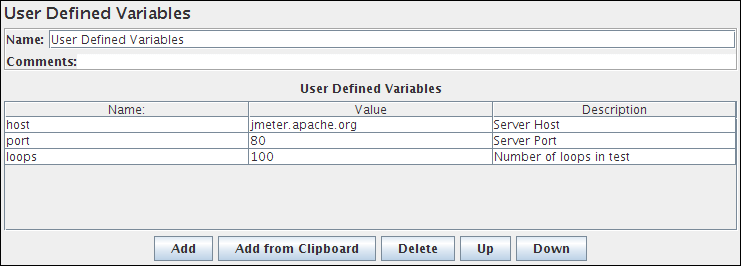
The User Defined Variables element lets you define an initial set of variables, just as in the Test Plan.
So you cannot reference variables which are defined as part of a test run, e.g. in a Post-Processor.
UDVs should not be used with functions that generate different results each time they are called.
Only the result of the first function call will be saved in the variable.
However, UDVs can be used with functions such as [__P()](/functions/p/), for example:
HOST \${__P(host,localhost)}which would define the variable “HOST” to have the value of the JMeter property “host”, defaulting to “localhost” if not defined.
For defining variables during a test run, see User Parameters. UDVs are processed in the order they appear in the Plan, from top to bottom.
For simplicity, it is suggested that UDVs are placed only at the start of a Thread Group (or perhaps under the Test Plan itself).
Once the Test Plan and all UDVs have been processed, the resulting set of variables is copied to each thread to provide the initial set of variables.
If a runtime element such as a User Parameters Pre-Processor or Regular Expression Extractor defines a variable with the same name as one of the UDV variables, then this will replace the initial value, and all other test elements in the thread will see the updated value.
| Name | Required | Description |
|---|---|---|
| Name | No | Descriptive name for this element that is shown in the tree. |
| User Defined Variables | No | Variable name/value pairs. The string under the “Name” column is what you’ll need to place inside the brackets in \${…} constructs to use the variables later on. The whole \${…} will then be replaced by the string in the “Value” column. |