

Configure the JMeter Simple Controller logic controllers: properties, defaults, and practical usage notes for building reliable load tests.
Part of the Logic Controllers category. Also documented in context in the full Component Reference.
The Simple Logic Controller lets you organize your Samplers and other Logic Controllers. Unlike other Logic Controllers, this controller provides no functionality beyond that of a storage device.
| Name | Required | Description |
|---|---|---|
| Name | No | Descriptive name for this controller that is shown in the tree. |
Using the Simple Controller
Section titled “Using the Simple Controller”Download this example (see Figure 6). In this example, we created a Test Plan that sends two Ant HTTP requests and two Log4J HTTP requests. We grouped the Ant and Log4J requests by placing them inside Simple Logic Controllers. Remember, the Simple Logic Controller has no effect on how JMeter processes the controller(s) you add to it. So, in this example, JMeter sends the requests in the following order: Ant Home Page, Ant News Page, Log4J Home Page, Log4J History Page.
Note, the File Reporter
is configured to store the results in a file named “simple-test.dat” in the current directory.
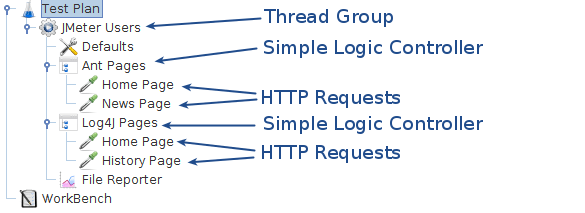 Figure 6 Simple Controller Example