

Configure the JMeter Summary Report listeners: properties, defaults, and practical usage notes for building reliable load tests.
Part of the Listeners category. Also documented in context in the full Component Reference.
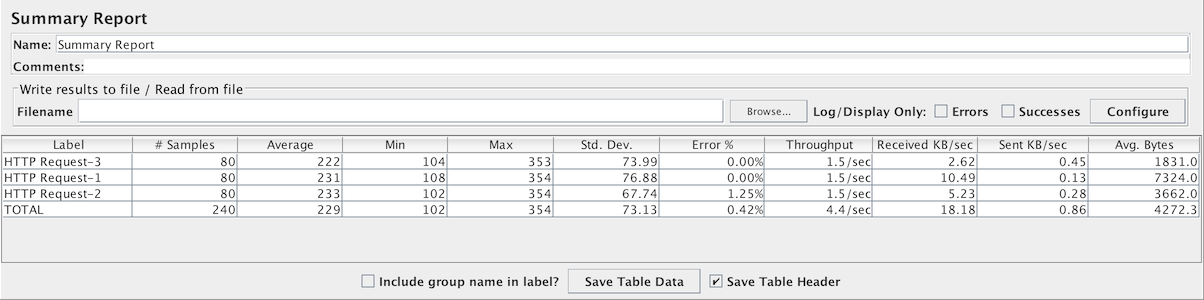
The summary report creates a table row for each differently named request in your test. This is similar to the Aggregate Report , except that it uses less memory.
The throughput is calculated from the point of view of the sampler target (e.g. the remote server in the case of HTTP samples). JMeter takes into account the total time over which the requests have been generated. If other samplers and timers are in the same thread, these will increase the total time, and therefore reduce the throughput value. So two identical samplers with different names will have half the throughput of two samplers with the same name. It is important to choose the sampler labels correctly to get the best results from the Report.
Label- The label of the sample. If “Include group name in label” is selected, then the name of the thread group is added as a prefix. This allows identical labels from different thread groups to be collated separately if required.# Samples- The number of samples with the same labelAverage- The average elapsed time of a set of resultsMin- The lowest elapsed time for the samples with the same labelMax- The longest elapsed time for the samples with the same labelStd. Dev.- the Standard Deviation of the sample elapsed timeError %- Percent of requests with errorsThroughput- the Throughput is measured in requests per second/minute/hour. The time unit is chosen so that the displayed rate is at least1.0. When the throughput is saved to a CSV file, it is expressed in requests/second, i.e. 30.0 requests/minute is saved as0.5.Received KB/sec- The throughput measured in Kilobytes per secondSent KB/sec- The throughput measured in Kilobytes per secondAvg. Bytes- average size of the sample response in bytes.
Times are in milliseconds.
The figure below shows an example of selecting the “Include group name” checkbox.
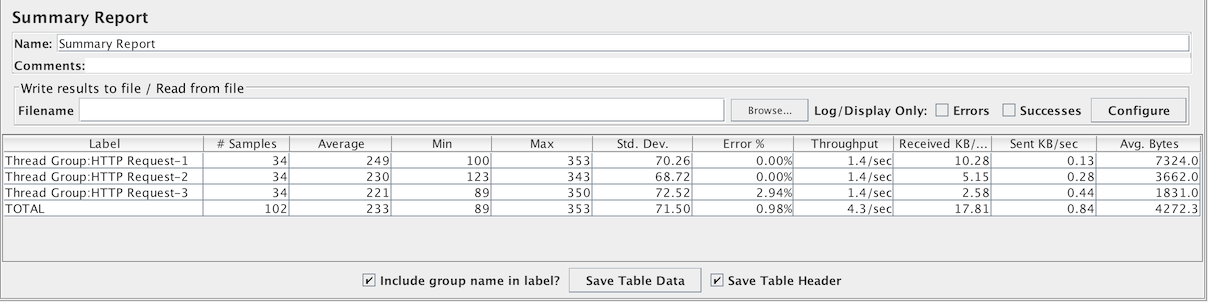 Sample “
Include group name” display