

Configure the JMeter Save Responses to a file listeners: properties, defaults, and practical usage notes for building reliable load tests.
Part of the Listeners category. Also documented in context in the full Component Reference.
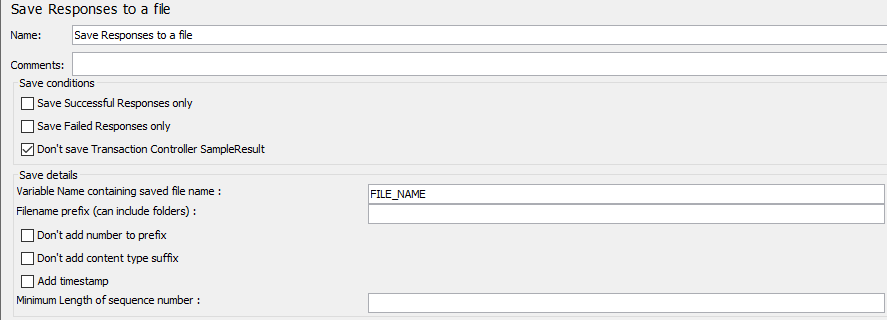
This test element can be placed anywhere in the test plan.
For each sample in its scope, it will create a file of the response Data.
The primary use for this is in creating functional tests, but it can also
be useful where the response is too large to be displayed in the
View Results Tree Listener.
The file name is created from the specified prefix, plus a number (unless this is disabled, see below).
The file extension is created from the document type, if known.
If not known, the file extension is set to ‘unknown’.
If numbering is disabled, and adding a suffix is disabled, then the file prefix is
taken as the entire file name. This allows a fixed file name to be generated if required.
The generated file name is stored in the sample response, and can be saved
in the test log output file if required.
The current sample is saved first, followed by any sub-samples (child samples). If a variable name is provided, then the names of the files are saved in the order that the sub-samples appear. See below.
| Name | Required | Description |
|---|---|---|
| Name | No | Descriptive name for this element that is shown in the tree. |
| Filename Prefix (can include folders) | Yes | Prefix for the generated file names; this can include a directory name. Relative paths are resolved relative to the current working directory (which defaults to the bin/ directory). JMeter also supports paths relative to the directory containing the current test plan (JMX file). If the path name begins with “~/” (or whatever is in the jmeter.save.saveservice.base_prefix JMeter property), then the path is assumed to be relative to the JMX file location. If parent folders in prefix do not exists, JMeter will create them and stop test if it fails. :::note Please note that Filename Prefix must not contain Thread related data, so don’t use any Variable (\${varName}) or functions like \${__threadNum} in this field ::: |
| Variable Name containing saved file name | No | Name of a variable in which to save the generated file name (so it can be used later in the test plan). If there are sub-samples then a numeric suffix is added to the variable name. E.g. if the variable name is FILENAME, then the parent sample file name is saved in the variable FILENAME, and the filenames for the child samplers are saved in FILENAME1, FILENAME2 etc. |
| Minimum Length of sequence number | No | If “Don't add number to prefix” is not checked, then numbers added to prefix will be padded by 0 so that prefix is has size of this value. Defaults to 0. |
| Save Failed Responses only | Yes | If selected, then only failed responses are saved |
| Save Successful Responses only | Yes | If selected, then only successful responses are saved |
| Don’t add number to prefix | Yes | If selected, then no number is added to the prefix. If you select this option, make sure that the prefix is unique or the file may be overwritten. |
| Don’t add content type suffix | Yes | If selected, then no suffix is added. If you select this option, make sure that the prefix is unique or the file may be overwritten. |
| Add timestamp | Yes | If selected, then date will be included in file suffix following format yyyyMMdd-HHmm_ |
| Don’t Save Transaction Controller SampleResult | Yes | If selected, then SamplerResult generated by Transaction Controller will be ignored |