

Configure the JMeter Mailer Visualizer listeners: properties, defaults, and practical usage notes for building reliable load tests.
Part of the Listeners category. Also documented in context in the full Component Reference.
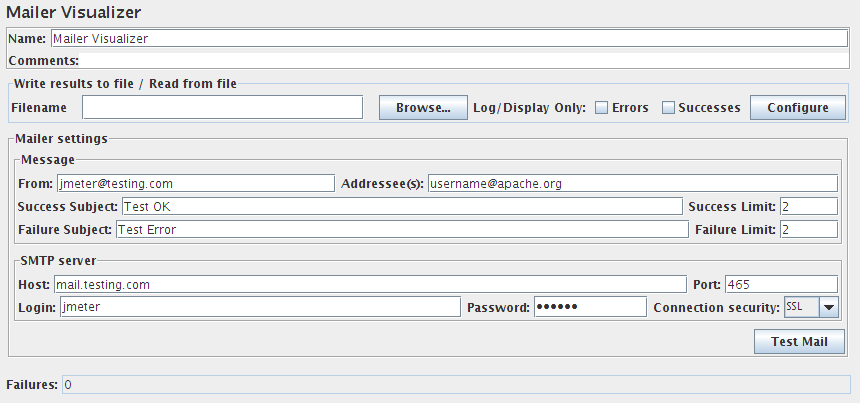
The mailer visualizer can be set up to send email if a test run receives too many failed responses from the server.
| Name | Required | Description |
|---|---|---|
| Name | No | Descriptive name for this element that is shown in the tree. |
| From | Yes | Email address to send messages from. |
| Addressee(s) | Yes | Email address to send messages to, comma-separated. |
| Success Subject | No | Email subject line for success messages. |
| Success Limit | Yes | Once this number of successful responses is exceeded after previously reaching the failure limit, a success email is sent. The mailer will thus only send out messages in a sequence of failed-succeeded-failed-succeeded, etc. |
| Failure Subject | No | Email subject line for fail messages. |
| Failure Limit | Yes | Once this number of failed responses is exceeded, a failure email is sent - i.e. set the count to 0 to send an e-mail on the first failure. |
| Host | No | IP address or host name of SMTP server (email redirector) server. |
| Port | No | Port of SMTP server (defaults to 25). |
| Login | No | Login used to authenticate. |
| Password | No | Password used to authenticate. |
| Connection security | No | Type of encryption for SMTP authentication (SSL, TLS or none). |
| Test Mail | No | Press this button to send a test mail |
| Failures | No | A field that keeps a running total of number of failures so far received. |
Related
Section titled “Related”Was this page helpful?
Thanks for the feedback!Tell us what's missing on GitHub