

Configure the JMeter DNS Cache Manager configuration elements: properties, defaults, and practical usage notes for building reliable load tests.
Part of the Configuration Elements category. Also documented in context in the full Component Reference.
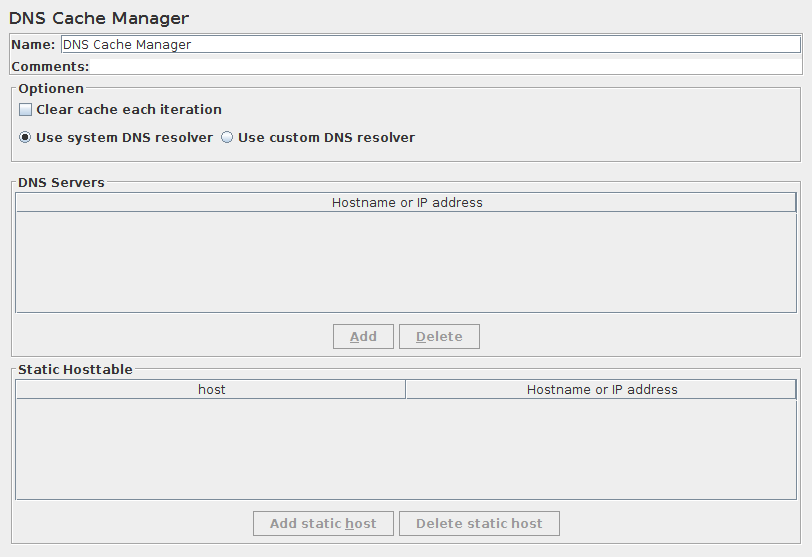
The DNS Cache Manager element allows to test applications, which have several servers behind load balancers (CDN, etc.), when user receives content from different IP’s. By default JMeter uses JVM DNS cache. That’s why only one server from the cluster receives load. DNS Cache Manager resolves names for each thread separately each iteration and saves results of resolving to its internal DNS Cache, which is independent from both JVM and OS DNS caches.
A mapping for static hosts can be used to simulate something like /etc/hosts file.
These entries will be preferred over the custom resolver. Use custom DNS resolver has to be enabled,
if you want to use this mapping.
Usage of static host table
Section titled “Usage of static host table”Say, you have a test server, that you want to reach with a name, that is not (yet) set up in your DNS servers.
For our example, this would be www.example.com for the server name, which you want to reach at the
IP of the server a123.another.example.org.
You could change your workstation and add an entry to your /etc/hosts file - or the equivalent for
your OS, or add an entry to the Static Host Table of the DNS Cache Manager.
You would type www.example.com into the first column (Host) and
a123.another.example.org into the second column (Hostname or IP address).
As the name of the second column implies, you could even use the IP address of your test server there.
The IP address for the test server will be looked up by using the custom DNS resolver. When none is given, the system DNS resolver will be used.
Now you can use www.example.com in your HTTPClient4 samplers and the requests will be made against
a123.another.example.org with all headers set to www.example.com.
| Name | Required | Description |
|---|---|---|
| Name | No | Descriptive name for this element that is shown in the tree. |
| Clear cache each Iteration | No | If selected, DNS cache of every Thread is cleared each time new iteration is started. |
| Use system DNS resolver | N/A | System DNS resolver will be used. For correct work edit $JAVA_HOME/jre/lib/security/java.security and add networkaddress.cache.ttl=0 |
| Use custom DNS resolver | N/A | Custom DNS resolver (from dnsjava library) will be used. |
| Hostname or IP address | No | List of DNS servers to use. If empty, network configuration DNS will used. |
| Add Button | N/A | Add an entry to the DNS servers table. |
| Delete Button | N/A | Delete the currently selected table entry. |
| Host and Hostname or IP address | No | Mapping of hostnames to a static host entry which will be resolved using the custom DNS resolver. |
| Add static host Button | N/A | Add an entry to the static hosts table. |
| Delete static host Button | N/A | Delete the currently selected static host in the table. |