

Configure the JMeter JUnit Request samplers: properties, defaults, and practical usage notes for building reliable load tests.
Part of the Samplers category. Also documented in context in the full Component Reference.
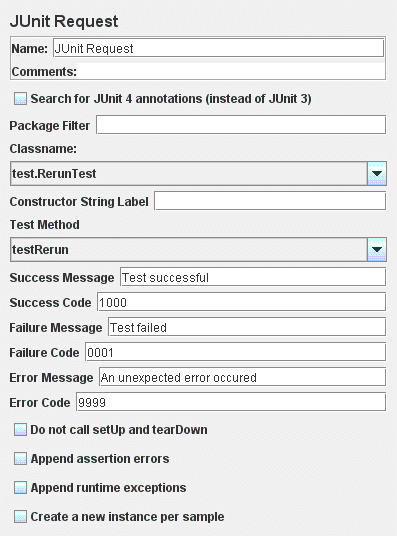
The current implementation supports standard JUnit convention and extensions. It also
includes extensions like oneTimeSetUp and oneTimeTearDown. The sampler works like the
Java Request with some differences.
- rather than use JMeter’s test interface, it scans the jar files for classes extending JUnit’s
TestCaseclass. That includes any class or subclass. - JUnit test jar files should be placed in
jmeter/lib/junitinstead of/libdirectory. You can also use the “user.classpath” property to specify where to look forTestCaseclasses. - JUnit sampler does not use name/value pairs for configuration like the Java Request. The sampler assumes
setUpandtearDownwill configure the test correctly. - The sampler measures the elapsed time only for the test method and does not include
setUpandtearDown. - Each time the test method is called, JMeter will pass the result to the listeners.
- Support for
oneTimeSetUpandoneTimeTearDownis done as a method. Since JMeter is multi-threaded, we cannot calloneTimeSetUp/oneTimeTearDownthe same way Maven does it. - The sampler reports unexpected exceptions as errors. There are some important differences between standard JUnit test runners and JMeter’s implementation. Rather than make a new instance of the class for each test, JMeter creates 1 instance per sampler and reuses it. This can be changed with checkbox “
Create a new instance per sample”.
The current implementation of the sampler will try to create an instance using the string constructor first. If the test class does not declare a string constructor, the sampler will look for an empty constructor. Example below:
JUnit Constructors
Section titled “JUnit Constructors”Empty Constructor:
public class myTestCase { public myTestCase() {}}String Constructor:
public class myTestCase { public myTestCase(String text) { super(text); }}By default, JMeter will provide some default values for the success/failure code and message. Users should define a set of unique success and failure codes and use them uniformly across all tests.
| Name | Required | Description |
|---|---|---|
| Name | No | Descriptive name for this element that is shown in the tree. |
| Search for JUnit4 annotations | Yes | Select this to search for JUnit4 tests (@Test annotations) |
| Package filter | No | Comma separated list of packages to show. Example, org.apache.jmeter,junit.framework. |
| Class name | Yes | Fully qualified name of the JUnit test class. |
| Constructor string | No | String pass to the string constructor. If a string is set, the sampler will use the string constructor instead of the empty constructor. |
| Test method | Yes | The method to test. |
| Success message | No | A descriptive message indicating what success means. |
| Success code | No | An unique code indicating the test was successful. |
| Failure message | No | A descriptive message indicating what failure means. |
| Failure code | No | An unique code indicating the test failed. |
| Error message | No | A description for errors. |
| Error code | No | Some code for errors. Does not need to be unique. |
| Do not call setUp and tearDown | Yes | Set the sampler not to call setUp and tearDown. By default, setUp and tearDown should be called. Not calling those methods could affect the test and make it inaccurate. This option should only be used with calling oneTimeSetUp and oneTimeTearDown. If the selected method is oneTimeSetUp or oneTimeTearDown, this option should be checked. |
| Append assertion errors | Yes | Whether or not to append assertion errors to the response message. |
| Append runtime exceptions | Yes | Whether or not to append runtime exceptions to the response message. Only applies if “Append assertion errors” is not selected. |
| Create a new Instance per sample | Yes | Whether or not to create a new JUnit instance for each sample. Defaults to false, meaning JUnit TestCase is created one and reused. |
The following JUnit4 annotations are recognised:
@Test
: used to find test methods and classes. The “expected” and “timeout” attributes are supported.
@Before
: treated the same as setUp() in JUnit3
@After
: treated the same as tearDown() in JUnit3
@BeforeClass, @AfterClass
: treated as test methods so they can be run independently as required