

Configure the JMeter JDBC Request samplers: properties, defaults, and practical usage notes for building reliable load tests.
Part of the Samplers category. Also documented in context in the full Component Reference.
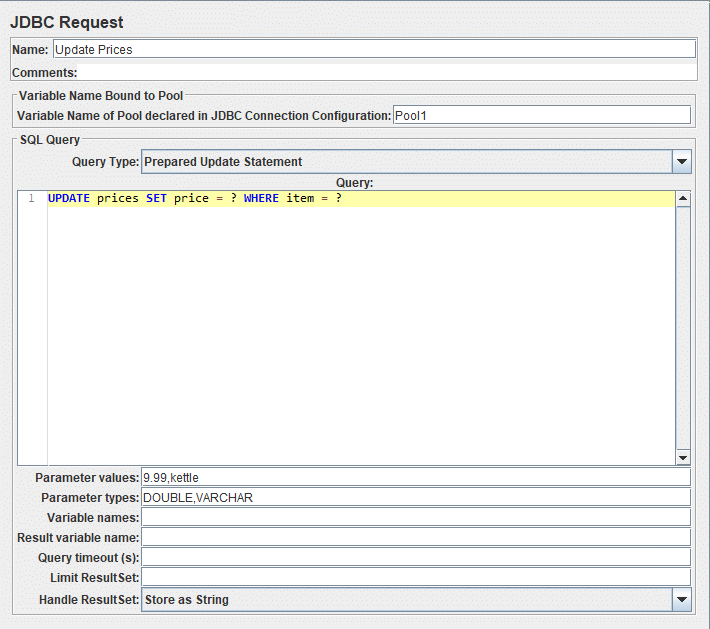
This sampler lets you send a JDBC Request (an SQL query) to a database.
Before using this you need to set up a JDBC Connection Configuration Configuration element
If the Variable Names list is provided, then for each row returned by a Select statement, the variables are set up
with the value of the corresponding column (if a variable name is provided), and the count of rows is also set up.
For example, if the Select statement returns 2 rows of 3 columns, and the variable list is A,,C,
then the following variables will be set up:
A_#=2 (number of rows)A_1=column 1, row 1A_2=column 1, row 2C_#=2 (number of rows)C_1=column 3, row 1C_2=column 3, row 2If the Select statement returns zero rows, then the A_# and C_# variables would be set to 0, and no other variables would be set.
Old variables are cleared if necessary - e.g. if the first select retrieves six rows and a second select returns only three rows, the additional variables for rows four, five and six will be removed.
| Name | Required | Description |
|---|---|---|
| Name | No | Descriptive name for this sampler that is shown in the tree. |
| Variable Name of Pool declared in JDBC Connection Configuration | Yes | Name of the JMeter variable that the connection pool is bound to. This must agree with the ‘Variable Name’ field of a JDBC Connection Configuration. |
| Query Type | Yes | Set this according to the statement type: - Select Statement - Update Statement - use this for Inserts and Deletes as well - Callable Statement - Prepared Select Statement - Prepared Update Statement - use this for Inserts and Deletes as well - Commit - Rollback - Autocommit(false) - Autocommit(true) - Edit - this should be a variable reference that evaluates to one of the above :::note The types Commit, Rollback, Autocommit(false) and Autocommit(true) are special, as they are ignoring the given SQL statements and are changing the state of the connection, only. ::: |
| SQL Query | Yes | SQL query. :::note Do not enter a trailing semi-colon. ::: There is generally no need to use { and } to enclose Callable statements; however they may be used if the database uses a non-standard syntax. :::note The JDBC driver automatically converts the statement if necessary when it is enclosed in {}. ::: For example: - select * from t_customers where id=23 - CALL SYSCS_UTIL.SYSCS_EXPORT_TABLE (null, ?, ?, null, null, null) - Parameter values: tablename,filename - Parameter types: VARCHAR,VARCHAR The second example assumes you are using Apache Derby. |
| Parameter values | Yes, if a prepared or callable statement has parameters | Comma-separated list of parameter values. Use ]NULL[ to indicate a NULL parameter. (If required, the null string can be changed by defining the property “jdbcsampler.nullmarker”.) The list must be enclosed in double-quotes if any of the values contain a comma or double-quote, and any embedded double-quotes must be doubled-up, for example: "Dbl-Quote: "" and Comma: ," :::note There must be as many values as there are placeholders in the statement even if your parameters are OUT ones. Be sure to set a value even if the value will not be used (for example in a CallableStatement). ::: |
| Parameter types | Yes, if a prepared or callable statement has parameters | Comma-separated list of SQL parameter types (e.g. INTEGER, DATE, VARCHAR, DOUBLE) or integer values of Constants. Those integer values can be used, when you use custom database types proposed by driver (For example OracleTypes.CURSOR could be represented by its integer value -10). These are defined as fields in the class java.sql.Types, see for example: Javadoc for java.sql.Types. :::note Note: JMeter will use whatever types are defined by the runtime JVM, so if you are running on a different JVM, be sure to check the appropriate documentation ::: If the callable statement has INOUT or OUT parameters, then these must be indicated by prefixing the appropriate parameter types, e.g. instead of “INTEGER”, use “INOUT INTEGER”. If not specified, “IN” is assumed, i.e. “DATE” is the same as “IN DATE”. If the type is not one of the fields found in java.sql.Types, JMeter also accepts the corresponding integer number, e.g. since OracleTypes.CURSOR == -10, you can use “INOUT -10”. There must be as many types as there are placeholders in the statement. |
| Variable Names | No | Comma-separated list of variable names to hold values returned by Select statements, Prepared Select Statements or CallableStatement. Note that when used with CallableStatement, list of variables must be in the same sequence as the OUT parameters returned by the call. If there are less variable names than OUT parameters only as many results shall be stored in the thread-context variables as variable names were supplied. If more variable names than OUT parameters exist, the additional variables will be ignored |
| Result Variable Name | No | If specified, this will create an Object variable containing a list of row maps. Each map contains the column name as the key and the column data as the value. Usage: columnValue = vars.getObject("resultObject").get(0).get("Column Name"); |
| Query timeout(s) | No | Set a timeout in seconds for query, empty value means 0 which is infinite. -1 means don’t set any query timeout which might be needed for use case or when certain drivers don’t support timeout. Defaults to 0. |
| Limit ResultSet | No | Limits the number of rows to iterate through the ResultSet. Empty value means -1, e.g. no limitation, which is also the default. This can help to reduce the amount of data to be fetched from the database via the JDBC driver, but affects all possible options of Handle ResultSet respectively – e.g. incomplete ResultSet and a record count ≤ the limit. |
| Handle ResultSet | No | Defines how ResultSet returned from callable statements be handled: - Store As String (default) - All variables on Variable Names list are stored as strings, will not iterate through a ResultSet when present on the list. CLOBs will be converted to Strings. BLOBs will be converted to Strings as if they were an UTF-8 encoded byte-array. Both CLOBs and BLOBs will be cut off after jdbcsampler.max_retain_result_size bytes. - Store As Object - Variables of ResultSet type on Variables Names list will be stored as Object and can be accessed in subsequent tests/scripts and iterated, will not iterate through the ResultSet. CLOBs will be handled as if Store As String was selected. BLOBs will be stored as a byte array. Both CLOBs and BLOBs will be cut off after jdbcsampler.max_retain_result_size bytes. - Count Records - Variables of ResultSet types will be iterated through showing the count of records as result. Variables will be stored as Strings. For BLOBs the size of the object will be stored. |