

Configure the JMeter User Parameters pre processors: properties, defaults, and practical usage notes for building reliable load tests.
Part of the Pre Processors category. Also documented in context in the full Component Reference.
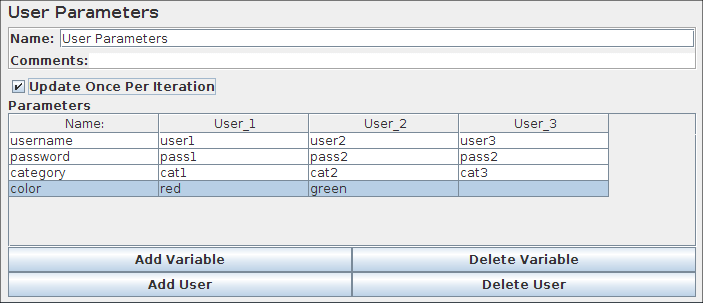
Allows the user to specify values for User Variables specific to individual threads.
User Variables can also be specified in the Test Plan but not specific to individual threads. This panel allows you to specify a series of values for any User Variable. For each thread, the variable will be assigned one of the values from the series in sequence. If there are more threads than values, the values get re-used. For example, this can be used to assign a distinct user id to be used by each thread. User variables can be referenced in any field of any JMeter Component.
The variable is specified by clicking the Add Variable button in the bottom of the panel and filling in the Variable name in the ‘Name:’ column.
To add a new value to the series, click the ‘Add User’ button and fill in the desired value in the newly added column.
Values can be accessed in any test component in the same thread group, using the function syntax: \${variable}.
See also the CSV Data Set Config element, which is more suitable for large numbers of parameters
| Name | Required | Description |
|---|---|---|
| Name | No | Descriptive name for this element that is shown in the tree. |
| Update Once Per Iteration | Yes | A flag to indicate whether the User Parameters element should update its variables only once per iteration. if you embed functions into the UP, then you may need greater control over how often the values of the variables are updated. Keep this box checked to ensure the values are updated each time through the UP’s parent controller. Uncheck the box, and the UP will update the parameters for every sample request made within its scope. |