

Configure the JMeter If Controller logic controllers: properties, defaults, and practical usage notes for building reliable load tests.
Part of the Logic Controllers category. Also documented in context in the full Component Reference.
TL;DR: the If Controller runs its children only when a condition evaluates true — either a JavaScript-style boolean expression or a variable comparison — the standard way to branch test logic (e.g. only retry on a specific error, only run checkout if login succeeded).
The If Controller allows the user to control whether the test elements below it (its children) are run or not.
By default, the condition is evaluated only once on initial entry, but you have the option to have it evaluated for every runnable element contained in the controller.
The best option (default one) is to check Interpret Condition as Variable Expression, then in the condition field you have 2 options:
-
Option 1: Use a variable that contains
trueorfalse:::note If you want to test if last sample was successful, you can use\${JMeterThread.last_sample_ok}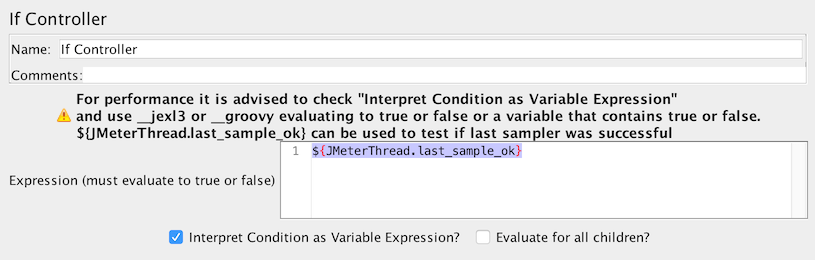 If Controller using Variable :::
 -
Option 2: Use a function (
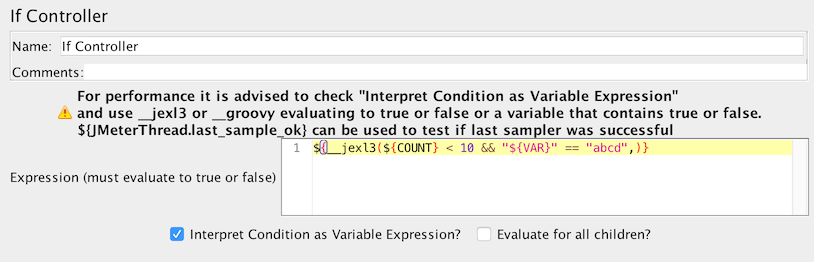
\${__jexl3()}is advised) to evaluate an expression that must returntrueorfalse If Controller using expressionFor example, previously one could use the condition:
\${__jexl3(\${VAR} == 23)}and this would be evaluated astrue/false, the result would then be passed to JavaScript which would then returntrue/false. If the Variable Expression option is selected, then the expression is evaluated and compared with “true”, without needing to use JavaScript.
If you uncheck Interpret Condition as Variable Expression, If Controller will internally use javascript to evaluate the condition
which has a performance penalty that can be very big and make your test less scalable.
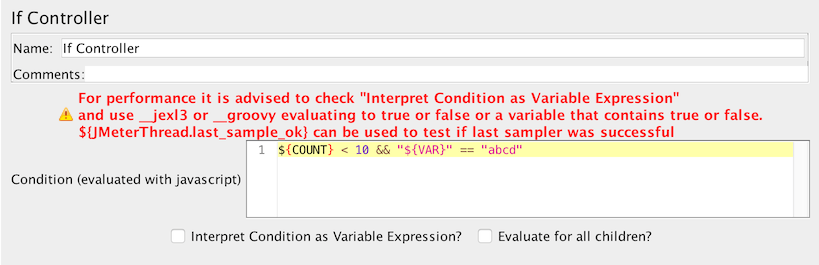 If Controller using javascript
| Name | Required | Description |
|---|---|---|
| Name | No | Descriptive name for this controller that is shown in the tree. |
| Condition (default JavaScript) | Yes | By default the condition is interpreted as JavaScript code that returns “true” or “false”, but this can be overridden (see below) |
| Interpret Condition as Variable Expression | Yes | If this is selected, then the condition must be an expression that evaluates to “true” (case is ignored). For example, \${FOUND} or \${__jexl3(\${VAR} > 100)}. Unlike the JavaScript case, the condition is only checked to see if it matches “true” (case is ignored). :::note Checking this and using [__jexl3](/functions/jexl3/) or [__groovy](/functions/groovy/) function in Condition is advised for performances ::: |
| Evaluate for all children | Yes | Should condition be evaluated for all children? If not checked, then the condition is only evaluated on entry. |
Examples (JavaScript)
Section titled “Examples (JavaScript)”-
\${COUNT} < 10 -
"\${VAR}" == "abcd"If there is an error interpreting the code, the condition is assumed to be
false, and a message is logged injmeter.log.
Examples (Variable Expression)
Section titled “Examples (Variable Expression)”\${__groovy(vars.get("myVar") != "Invalid" )}(Groovy check myVar is not equal to Invalid)\${__groovy(vars.get("myInt").toInteger() <=4 )}(Groovy check myInt is less then or equal to 4)\${__groovy(vars.get("myMissing") != null )}(Groovy check if the myMissing variable is not set)\${__jexl3(\${COUNT} < 10)}\${RESULT}\${JMeterThread.last_sample_ok}(check if the last sample succeeded)
Common gotchas
Section titled “Common gotchas”- “Interpret Condition as Variable Expression” switches evaluation mode entirely: unchecked, it evaluates the condition as JavaScript (
"${status}" == "200"); checked, it treats it as a JMeter variable/function expression that must resolve to the literal stringtrue. - The condition is a string comparison by default —
${count} > 5as JavaScript works, but subtle quoting mistakes (missing"around a variable) are the most common reason a seemingly-correct condition never triggers. - Evaluated once per loop iteration when the controller is reached — it won’t re-check mid-way through its children.
- For sequencing rather than branching, see Loop Controller and While Controller alongside the Logic Controllers & Flow Control guide.