

Configure the JMeter LDAP Extended Request samplers: properties, defaults, and practical usage notes for building reliable load tests.
Part of the Samplers category. Also documented in context in the full Component Reference.
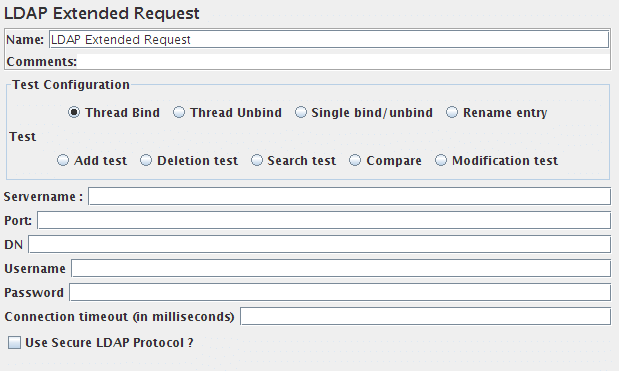
This Sampler can send all 8 different LDAP requests to an LDAP server. It is an extended version of the LDAP sampler, therefore it is harder to configure, but can be made much closer resembling a real LDAP session. If you are going to send multiple requests to the same LDAP server, consider using an LDAP Extended Request Defaults Configuration Element so you do not have to enter the same information for each LDAP Request.
There are nine test operations defined. These operations are given below:
Thread bind
: Any LDAP request is part of an LDAP session, so the first thing that should be done is starting a session to the LDAP server.
For starting this session a thread bind is used, which is equal to the LDAP “bind” operation.
The user is requested to give a username (Distinguished name) and password,
which will be used to initiate a session.
When no password, or the wrong password is specified, an anonymous session is started. Take care,
omitting the password will not fail this test, a wrong password will.
(N.B. this is stored unencrypted in the test plan)
| Name | Required | Description |
|---|---|---|
| Name | No | Descriptive name for this sampler that is shown in the tree. |
| Servername | Yes | The name (or IP-address) of the LDAP server. |
| Port | No | The port number that the LDAP server is listening to. If this is omitted JMeter assumes the LDAP server is listening on the default port(389). |
| DN | No | The distinguished name of the base object that will be used for any subsequent operation. It can be used as a starting point for all operations. You cannot start any operation on a higher level than this DN! |
| Username | No | Full distinguished name of the user as which you want to bind. |
| Password | No | Password for the above user. If omitted it will result in an anonymous bind. If it is incorrect, the sampler will return an error and revert to an anonymous bind. (N.B. this is stored unencrypted in the test plan) |
| Connection timeout (in milliseconds) | No | Timeout for connection, if exceeded connection will be aborted |
| Use Secure LDAP Protocol | No | Use ldaps:// scheme instead of ldap:// |
| Trust All Certificates | No | Trust all certificates, only used if Use Secure LDAP Protocol is checked |
Thread unbind
: This is simply the operation to end a session.
It is equal to the LDAP “unbind” operation.
| Name | Required | Description |
|---|---|---|
| Name | No | Descriptive name for this sampler that is shown in the tree. |
Single bind/unbind
: This is a combination of the LDAP “bind” and “unbind” operations.
It can be used for an authentication request/password check for any user. It will open a new session, just to
check the validity of the user/password combination, and end the session again.
| Name | Required | Description |
|---|---|---|
| Name | No | Descriptive name for this sampler that is shown in the tree. |
| Username | Yes | Full distinguished name of the user as which you want to bind. |
| Password | No | Password for the above user. If omitted it will result in an anonymous bind. If it is incorrect, the sampler will return an error. (N.B. this is stored unencrypted in the test plan) |
Rename entry
: This is the LDAP “moddn” operation. It can be used to rename an entry, but
also for moving an entry or a complete subtree to a different place in
the LDAP tree.
| Name | Required | Description |
|---|---|---|
| Name | No | Descriptive name for this sampler that is shown in the tree. |
| Old entry name | Yes | The current distinguished name of the object you want to rename or move, relative to the given DN in the thread bind operation. |
| New distinguished name | Yes | The new distinguished name of the object you want to rename or move, relative to the given DN in the thread bind operation. |
Add test
: This is the LDAP “add” operation. It can be used to add any kind of
object to the LDAP server.
| Name | Required | Description |
|---|---|---|
| Name | No | Descriptive name for this sampler that is shown in the tree. |
| Entry DN | Yes | Distinguished name of the object you want to add, relative to the given DN in the thread bind operation. |
| Add test | Yes | A list of attributes and their values you want to use for the object. If you need to add a multiple value attribute, you need to add the same attribute with their respective values several times to the list. |
Delete test
: This is the LDAP “delete” operation, it can be used to delete an
object from the LDAP tree
| Name | Required | Description |
|---|---|---|
| Name | No | Descriptive name for this sampler that is shown in the tree. |
| Delete | Yes | Distinguished name of the object you want to delete, relative to the given DN in the thread bind operation. |
Search test
: This is the LDAP “search” operation, and will be used for defining searches.
| Name | Required | Description |
|---|---|---|
| Name | No | Descriptive name for this sampler that is shown in the tree. |
| Search base | No | Distinguished name of the subtree you want your search to look in, relative to the given DN in the thread bind operation. |
| Search Filter | Yes | searchfilter, must be specified in LDAP syntax. |
| Scope | No | Use 0 for baseobject-, 1 for onelevel- and 2 for a subtree search. (Default=0) |
| Size Limit | No | Specify the maximum number of results you want back from the server. (default=0, which means no limit.) When the sampler hits the maximum number of results, it will fail with errorcode 4 |
| Time Limit | No | Specify the maximum amount of (cpu)time (in milliseconds) that the server can spend on your search. Take care, this does not say anything about the response time. (default is 0, which means no limit) |
| Attributes | No | Specify the attributes you want to have returned, separated by a semicolon. An empty field will return all attributes |
| Return object | No | Whether the object will be returned (true) or not (false). Default=false |
| Dereference aliases | No | If true, it will dereference aliases, if false, it will not follow them (default=false) |
| Parse the search results | No | If true, the search results will be added to the response data. If false, a marker - whether results where found or not - will be added to the response data. |
Modification test
: This is the LDAP “modify” operation. It can be used to modify an object. It
can be used to add, delete or replace values of an attribute.
| Name | Required | Description |
|---|---|---|
| Name | No | Descriptive name for this sampler that is shown in the tree. |
| Entry name | Yes | Distinguished name of the object you want to modify, relative to the given DN in the thread bind operation |
| Modification test | Yes | The attribute-value-opCode triples. The opCode can be any valid LDAP operationCode (add, delete, remove or replace). If you don’t specify a value with a delete operation, all values of the given attribute will be deleted. If you do specify a value in a delete operation, only the given value will be deleted. If this value is non-existent, the sampler will fail the test. |
Compare
: This is the LDAP “compare” operation. It can be used to compare the value
of a given attribute with some already known value. In reality this is mostly
used to check whether a given person is a member of some group. In such a case
you can compare the DN of the user as a given value, with the values in the
attribute “member” of an object of the type groupOfNames.
If the compare operation fails, this test fails with errorcode 49.
| Name | Required | Description |
|---|---|---|
| Name | No | Descriptive name for this sampler that is shown in the tree. |
| Entry DN | Yes | The current distinguished name of the object of which you want to compare an attribute, relative to the given DN in the thread bind operation. |
| Compare filter | Yes | In the form “attribute=value” |