

Configure the JMeter ForEach Controller logic controllers: properties, defaults, and practical usage notes for building reliable load tests.
Part of the Logic Controllers category. Also documented in context in the full Component Reference.
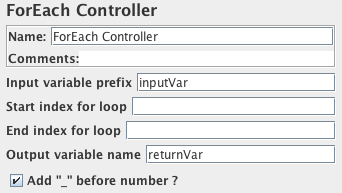
A ForEach controller loops through the values of a set of related variables.
When you add samplers (or controllers) to a ForEach controller, every sample (or controller)
is executed one or more times, where during every loop the variable has a new value.
The input should consist of several variables, each extended with an underscore and a number.
Each such variable must have a value.
So for example when the input variable has the name inputVar, the following variables should have been defined:
-
inputVar_1 = wendy -
inputVar_2 = charles -
inputVar_3 = peter -
inputVar_4 = johnNote: the “
_” separator is now optional.
When the return variable is given as “returnVar”, the collection of samplers and controllers under the ForEach controller will be executed 4 consecutive times,
with the return variable having the respective above values, which can then be used in the samplers.
It is especially suited for running with the regular expression post-processor.
This can “create” the necessary input variables out of the result data of a previous request.
By omitting the “_” separator, the ForEach Controller can be used to loop through the groups by using
the input variable refName_g, and can also loop through all the groups in all the matches
by using an input variable of the form refName_\${C}_g, where C is a counter variable.
| Name | Required | Description |
|---|---|---|
| Name | No | Descriptive name for this controller that is shown in the tree. |
| Input variable prefix | No | Prefix for the variable names to be used as input. Defaults to an empty string as prefix. |
| Start index for loop | No | Start index (exclusive) for loop over variables (first element is at start index + 1) |
| End index for loop | No | End index (inclusive) for loop over variables |
| Output variable | No | The name of the variable which can be used in the loop for replacement in the samplers. Defaults to an empty variable name, which is most probably not wanted. |
| Use Separator | Yes | If not checked, the “_” separator is omitted. |
ForEach Example
Section titled “ForEach Example”Download this example (see Figure 7). In this example, we created a Test Plan that sends a particular HTTP Request only once and sends another HTTP Request to every link that can be found on the page.
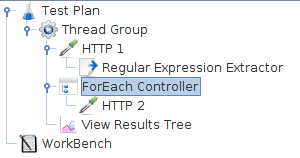 Figure 7 - ForEach Controller Example
We configured the Thread Group for a single thread and a loop count value of one. You can see that we added one HTTP Request to the Thread Group and another HTTP Request to the ForEach Controller.
After the first HTTP request, a regular expression extractor is added, which extracts all the html links
out of the return page and puts them in the inputVar variable
In the ForEach loop, a HTTP sampler is added which requests all the links that were extracted from the first returned HTML page.
ForEach Example
Section titled “ForEach Example”Here is another example you can download. This has two Regular Expressions and ForEach Controllers. The first RE matches, but the second does not match, so no samples are run by the second ForEach Controller
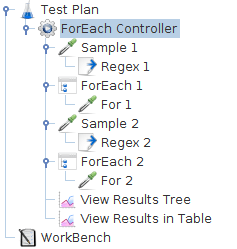 Figure 8 - ForEach Controller Example 2
The Thread Group has a single thread and a loop count of two.
Sample 1 uses the JavaTest Sampler to return the string “a b c d”.
The Regex Extractor uses the expression (\w)\s which matches a letter followed by a space,
and returns the letter (not the space). Any matches are prefixed with the string “inputVar”.
The ForEach Controller extracts all variables with the prefix “inputVar_”, and executes its
sample, passing the value in the variable “returnVar”. In this case it will set the variable to the values “a” “b” and “c” in turn.
The For 1 Sampler is another Java Sampler which uses the return variable “returnVar” as part of the sample Label
and as the sampler Data.
Sample 2, Regex 2 and For 2 are almost identical, except that the Regex has been changed to “(\w)\sx”,
which clearly won’t match. Thus the For 2 Sampler will not be run.