

Configure the JMeter Open Model Thread Group miscellaneous features: properties, defaults, and practical usage notes for building reliable load tests.
Part of the Miscellaneous Features category. Also documented in context in the full Component Reference.
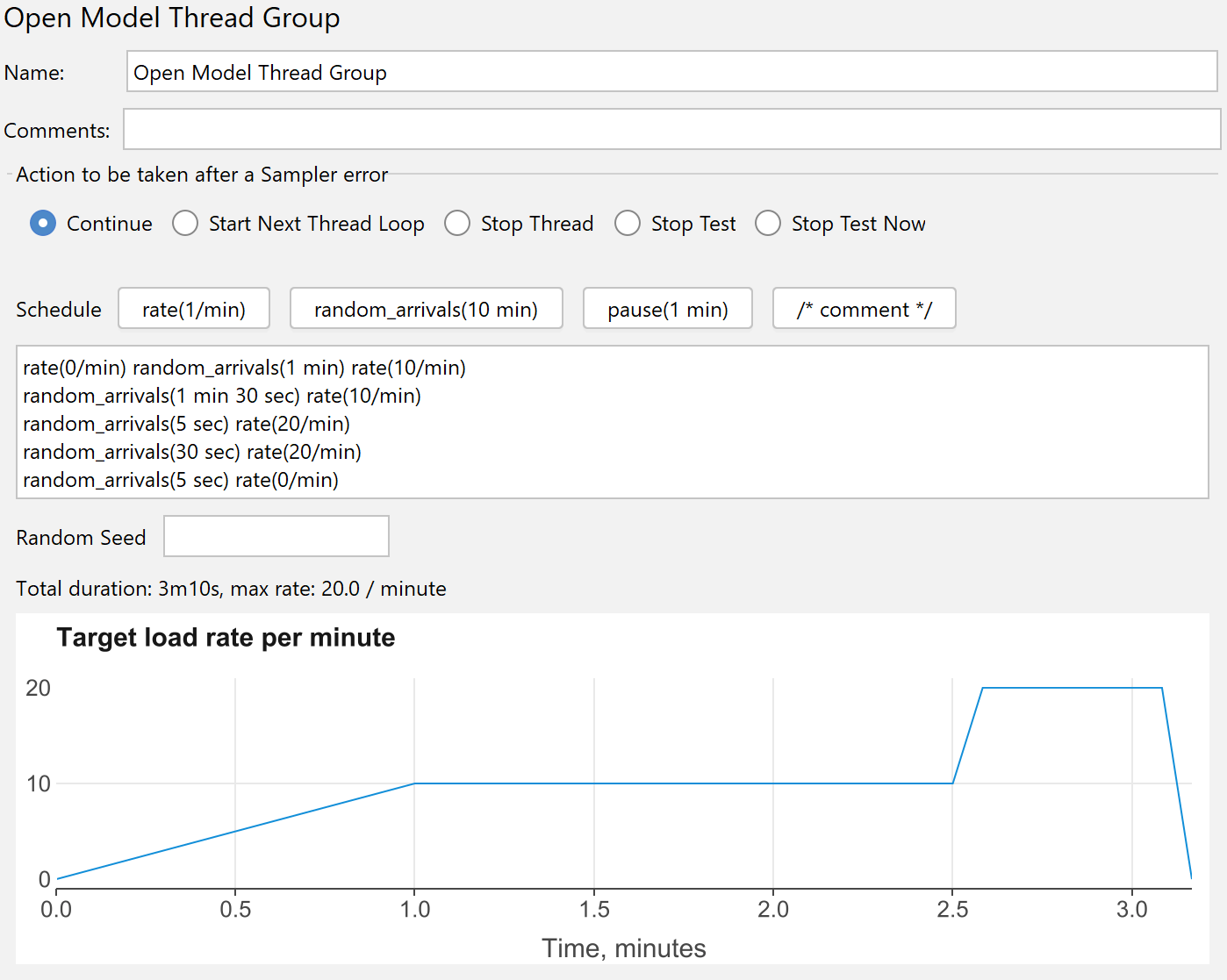
Open Model Thread Group defines a pool of users that will execute a particular test case against the server. The users are generated according to the schedule.
The load profile consists of a sequence of constant, increasing or decreasing load.
The basic configuration is rate(1/sec) random_arrivals(2 min) rate(3/sec) which means the load will increase linearly
from one request per second to three requests per second during a period of two-minutes.
If you omit rate at the end, then it will be set to the same value as that from the start. For example,
rate(1/sec) random_arrivals(2 min) is exactly the same as rate(1/sec) random_arrivals(2 min) rate(1/sec).
That is why rate(1/sec) random_arrivals(2 min) random_arrivals(3 min) rate(4/sec) is exactly the same as
rate(1/sec) random_arrivals(2 min) rate(1/sec) random_arrivals(3 min) rate(4/sec), so the load is one request per second during the first two minutes,
after which it increases linearly from one request per second to four requests per second during three minutes.
Here are examples for using the schedule:
rate(10/sec) random_arrivals(1 min) rate(10/sec)
: constant load rate of ten requests per second during one minute
rate(0) random_arrivals(1 min) rate(10/sec)
: linearly increase the load from zero requests per second to ten requests per second during one minute
rate(0) random_arrivals(1 min) rate(10/sec) random_arrivals(1 min) rate(10/sec) random_arrivals(1 min) rate(0)
: linearly increase the load from zero requests per second to ten requests per second during one minute, then hold the load during one minute,
then linearly decrease the load from ten requests per second to zero during one minute
rate(10) random_arrivals(1 min) rate(10/sec) random_arrivals(1 min) rate(10/sec) random_arrivals(1 min) rate(0)
: linearly increase the load from zero requests per second to ten requests per second during one minute, then hold the load during one minute,
then linearly decrease the load from ten requests per second to zero requests per second during one minute
rate(10) random_arrivals(1 min) pause(2 sec) random_arrivals(1 min)
: run with constant load of ten requests per second during one minute, then make two second pause, then resume the load of ten requests per second for one minute
The following commands are available:
rate(<number>/sec)
: configures target load rate.
The following time units are supported: ms, sec, min, hour, day.
You can omit time unit in case the rate is 0: rate(0)
random_arrivals(<number> sec)
: configures random arrivals schedule with the given duration.
The starting load rate is configured before random_arrivals, and the finish load rate is configured after random_arrivals.
For example, 10 minute test from five requests per second at the beginning to fifteen request per second at the end could be configured as rate(5/sec) random_arrivals(10 min) rate(15/sec).
The implicit rate at the beginning of the test is 0. If the finish rate is not provided (or if several random_arrivals steps go one after another),
then the load is constant. For instance, rate(3/sec) random_arrivals(1 min) random_arrivals(2 min) rate(6/sec) configures
constant rate of three requests per second for the first minute, and then the load increases from three requests per second to six requests per second during the next two minutes.
The time units are the same as in rate.
even_arrivals(<number> sec)
: configures even arrivals (TODO: not implemented yet). For instance, if the desired load
is one request per second, then random_arrivals would lauch samples with exactly one second intervals.
pause(<number> sec)
: configures a pause for the given duration.
The rate is restored after the pause, so rate(2/sec) random_arrivals(5 sec) pause(5 sec) random_arrivals(5 sec)
generates random arrivals with two requests per second rate, then a pause for five seconds (no new arrivals), then five more seconds with two requests per second rate.
Note: pause duration is always honoured, even if all the scenarios are complete, and no new ones will be scheduled.
For instance, if you use rate(1/sec) random_arrivals(1 min) pause(1 hour), the thread group would
always last for sixty-one minutes no matter how much time do individual scenarios take.
/* Comments */
: can be used to clarify the schedule or temporary disable some steps. Comments
cannot be nested.
// line comments
: can be used to clarify the schedule or temporary disable some steps.
Line comment lasts till the end of the line.
The thread groups terminates threads as soon as the schedule ends. In other words, the threads are interrupted
after all arrivals and pause intervals.
If you want to let the threads complete safely, consider adding pause(5 min) at the end of the schedule.
That will add five minutes for the threads to continue.
There are no special functions for generating the load profile in a loop, however, the default JMeter templating functions can be helpful for generating the schedule.
For example, the following pattern would generate a sequence of 10 steps where each step lasts 10 seconds: 10/sec, 20/sec, 30/sec, …
\${__groovy((1..10).collect { "rate(" + it*10 + "/sec) random_arrivals(10 sec) pause(1 sec)" }.join(" "))}
You can get variables from properties as follows:
rate(\${__P(beginRate,40)}) random_arrivals(\${__P(testDuration, 10)} sec) rate(\${__P(endRate,40)})
Currently, the load profile is evaluated at the beginning of the test only, so if you use dynamic functions, then only the first result will be used.
| Name | Required | Description |
|---|---|---|
| Name | No | Descriptive name for this thread group that is shown in the tree |
| Schedule | Yes | The expression that configures schedule. For example: rate(5/sec) random_arrivals(1 min) pause(5 sec) |
| Random Seed (change from 0 to random) | No | Note: different thread groups should better have different seed values. Constant seed ensures thread group generates the same delays each test start. The value of “0” means the schedule is truly random (non-repeatable from one execution to another).. |