

Configure the JMeter HTTP Request samplers: properties, defaults, and practical usage notes for building reliable load tests.
Part of the Samplers category. Also documented in context in the full Component Reference.
TL;DR: the HTTP Request sampler is the workhorse of almost every JMeter test plan — it sends one HTTP/HTTPS call and records the response. Everything else (extractors, assertions, timers) usually hangs off this element.
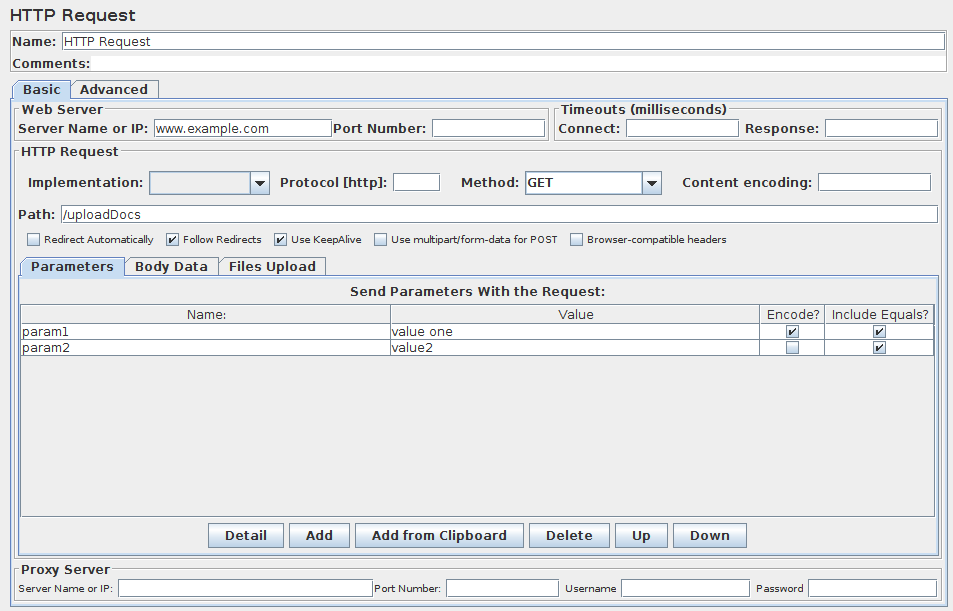
This sampler lets you send an HTTP/HTTPS request to a web server. It also lets you control whether or not JMeter parses HTML files for images and other embedded resources and sends HTTP requests to retrieve them. The following types of embedded resource are retrieved:
-
images
-
applets
-
stylesheets (CSS) and resources referenced from those files
-
external scripts
-
frames, iframes
-
background images (body, table, TD, TR)
-
background sound
The default parser is
org.apache.jmeter.protocol.http.parser.LagartoBasedHtmlParser. This can be changed by using the property “htmlparser.className” - seejmeter.propertiesfor details.If you are going to send multiple requests to the same web server, consider using an HTTP Request Defaults Configuration Element so you do not have to enter the same information for each HTTP Request.
Or, instead of manually adding HTTP Requests, you may want to use JMeter’s HTTP(S) Test Script Recorder to create them. This can save you time if you have a lot of HTTP requests or requests with many parameters.
There are three different test elements used to define the samplers:
AJP/1.3 Sampler : uses the Tomcat mod_jk protocol (allows testing of Tomcat in AJP mode without needing Apache httpd) The AJP Sampler does not support multiple file upload; only the first file will be used.
HTTP Request : this has an implementation drop-down box, which selects the HTTP protocol implementation to be used:
Java
: uses the HTTP implementation provided by the JVM.
This has some limitations in comparison with the HttpClient implementations - see below.
HTTPClient4
: uses Apache HttpComponents HttpClient 4.x.
Blank Value
: does not set implementation on HTTP Samplers, so relies on HTTP Request Defaults if present or on jmeter.httpsampler property defined in jmeter.properties
GraphQL HTTP Request : this is a GUI variation of the HTTP Request to provide more convenient UI elements to view or edit GraphQL Query, Variables and Operation Name, while converting them into HTTP Arguments automatically under the hood using the same sampler. This hides or customizes the following UI elements as they are less convenient for or irrelevant to GraphQL over HTTP/HTTPS requests:
-
Method: Only POST and GET methods are available conforming the GraphQL over HTTP specification. POST method is selected by default.
-
Parameters and Post Body tabs: you may view or edit parameter content through Query, Variables and Operation Name UI elements instead.
-
File Upload tab: irrelevant to GraphQL queries.
-
Embedded Resources from HTML Files section in the Advanced tab: irrelevant in GraphQL JSON responses.
The Java HTTP implementation has some limitations:
-
There is no control over how connections are re-used. When a connection is released by JMeter, it may or may not be re-used by the same thread.
-
The API is best suited to single-threaded usage - various settings are defined via system properties, and therefore apply to all connections.
-
No support of Kerberos authentication
-
It does not support client based certificate testing with Keystore Config.
-
Better control of Retry mechanism
-
It does not support virtual hosts.
-
It supports only the following methods:
GET,POST,HEAD,OPTIONS,PUT,DELETEandTRACE -
Better control on DNS Caching with DNS Cache Manager
If the request requires server or proxy login authorization (i.e. where a browser would create a pop-up dialog box),
you will also have to add an HTTP Authorization Manager Configuration Element.
For normal logins (i.e. where the user enters login information in a form), you will need to work out what the form submit button does,
and create an HTTP request with the appropriate method (usually POST)
and the appropriate parameters from the form definition.
If the page uses HTTP, you can use the JMeter Proxy to capture the login sequence.
A separate SSL context is used for each thread. If you want to use a single SSL context (not the standard behaviour of browsers), set the JMeter property:
https.sessioncontext.shared=trueBy default, since version 5.0, the SSL context is retained during a Thread Group iteration and reset for each test iteration. If in your test plan the same user iterates multiple times, then you should set this to false.
httpclient.reset_state_on_thread_group_iteration=trueJMeter defaults to the SSL protocol level TLS.
If the server needs a different level, e.g. SSLv3, change the JMeter property, for example:
https.default.protocol=SSLv3JMeter also allows one to enable additional protocols, by changing the property https.socket.protocols.
If the request uses cookies, then you will also need an HTTP Cookie Manager. You can add either of these elements to the Thread Group or the HTTP Request. If you have more than one HTTP Request that needs authorizations or cookies, then add the elements to the Thread Group. That way, all HTTP Request controllers will share the same Authorization Manager and Cookie Manager elements.
If the request uses a technique called “URL Rewriting” to maintain sessions, then see section 6.1 Handling User Sessions With URL Rewriting for additional configuration steps.
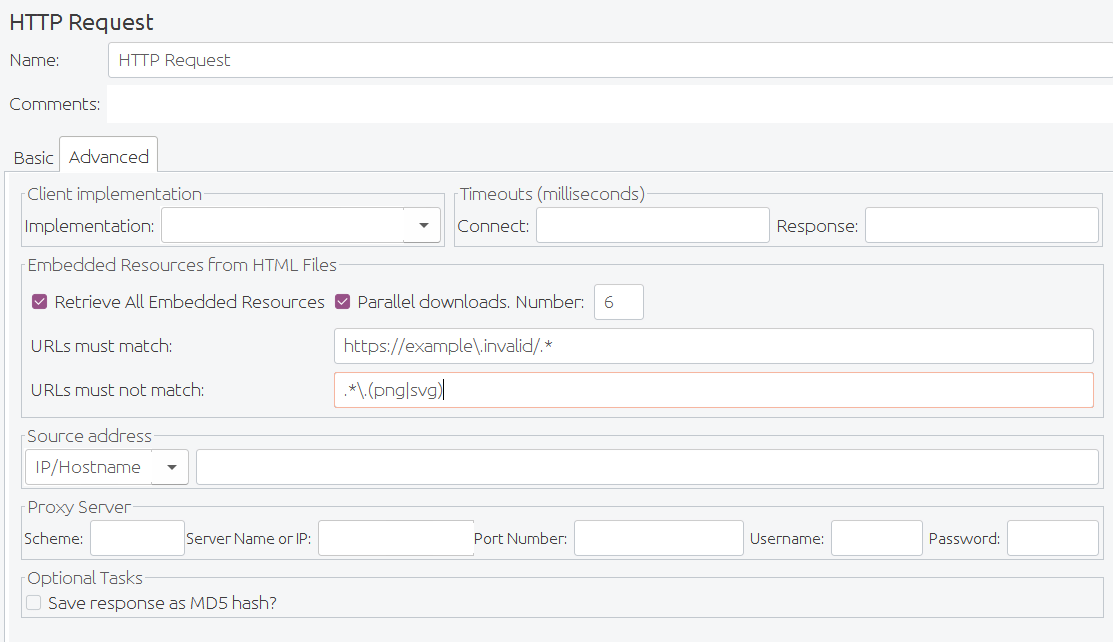 HTTP Request Advanced config fields
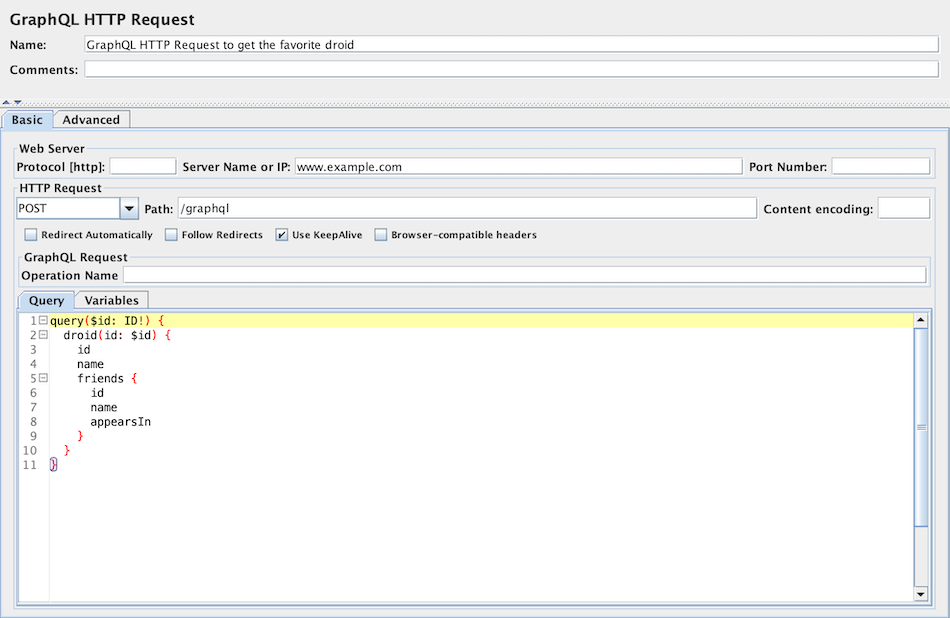 Screenshot of Control-Panel of GraphQL HTTP Request
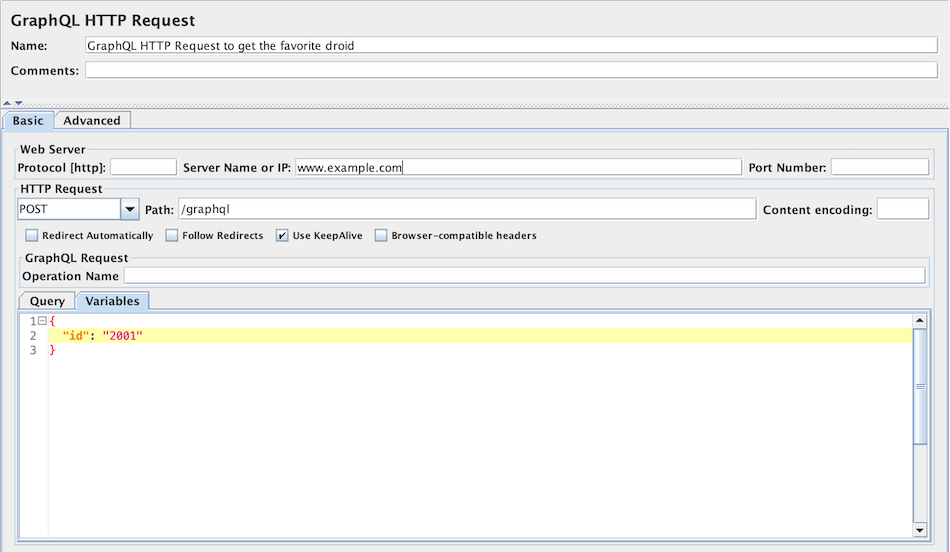 Variables field for GraphQL HTTP Request
| Name | Required | Description |
|---|---|---|
| Name | No | Descriptive name for this sampler that is shown in the tree. |
| Server | No | Domain name or IP address of the web server, e.g. www.example.com. [Do not include the http:// prefix.] Note: If the “Host” header is defined in a Header Manager, then this will be used as the virtual host name. :::note Server is required, unless: - it is provided by HTTP Request Defaults - or a full URL including scheme, host and port (scheme://host:port) is set in Path field ::: |
| Port | No | Port the web server is listening to. Default: 80 |
| Connect Timeout | No | Connection Timeout. Number of milliseconds to wait for a connection to open. |
| Response Timeout | No | Response Timeout. Number of milliseconds to wait for a response. Note that this applies to each wait for a response. If the server response is sent in several chunks, the overall elapsed time may be longer than the timeout. A Duration Assertion can be used to detect responses that take too long to complete. |
| Server (proxy) | No | Hostname or IP address of a proxy server to perform request. [Do not include the http:// prefix.] |
| Port | No, unless proxy hostname is specified | Port the proxy server is listening to. |
| Username | No | (Optional) username for proxy server. |
| Password | No | (Optional) password for proxy server. (N.B. this is stored unencrypted in the test plan) |
| Implementation | No | Java, HttpClient4. If not specified (and not defined by HTTP Request Defaults), the default depends on the value of the JMeter property jmeter.httpsampler, failing that, the HttpClient4 implementation is used. |
| Protocol | No | HTTP, HTTPS or FILE. Default: HTTP |
| Method | Yes | GET, POST, HEAD, TRACE, OPTIONS, PUT, DELETE, PATCH (not supported for JAVA implementation). With HttpClient4, the following methods related to WebDav are also allowed: COPY, LOCK, MKCOL, MOVE, PROPFIND, PROPPATCH, UNLOCK, REPORT, MKCALENDAR, SEARCH. More methods can be pre-defined for the HttpClient4 by using the JMeter property httpsampler.user_defined_methods. |
| Content Encoding | No | Content encoding to be used (for POST, PUT, PATCH and FILE). This is the character encoding to be used, and is not related to the Content-Encoding HTTP header. |
| Redirect Automatically | No | Sets the underlying http protocol handler to automatically follow redirects, so they are not seen by JMeter, and thus will not appear as samples. Should only be used for GET and HEAD requests. The HttpClient sampler will reject attempts to use it for POST or PUT. :::note Warning: see below for information on cookie and header handling. ::: |
| Follow Redirects | No | This only has any effect if “Redirect Automatically” is not enabled. If set, the JMeter sampler will check if the response is a redirect and follow it if so. The initial redirect and further responses will appear as additional samples. The URL and data fields of the parent sample will be taken from the final (non-redirected) sample, but the parent byte count and elapsed time include all samples. The latency is taken from the initial response. Note that the HttpClient sampler may log the following message: "Redirect requested but followRedirects is disabled" This can be ignored. JMeter will collapse paths of the form ‘/../segment’ in both absolute and relative redirect URLs. For example http://host/one/../two will be collapsed into http://host/two. If necessary, this behaviour can be suppressed by setting the JMeter property httpsampler.redirect.removeslashdotdot=false |
| Use KeepAlive | No | JMeter sets the Connection: keep-alive header. This does not work properly with the default HTTP implementation, as connection re-use is not under user-control. It does work with the Apache HttpComponents HttpClient implementations. |
| Use multipart/form-data for HTTP POST | No | Use a multipart/form-data or application/x-www-form-urlencoded post request |
| Browser-compatible headers | No | When using multipart/form-data, this suppresses the Content-Type and Content-Transfer-Encoding headers; only the Content-Disposition header is sent. |
| Path | No | The path to resource (for example, /servlets/myServlet). If the resource requires query string parameters, add them below in the “Send Parameters With the Request” section. :::note As a special case, if the path starts with “http://” or “https://” then this is used as the full URL. ::: In this case, the server, port and protocol fields are ignored; parameters are also ignored for GET and DELETE methods. Also please note that the path is not encoded - apart from replacing spaces with %20 - so unsafe characters may need to be encoded to avoid errors such as URISyntaxException. |
| Send Parameters With the Request | No | The query string will be generated from the list of parameters you provide. Each parameter has a name and value, the options to encode the parameter, and an option to include or exclude an equals sign (some applications don’t expect an equals sign when the value is the empty string). The query string will be generated in the correct fashion, depending on the choice of “Method” you made (i.e. if you chose GET or DELETE, the query string will be appended to the URL, if POST or PUT, then it will be sent separately). Also, if you are sending a file using a multipart form, the query string will be created using the multipart form specifications. See below for some further information on parameter handling. Additionally, you can specify whether each parameter should be URL encoded. If you are not sure what this means, it is probably best to select it. If your values contain characters such as the following then encoding is usually required.: - ASCII Control Chars - Non-ASCII characters - Reserved characters:URLs use some characters for special use in defining their syntax. When these characters are not used in their special role inside a URL, they need to be encoded, example: ‘$’, ‘&’, ‘+’, ‘,’ , ‘/’, ‘:’, ‘;’, ‘=’, ‘?’, ‘@’ - Unsafe characters: Some characters present the possibility of being misunderstood within URLs for various reasons. These characters should also always be encoded, example: ‘ ’, ‘<’, ‘>’, ‘#’, ‘%’, … |
| File Path: | No | Name of the file to send. If left blank, JMeter does not send a file, if filled in, JMeter automatically sends the request as a multipart form request. When MIME Type is empty, JMeter will try to guess the MIME type of the given file. If it is a POST or PUT or PATCH request and there is a single file whose ‘Parameter name’ attribute (below) is omitted, then the file is sent as the entire body of the request, i.e. no wrappers are added. This allows arbitrary bodies to be sent. This functionality is present for POST requests, and also for PUT requests. See below for some further information on parameter handling. |
| Parameter name: | No | Value of the “name” web request parameter. |
| MIME Type | No | MIME type (for example, text/plain). If it is a POST or PUT or PATCH request and either the ‘name’ attribute (below) are omitted or the request body is constructed from parameter values only, then the value of this field is used as the value of the content-type request header. |
| Retrieve All Embedded Resources from HTML Files | No | Tell JMeter to parse the HTML file and send HTTP/HTTPS requests for all images, Java applets, JavaScript files, CSSs, etc. referenced in the file. See below for more details. |
| Save response as MD5 hash | No | If this is selected, then the response is not stored in the sample result. Instead, the 32 character MD5 hash of the data is calculated and stored instead. This is intended for testing large amounts of data. |
| URLs must match: | No | If present, this must be a regular expression that is used to match against any embedded URLs found. So if you only want to download embedded resources from http://example.invalid/, use the expression: http://example\.invalid/.* |
| URLs must not match: | No | If present, this must be a regular expression that is used to filter out any embedded URLs found. So if you don’t want to download PNG or SVG files from any source, use the expression: `.*.(?i:svg |
| Use concurrent pool | No | Use a pool of concurrent connections to get embedded resources. |
| Size | No | Pool size for concurrent connections used to get embedded resources. |
| Source address type | No | [Only for HTTP Request with HTTPClient implementation] To distinguish the source address value, select the type of these: - Select IP/Hostname to use a specific IP address or a (local) hostname - Select Device to pick the first available address for that interface which this may be either IPv4 or IPv6 - Select Device IPv4 to select the IPv4 address of the device name (like eth0, lo, em0, etc.) - Select Device IPv6 to select the IPv6 address of the device name (like eth0, lo, em0, etc.) |
| Source address field | No | [Only for HTTP Request with HTTPClient implementation] This property is used to enable IP Spoofing. It overrides the default local IP address for this sample. The JMeter host must have multiple IP addresses (i.e. IP aliases, network interfaces, devices). The value can be a host name, IP address, or a network interface device such as “eth0” or “lo” or “wlan0”. If the property httpclient.localaddress is defined, that is used for all HttpClient requests. |
The following parameters are available only for GraphQL HTTP Request:
| Name | Required | Description |
|---|---|---|
| Query | Yes | GraphQL query (or mutation) statement. |
| Variables | No | GraphQL query (or mutation) variables in a valid JSON string. Note: If the input string is not a valid JSON string, this will be ignored with an ERROR log. |
| Operation Name | No | Optional GraphQL operation name when making a request for multi-operation documents. |
Parameter Handling:
For the POST and PUT method, if there is no file to send, and the name(s) of the parameter(s) are omitted,
then the body is created by concatenating all the value(s) of the parameters.
Note that the values are concatenated without adding any end-of-line characters.
These can be added by using the [__char()](/functions/char/) function in the value fields.
This allows arbitrary bodies to be sent.
The values are encoded if the encoding flag is set.
See also the MIME Type above how you can control the content-type request header that is sent.
For other methods, if the name of the parameter is missing, then the parameter is ignored. This allows the use of optional parameters defined by variables.
You have the option to switch to Body Data tab when a request has only unnamed parameters
(or no parameters at all).
This option is useful in the following cases (amongst others):
- GWT RPC HTTP Request
- JSON REST HTTP Request
- XML REST HTTP Request
- SOAP HTTP Request
In Body Data mode, each line will be sent with CRLF appended, apart from the last line.
To send a CRLF after the last line of data, just ensure that there is an empty line following it.
(This cannot be seen, except by noting whether the cursor can be placed on the subsequent line.)
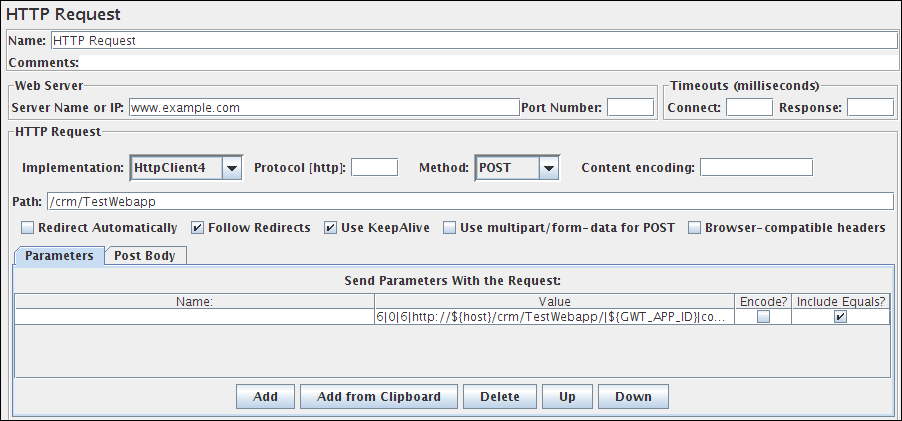 Figure 1 - HTTP Request with one unnamed parameter
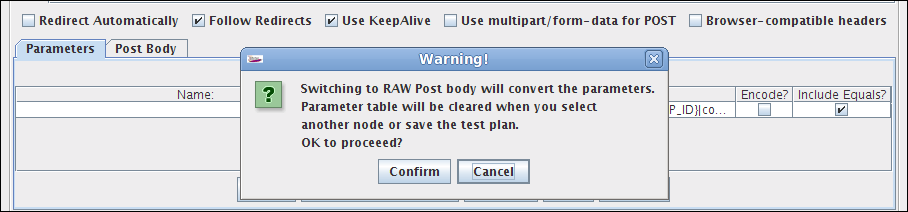 Figure 2 - Confirm dialog to switch
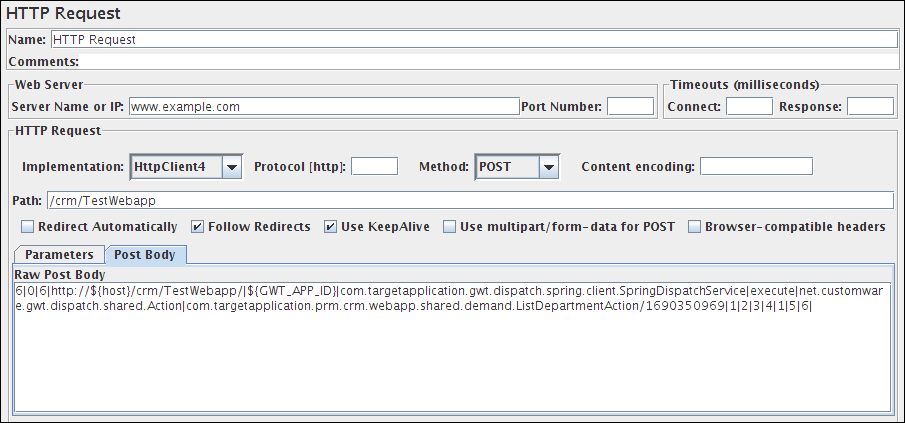 Figure 3 - HTTP Request using Body Data
Method Handling:
The GET, DELETE, POST, PUT and PATCH request methods work similarly, except that as of 3.1, only POST method supports multipart requests
or file upload.
The PUT and PATCH method body must be provided as one of the following:
- define the body as a file with empty Parameter name field; in which case the MIME Type is used as the Content-Type
- define the body as parameter value(s) with no name
- use the
Body Datatab
The GET, DELETE and POST methods have an additional way of passing parameters by using the Parameters tab.
GET, DELETE, PUT and PATCH require a Content-Type.
If not using a file, attach a Header Manager to the sampler and define the Content-Type there.
JMeter scan responses from embedded resources. It uses the property HTTPResponse.parsers, which is a list of parser ids,
e.g. htmlParser, cssParser and wmlParser. For each id found, JMeter checks two further properties:
id.types- a list of content typesid.className- the parser to be used to extract the embedded resources
See jmeter.properties file for the details of the settings.
If the HTTPResponse.parser property is not set, JMeter reverts to the previous behaviour,
i.e. only text/html responses will be scanned
Emulating slow connections:
HttpClient4 and Java Sampler support emulation of slow connections; see the following entries in jmeter.properties:
# Define characters per second > 0 to emulate slow connections#httpclient.socket.http.cps=0#httpclient.socket.https.cps=0However the Java sampler only supports slow HTTPS connections.
Response size calculation
Retry handling
By default retry has been set to 0 for both HttpClient4 and Java implementations, meaning no retry is attempted.
For HttpClient4, the retry count can be overridden by setting the relevant JMeter property, for example:
httpclient4.retrycount=3Note that the Java implementation does not retry neither by default, you can change this by setting
http.java.sampler.retries=3Note: Certificates does not conform to algorithm constraints
You may encounter the following error: java.security.cert.CertificateException: Certificates does not conform to algorithm constraints
if you run a HTTPS request on a web site with a SSL certificate (itself or one of SSL certificates in its chain of trust) with a signature
algorithm using MD2 (like md2WithRSAEncryption) or with a SSL certificate with a size lower than 1024 bits.
This error is related to increased security in Java 8.
To allow you to perform your HTTPS request, you can downgrade the security of your Java installation by editing
the Java jdk.certpath.disabledAlgorithms property. Remove the MD2 value or the constraint on size, depending on your case.
This property is in this file:
JAVA_HOME/jre/lib/security/java.securitySee Bug 56357 for details.
See Also
Section titled “See Also”HTTP Authorization Manager HTTP Cookie Manager HTTP Header Manager HTML Link Parser HTTP(S) Test Script Recorder HTTP Request Defaults
Common gotchas
Section titled “Common gotchas”- Don’t hardcode auth tokens. Extract them once (login response) and reuse via a variable — see Correlation & Dynamic Values.
- Retrieve embedded resources only if you’re deliberately modeling real browser load (images/CSS/JS); for pure API load testing it just adds noise and skews response times.
- Connect/response timeouts default to 0 (infinite). A single hung request can silently stall a whole thread — set explicit timeouts under “Advanced” for anything hitting a real network.
- Prefer HTTP Request Defaults for shared server/protocol/timeout settings across many samplers instead of repeating them.