

Configure the JMeter XPath Extractor post-processors: properties, defaults, and practical usage notes for building reliable load tests.
Part of the Post-Processors category. Also documented in context in the full Component Reference.
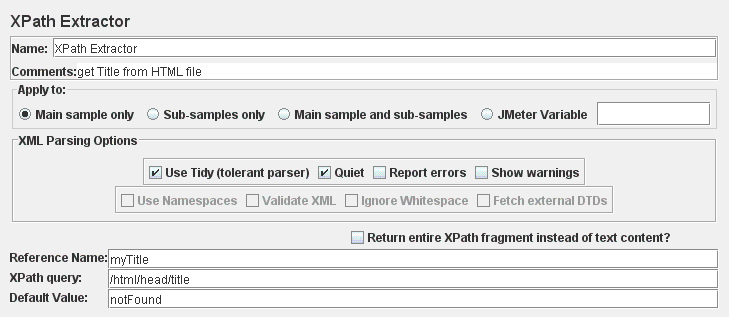
This test element allows the user to extract value(s) from structured response - XML or (X)HTML - using XPath query language.
| Name | Required | Description |
|---|---|---|
| Name | No | Descriptive name for this element that is shown in the tree. |
| Apply to: | Yes | This is for use with samplers that can generate sub-samples, e.g. HTTP Sampler with embedded resources, Mail Reader or samples generated by the Transaction Controller. - Main sample only - only applies to the main sample - Sub-samples only - only applies to the sub-samples - Main sample and sub-samples - applies to both. - JMeter Variable Name to use - extraction is to be applied to the contents of the named variable XPath matching is applied to all qualifying samples in turn, and all the matching results will be returned. |
| Use Tidy (tolerant parser) | Yes | If checked use Tidy to parse HTML response into XHTML. - “Use Tidy” should be checked on for HTML response. Such response is converted to valid XHTML (XML compatible HTML) using Tidy - “Use Tidy” should be unchecked for both XHTML or XML response (for example RSS) :::note For HTML, CSS Selector Extractor is the correct and performing solution. Don’t use XPath for HTML extractions. ::: |
| Quiet | If Tidy is selected | Sets the Tidy Quiet flag |
| Report Errors | If Tidy is selected | If a Tidy error occurs, then set the Assertion accordingly |
| Show warnings | If Tidy is selected | Sets the Tidy showWarnings option |
| Use Namespaces | If Tidy is not selected | If checked, then the XML parser will use namespace resolution.(see note below on NAMESPACES) Note that currently only namespaces declared on the root element will be recognised. See below for user-definition of additional workspace names. |
| Validate XML | If Tidy is not selected | Check the document against its schema. |
| Ignore Whitespace | If Tidy is not selected | Ignore Element Whitespace. |
| Fetch External DTDs | If Tidy is not selected | If selected, external DTDs are fetched. |
| Return entire XPath fragment instead of text content | Yes | If selected, the fragment will be returned rather than the text content. For example //title would return “<title>Apache JMeter</title>” rather than “Apache JMeter”. In this case, //title/text() would return “Apache JMeter”. |
| Name of created variable | Yes | The name of the JMeter variable in which to store the result. |
| XPath Query | Yes | Element query in XPath language. Can return more than one match. |
| Match No. (0 for Random) | No | If the XPath Path query leads to many results, you can choose which one(s) to extract as Variables: - 0: means random - -1 means extract all results (default value), they will be named as _<variable name>__N (where N goes from 1 to Number of results) - X: means extract the Xth result. If this Xth is greater than number of matches, then nothing is returned. Default value will be used |
| Default Value | No | Default value returned when no match found. It is also returned if the node has no value and the fragment option is not selected. |
To allow for use in a ForEach Controller, the following variables are set on return:
refName- set to first (or only) match; if no match, then set to defaultrefName_matchNr- set to number of matches (may be0)refName_n-n=1,2,3, etc. Set to the 1st, 2nd 3rd match etc.
XPath is query language targeted primarily for XSLT transformations. However it is useful as generic query language for structured data too. See XPath Reference or XPath specification for more information. Here are few examples:
/html/head/title
: extracts title element from HTML response
/book/page[2]
: extracts 2nd page from a book
/book/page
: extracts all pages from a book
//form[@name='countryForm']//select[@name='country']/option[text()='Czech Republic'])/@value
: extracts value attribute of option element that match text ‘Czech Republic’
inside of select element with name attribute ‘country’ inside of
form with name attribute ‘countryForm’
Another option is to use the following code:
//mynamespace:tagnameby:
//*[local-name()='tagname' and namespace-uri()='uri-for-namespace']where “uri-for-namespace” is the uri for the “mynamespace” namespace.(not applicable if Tidy is selected)