

Configure the JMeter JDBC Connection Configuration configuration elements: properties, defaults, and practical usage notes for building reliable load tests.
Part of the Configuration Elements category. Also documented in context in the full Component Reference.
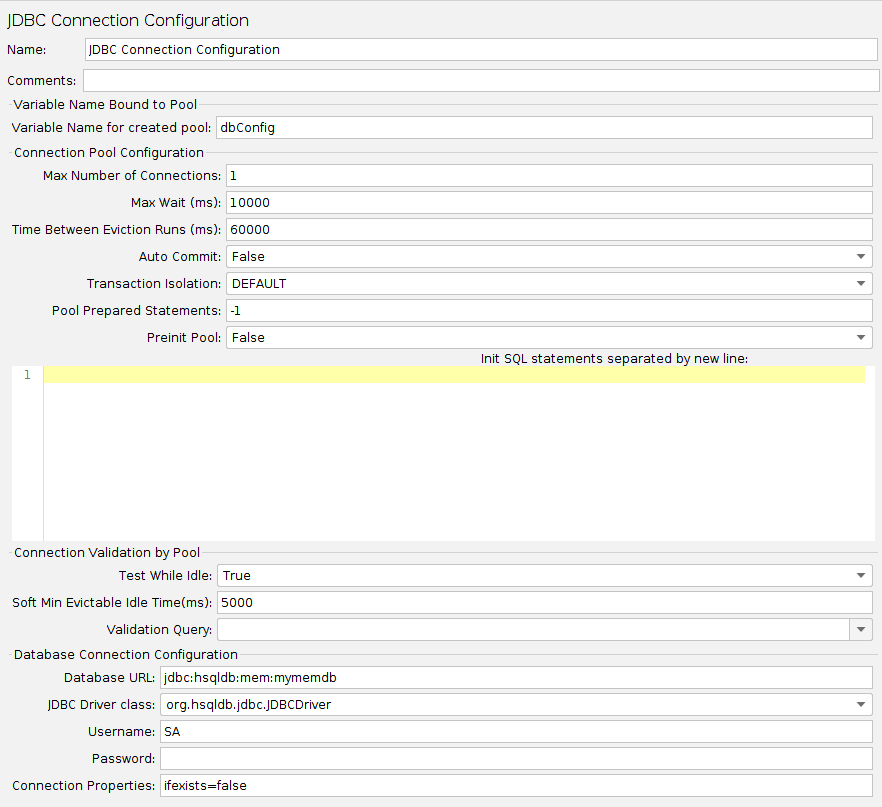
Creates a database connection (used by JDBC RequestSampler) from the supplied JDBC Connection settings. The connection may be optionally pooled between threads. Otherwise each thread gets its own connection. The connection configuration name is used by the JDBC Sampler to select the appropriate connection. The used pool is DBCP, see BasicDataSource Configuration Parameters
| Name | Required | Description |
|---|---|---|
| Name | No | Descriptive name for the connection configuration that is shown in the tree. |
| Variable Name for created pool | Yes | The name of the variable the connection is tied to. Multiple connections can be used, each tied to a different variable, allowing JDBC Samplers to select the appropriate connection. :::note Each name must be different. If there are two configuration elements using the same name, only one will be saved. JMeter logs a message if a duplicate name is detected. ::: |
| Max Number of Connections | Yes | Maximum number of connections allowed in the pool. In most cases, set this to zero (0). This means that each thread will get its own pool with a single connection in it, i.e. the connections are not shared between threads. If you really want to use shared pooling (why?), then set the max count to the same as the number of threads to ensure threads don’t wait on each other. |
| Max Wait (ms) | Yes | Pool throws an error if the timeout period is exceeded in the process of trying to retrieve a connection, see BasicDataSource.html#getMaxWaitMillis |
| Time Between Eviction Runs (ms) | Yes | The number of milliseconds to sleep between runs of the idle object evictor thread. When non-positive, no idle object evictor thread will be run. (Defaults to “60000”, 1 minute). See BasicDataSource.html#getTimeBetweenEvictionRunsMillis |
| Auto Commit | Yes | Turn auto commit on or off for the connections. |
| Transaction isolation | Yes | Transaction isolation level |
| Pool Prepared Statements | Yes | Max number of Prepared Statements to pool per connection. "-1” disables the pooling and “0” means unlimited number of Prepared Statements to pool. (Defaults to “-1”) |
| Preinit Pool | No | The connection pool can be initialized instantly. If set to False (default), the JDBC request samplers using this pool might measure higher response times for the first queries – as the connection establishment time for the whole pool is included. |
| Init SQL statements separated by new line | No | A Collection of SQL statements that will be used to initialize physical connections when they are first created. These statements are executed only once - when the configured connection factory creates the connection. |
| Test While Idle | Yes | Test idle connections of the pool, see BasicDataSource.html#getTestWhileIdle. Validation Query will be used to test it. |
| Soft Min Evictable Idle Time(ms) | Yes | Minimum amount of time a connection may sit idle in the pool before it is eligible for eviction by the idle object evictor, with the extra condition that at least minIdle connections remain in the pool. See BasicDataSource.html#getSoftMinEvictableIdleTimeMillis. Defaults to 5000 (5 seconds) |
| Validation Query | No | A simple query used to determine if the database is still responding. This defaults to the ‘isValid()’ method of the jdbc driver, which is suitable for many databases. However some may require a different query; for example Oracle something like ‘SELECT 1 FROM DUAL’ could be used. The list of the validation queries can be configured with jdbc.config.check.query property and are by default: hsqldb : select 1 from INFORMATION_SCHEMA.SYSTEM_USERS Oracle : select 1 from dual DB2 : select 1 from sysibm.sysdummy1 MySQL or MariaDB : select 1 Microsoft SQL Server (MS JDBC driver) : select 1 PostgreSQL : select 1 Ingres : select 1 Derby : values 1 H2 : select 1 Firebird : select 1 from rdb$database Exasol : select 1 :::note The list come from stackoverflow entry on different database validation queries and it can be incorrect ::: :::note Note this validation query is used on pool creation to validate it even if “Test While Idle” suggests query would only be used on idle connections. This is DBCP behaviour. ::: |
| Database URL | Yes | JDBC Connection string for the database. |
| JDBC Driver class | Yes | Fully qualified name of driver class. (Must be in JMeter’s classpath - easiest to copy .jar file into JMeter’s /lib directory). The list of the preconfigured jdbc driver classes can be configured with jdbc.config.jdbc.driver.class property and are by default: hsqldb : org.hsqldb.jdbc.JDBCDriver Oracle : oracle.jdbc.OracleDriver DB2 : com.ibm.db2.jcc.DB2Driver MySQL : com.mysql.cj.jdbc.Driver com.mysql.jdbc.Driver (deprecated) Microsoft SQL Server (MS JDBC driver) : com.microsoft.sqlserver.jdbc.SQLServerDriver or com.microsoft.jdbc.sqlserver.SQLServerDriver PostgreSQL : org.postgresql.Driver Ingres : com.ingres.jdbc.IngresDriver Derby : org.apache.derby.jdbc.ClientDriver H2 : org.h2.Driver Firebird : org.firebirdsql.jdbc.FBDriver Apache Derby : org.apache.derby.jdbc.ClientDriver MariaDB : org.mariadb.jdbc.Driver SQLite : org.sqlite.JDBC Sybase AES : net.sourceforge.jtds.jdbc.Driver Exasol : com.exasol.jdbc.EXADriver |
| Username | No | Name of user to connect as. |
| Password | No | Password to connect with. (N.B. this is stored unencrypted in the test plan) |
| Connection Properties | No | Connection Properties to set when establishing connection (like internal_logon=sysdba for Oracle for example) |
Different databases and JDBC drivers require different JDBC settings. The Database URL and JDBC Driver class are defined by the provider of the JDBC implementation.
Some possible settings are shown below. Please check the exact details in the JDBC driver documentation.
If JMeter reports No suitable driver, then this could mean either:
- The driver class was not found. In this case, there will be a log message such as
DataSourceElement: Could not load driver: {classname} java.lang.ClassNotFoundException: {classname} - The driver class was found, but the class does not support the connection string. This could be because of a syntax error in the connection string, or because the wrong classname was used.
If the database server is not running or is not accessible, then JMeter will report a java.net.ConnectException.
Some examples for databases and their parameters are given below.
MySQL
: Driver class
: com.mysql.cj.jdbc.Driver
Database URL
: jdbc:mysql://host[:port]/dbname
PostgreSQL
: Driver class
: org.postgresql.Driver
Database URL
: jdbc:postgresql:{dbname}
Oracle
: Driver class
: oracle.jdbc.OracleDriver
Database URL
: jdbc:oracle:thin:@//host:port/service OR jdbc:oracle:thin:@(description=(address=(host={mc-name})(protocol=tcp)(port={port-no}))(connect_data=(sid={sid})))
Ingress (2006)
: Driver class
: ingres.jdbc.IngresDriver
Database URL
: jdbc:ingres://host:port/db[;attr=value]
Microsoft SQL Server (MS JDBC driver)
: Driver class
: com.microsoft.sqlserver.jdbc.SQLServerDriver
Database URL
: jdbc:sqlserver://host:port;DatabaseName=dbname
Apache Derby
: Driver class
: org.apache.derby.jdbc.ClientDriver
Database URL
: jdbc:derby://server[:port]/databaseName[;URLAttributes=value[;…]]
MariaDB
: Driver class
: org.mariadb.jdbc.Driver
Database URL
: jdbc:mariadb://host[:port]/dbname[;URLAttributes=value[;…]]
Exasol (see also JDBC driver documentation)
: Driver class
: com.exasol.jdbc.EXADriver
Database URL
: jdbc:exa:host[:port][;schema=SCHEMA_NAME][;prop_x=value_x]