

Configure the JMeter TCP Sampler Config configuration elements: properties, defaults, and practical usage notes for building reliable load tests.
Part of the Configuration Elements category. Also documented in context in the full Component Reference.
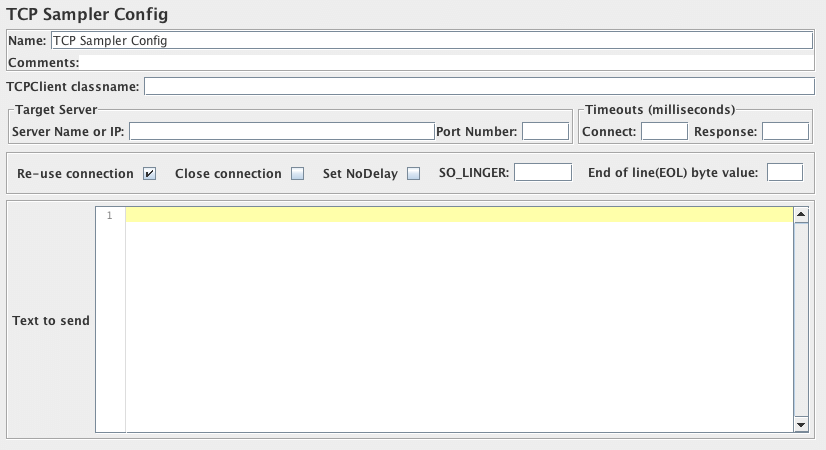
The TCP Sampler Config provides default data for the TCP Sampler
| Name | Required | Description |
|---|---|---|
| Name | No | Descriptive name for this element that is shown in the tree. |
| TCPClient classname | No | Name of the TCPClient class. Defaults to the property tcp.handler, failing that TCPClientImpl. |
| ServerName or IP | No | Name or IP of TCP server |
| Port Number | No | Port to be used |
| Re-use connection | Yes | If selected, the connection is kept open. Otherwise it is closed when the data has been read. |
| Close connection | Yes | If selected, the connection will be closed after running the sampler. |
| SO_LINGER | No | Enable/disable SO_LINGER with the specified linger time in seconds when a socket is created. If you set “SO_LINGER” value as 0, you may prevent large numbers of sockets sitting around with a TIME_WAIT status. |
| End of line(EOL) byte value | No | Byte value for end of line, set this to a value outside the range -128 to +127 to skip EOL checking. You may set this in jmeter.properties file as well with the tcp.eolByte property. If you set this in TCP Sampler Config and in jmeter.properties file at the same time, the setting value in the TCP Sampler Config will be used. |
| Connect Timeout | No | Connect Timeout (milliseconds, 0 disables). |
| Response Timeout | No | Response Timeout (milliseconds, 0 disables). |
| Set Nodelay | No | Should the nodelay property be set? |
| Text to Send | No | Text to be sent |
Related
Section titled “Related”Was this page helpful?
Thanks for the feedback!Tell us what's missing on GitHub