

Configure the JMeter JSON JMESPath Extractor post-processors: properties, defaults, and practical usage notes for building reliable load tests.
Part of the Post-Processors category. Also documented in context in the full Component Reference.
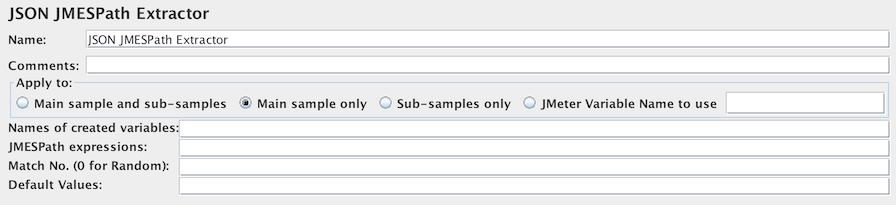
This test element allows the user to extract value(s) from JSON response using JMESPath query language.
| Name | Required | Description |
|---|---|---|
| Name | No | Descriptive name for this element that is shown in the tree. |
| Apply to: | Yes | This is for use with samplers that can generate sub-samples, e.g. HTTP Sampler with embedded resources, Mail Reader or samples generated by the Transaction Controller. - Main sample only - only applies to the main sample - Sub-samples only - only applies to the sub-samples - Main sample and sub-samples - applies to both. - JMeter Variable Name to use - extraction is to be applied to the contents of the named variable |
| Name of created variable | Yes | The name of the JMeter variable in which to store the result. |
| JMESPath expressions | Yes | Element query in JMESPath query language. Can return the matched result. |
| Match No. (0 for Random) | No | If the JMESPath query leads to many results, you can choose which one(s) to extract as Variables: - 0: means random - -1 means extract all results (default value), they will be named as _<variable name>__N (where N goes from 1 to Number of results) - X: means extract the Xth result. If this Xth is greater than number of matches, then nothing is returned. Default value will be used |
| Default Value | No | Default value returned when no match found. It is also returned if the node has no value and the fragment option is not selected. |
JMESPath is a query language for JSON. It is described in an ABNF grammar with a complete specification. This ensures that the language syntax is precisely defined. See JMESPath Reference for more information. Here are also some examples JMESPath Example.
Related
Section titled “Related”Was this page helpful?
Thanks for the feedback!Tell us what's missing on GitHub