

Configure the JMeter HTTP Request Defaults configuration elements: properties, defaults, and practical usage notes for building reliable load tests.
Part of the Configuration Elements category. Also documented in context in the full Component Reference.
TL;DR: HTTP Request Defaults sets shared server, port, protocol, path prefix, and timeout values that every HTTP Request underneath it inherits — the standard way to avoid repeating the same hostname on 50 samplers.
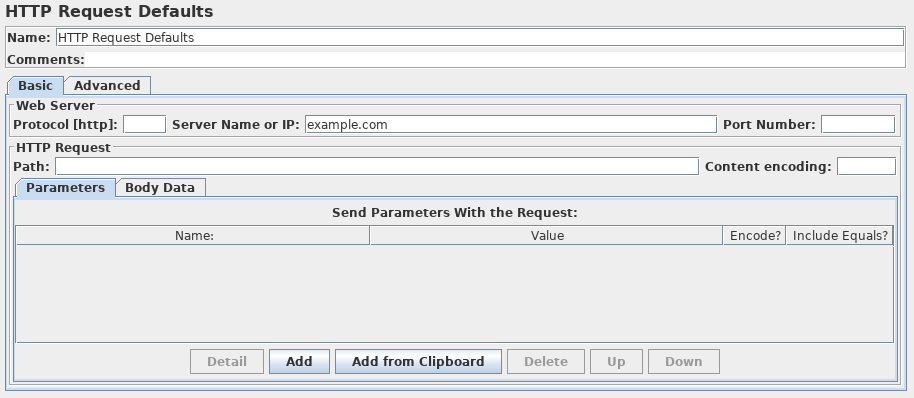
This element lets you set default values that your HTTP Request controllers use. For example, if you are
creating a Test Plan with 25 HTTP Request controllers and all of the requests are being sent to the same server,
you could add a single HTTP Request Defaults element with the “Server Name or IP” field filled in. Then, when
you add the 25 HTTP Request controllers, leave the “Server Name or IP” field empty. The controllers will inherit
this field value from the HTTP Request Defaults element.
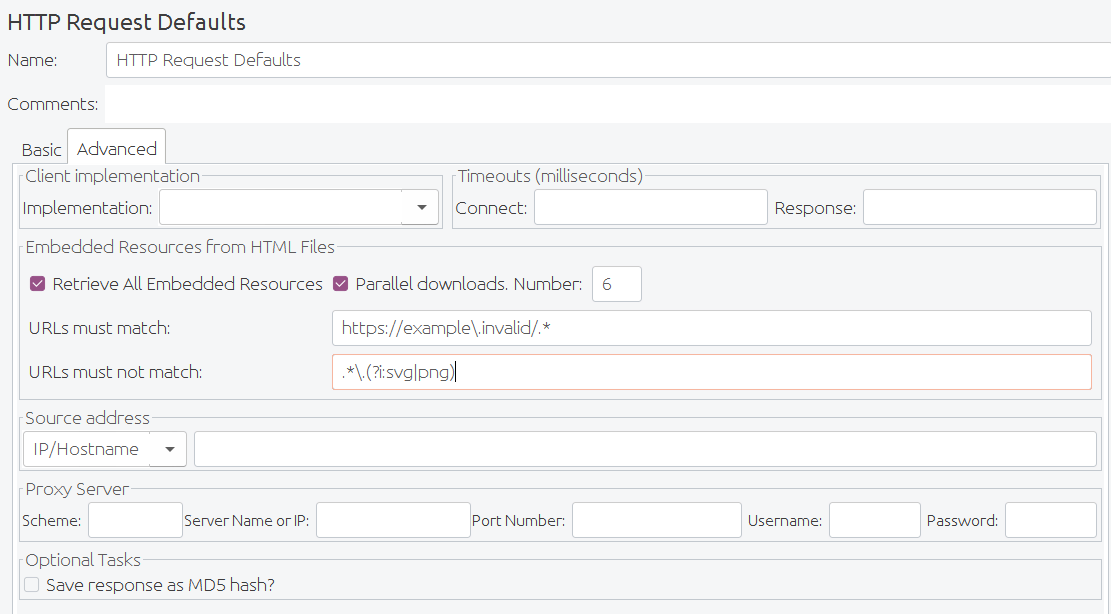 HTTP Request Advanced config fields
| Name | Required | Description |
|---|---|---|
| Name | No | Descriptive name for this element that is shown in the tree. |
| Server | No | Domain name or IP address of the web server. E.g. www.example.com. [Do not include the http:// prefix. |
| Port | No | Port the web server is listening to. |
| Connect Timeout | No | Connection Timeout. Number of milliseconds to wait for a connection to open. |
| Response Timeout | No | Response Timeout. Number of milliseconds to wait for a response. |
| Implementation | No | Java, HttpClient4. If not specified the default depends on the value of the JMeter property jmeter.httpsampler, failing that, the Java implementation is used. |
| Protocol | No | HTTP or HTTPS. |
| Content encoding | No | The encoding to be used for the request. |
| Path | No | The path to resource (for example, /servlets/myServlet). If the resource requires query string parameters, add them below in the “Send Parameters With the Request” section. Note that the path is the default for the full path, not a prefix to be applied to paths specified on the HTTP Request screens. |
| Send Parameters With the Request | No | The query string will be generated from the list of parameters you provide. Each parameter has a name and value. The query string will be generated in the correct fashion, depending on the choice of “Method” you made (i.e. if you chose GET, the query string will be appended to the URL, if POST, then it will be sent separately). Also, if you are sending a file using a multipart form, the query string will be created using the multipart form specifications. |
| Server (proxy) | No | Hostname or IP address of a proxy server to perform request. [Do not include the http:// prefix.] |
| Port | No, unless proxy hostname is specified | Port the proxy server is listening to. |
| Username | No | (Optional) username for proxy server. |
| Password | No | (Optional) password for proxy server. (N.B. this is stored unencrypted in the test plan) |
| Retrieve All Embedded Resources from HTML Files | No | Tell JMeter to parse the HTML file and send HTTP/HTTPS requests for all images, Java applets, JavaScript files, CSSs, etc. referenced in the file. |
| Use concurrent pool | No | Use a pool of concurrent connections to get embedded resources. |
| Size | No | Pool size for concurrent connections used to get embedded resources. |
| URLs must match: | No | If present, this must be a regular expression that is used to match against any embedded URLs found. So if you only want to download embedded resources from http://example.invalid/, use the expression: http://example\.invalid/.* |
| URLs must not match: | No | If present, this must be a regular expression that is used to filter out any embedded URLs found. So if you don’t want to download PNG or SVG files from any source, use the expression: `.*.(?i:svg |
Common gotchas
Section titled “Common gotchas”- Values here are defaults, not overrides — if an individual HTTP Request has its own server/port filled in, that sampler’s value wins, which can cause “why is this one request hitting the wrong host” confusion after a copy-paste.
- Great place to centralize Connect/Response timeouts so every request in a scope gets a sane timeout without configuring each sampler individually.
- Works well combined with a variable for the hostname (
${host}) so switching environments (staging vs. production) is a single property change — see the API Load Testing Guide. - Scope it at the Thread Group (or higher) level for test-plan-wide defaults, or lower in the tree for per-flow overrides.