

Configure the JMeter JMS Publisher samplers: properties, defaults, and practical usage notes for building reliable load tests.
Part of the Samplers category. Also documented in context in the full Component Reference.
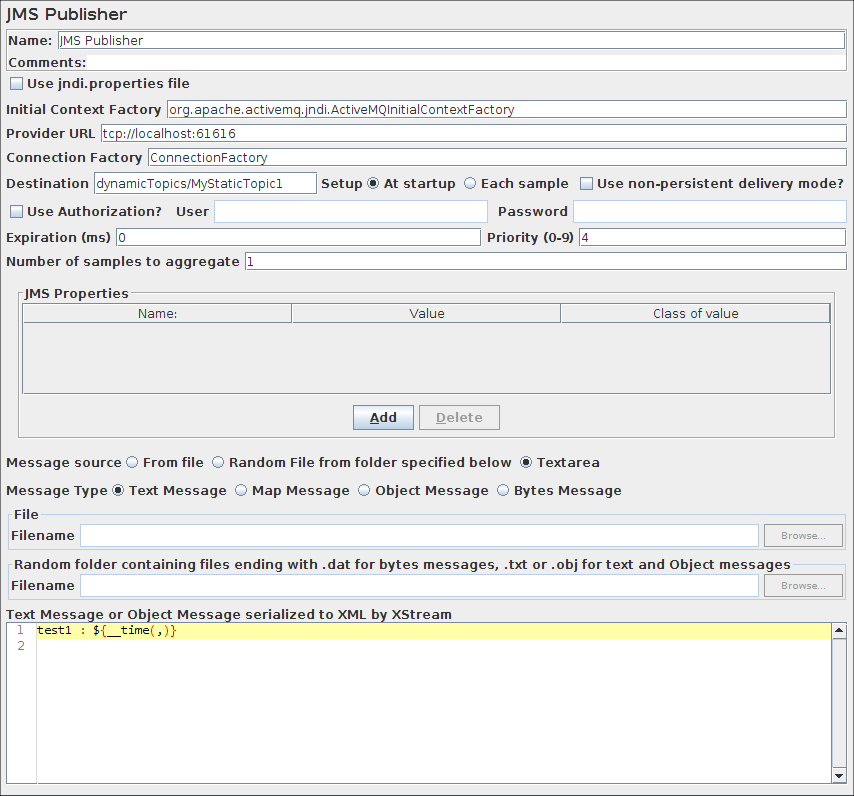
JMS Publisher will publish messages to a given destination (topic/queue). For those not familiar with JMS, it is the J2EE specification for messaging. There are numerous JMS servers on the market and several open source options.
| Name | Required | Description |
|---|---|---|
| Name | No | Descriptive name for this element that is shown in the tree. |
| use JNDI properties file | Yes | use jndi.properties. Note that the file must be on the classpath - e.g. by updating the user.classpath JMeter property. If this option is not selected, JMeter uses the “JNDI Initial Context Factory” and “Provider URL” fields to create the connection. |
| JNDI Initial Context Factory | No | Name of the context factory |
| Provider URL | Yes, unless using jndi.properties | The URL for the JMS provider |
| Destination | Yes | The message destination (topic or queue name) |
| Setup | Yes | The destination setup type. With At startup, the destination name is static (i.e. always same name during the test), with Each sample, the destination name is dynamic and is evaluate at each sample (i.e. the destination name may be a variable) |
| Authentication | Yes | Authentication requirement for the JMS provider |
| User | No | User Name |
| Password | No | Password (N.B. this is stored unencrypted in the test plan) |
| Expiration | No | The expiration time (in milliseconds) of the message before it becomes obsolete. If you do not specify an expiration time, the default value is 0 (never expires). |
| Priority | No | The priority level of the message. There are ten priority levels from 0 (lowest) to 9 (highest). If you do not specify a priority level, the default level is 4. |
| Reconnect on error codes (regex) | No | Regular expression for JMSException error codes which force reconnection. If empty no reconnection will be done |
| Number of samples to aggregate | Yes | Number of samples to aggregate |
| Message source | Yes | Where to obtain the message: From File : means the referenced file will be read and reused by all samples. If file name changes it is reloaded since JMeter 3.0 Random File from folder specified below : means a random file will be selected from folder specified below, this folder must contain either files with extension .dat for Bytes Messages, or files with extension .txt or .obj for Object or Text messages Text area : The Message to use either for Text or Object message |
| Message type | Yes | Text, Map, Object message or Bytes Message |
| Content encoding | Yes | Specify the encoding for reading the message source file: RAW: : No variable support from the file and load it with default system charset. DEFAULT: : Load file with default system encoding, except for XML which relies on XML prolog. If the file contain variables, they will be processed. Standard charsets: : The specified encoding (valid or not) is used for reading the file and processing variables |
| Use non-persistent delivery mode | No | Whether to set DeliveryMode.NON_PERSISTENT (defaults to false) |
| JMS Properties | No | The JMS Properties are properties specific for the underlying messaging system. You can setup the name, the value and the class (type) of value. Default type is String. For example: for WebSphere 5.1 web services you will need to set the JMS Property targetService to test webservices through JMS. |
For the MapMessage type, JMeter reads the source as lines of text. Each line must have 3 fields, delimited by commas. The fields are:
- Name of entry
- Object class name, e.g. “
String” (assumesjava.langpackage if not specified) - Object string value
For each entry, JMeter adds an Object with the given name.
The value is derived by creating an instance of the class, and using the valueOf(String) method to convert the value if necessary.
For example:
name,String,Examplesize,Integer,1234This is a very simple implementation; it is not intended to support all possible object types.
The following table shows some values which may be useful when configuring JMS:
| Context Factory | org.apache.activemq.jndi.ActiveMQInitialContextFactory | . |
| Provider URL | vm://localhost | |
| Provider URL | vm:(broker:(vm://localhost)?persistent=false) | Disable persistence |
| Queue Reference | dynamicQueues/QUEUENAME | Dynamically define the QUEUENAME to JNDI |
| Topic Reference | dynamicTopics/TOPICNAME | Dynamically define the TOPICNAME to JNDI |