

Configure the JMeter Keystore Configuration configuration elements: properties, defaults, and practical usage notes for building reliable load tests.
Part of the Configuration Elements category. Also documented in context in the full Component Reference.
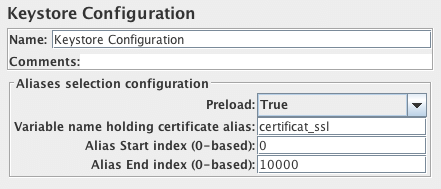
The Keystore Config Element lets you configure how Keystore will be loaded and which keys it will use. This component is typically used in HTTPS scenarios where you don’t want to take into account keystore initialization into account in response time.
To use this element, you need to setup first a Java Key Store with the client certificates you want to test, to do that:
- Create your certificates either with Java
keytoolutility or through your PKI - If created by PKI, import your keys in Java Key Store by converting them to a format acceptable by JKS
- Then reference the keystore file through the two JVM properties (or add them in
system.properties): --Djavax.net.ssl.keyStore=path_to_keystore--Djavax.net.ssl.keyStorePassword=password_of_keystore
To use PKCS11 as the source for the store, you need to set javax.net.ssl.keyStoreType to PKCS11
and javax.net.ssl.keyStore to NONE.
| Name | Required | Description |
|---|---|---|
| Name | No | Descriptive name for this element that is shown in the tree. |
| Preload | Yes | Whether or not to preload Keystore. Setting it to true is usually the best option. |
| Variable name holding certificate alias | False | Variable name that will contain the alias to use for authentication by client certificate. Variable value will be filled from CSV Data Set for example. In the screenshot, “certificat_ssl” will also be a variable in CSV Data Set. Defaults to clientCertAliasVarName |
| Alias Start Index | Yes | The index of the first key to use in Keystore, 0-based. |
| Alias End Index | Yes | The index of the last key to use in Keystore, 0-based. When using “Variable name holding certificate alias” ensure it is large enough so that all keys are loaded at startup. Default to -1 which means load all. |