

Configure the JMeter SMTP Sampler samplers: properties, defaults, and practical usage notes for building reliable load tests.
Part of the Samplers category. Also documented in context in the full Component Reference.
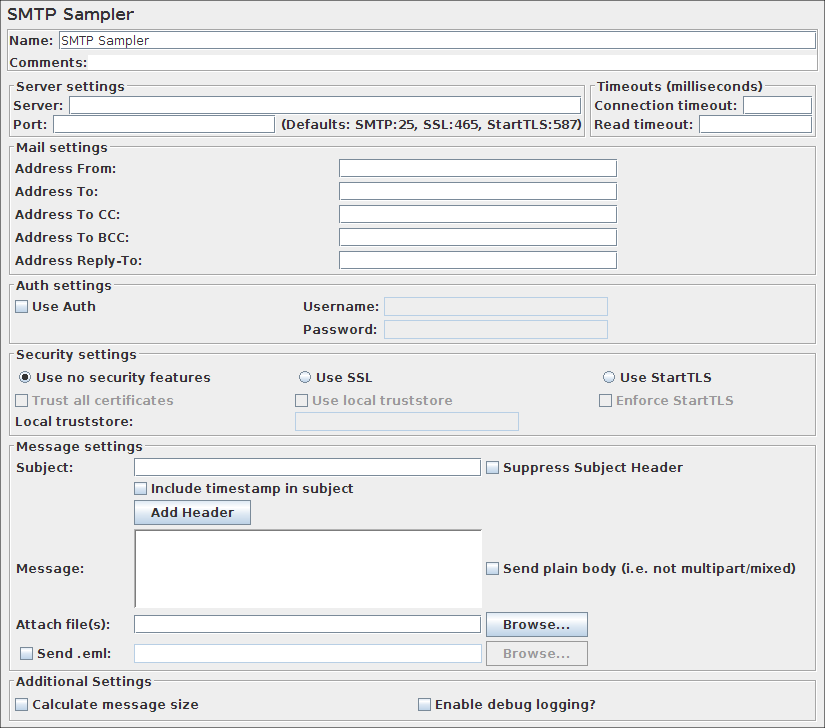
The SMTP Sampler can send mail messages using SMTP/SMTPS protocol. It is possible to set security protocols for the connection (SSL and TLS), as well as user authentication. If a security protocol is used a verification on the server certificate will occur.
Two alternatives to handle this verification are available:
Trust all certificates
: This will ignore certificate chain verification
Use a local truststore
: With this option the certificate chain will be validated against the local truststore file.
| Name | Required | Description |
|---|---|---|
| Server | Yes | Hostname or IP address of the server. See below for use with file protocol. |
| Port | No | Port to be used to connect to the server. Defaults are: SMTP=25, SSL=465, StartTLS=587 |
| Connection timeout | No | Connection timeout value in milliseconds (socket level). Default is infinite timeout. |
| Read timeout | No | Read timeout value in milliseconds (socket level). Default is infinite timeout. |
| Address From | Yes | The from address that will appear in the e-mail |
| Address To | Yes, unless CC or BCC is specified | The destination e-mail address (multiple values separated by “;”) |
| Address To CC | No | Carbon copy destinations e-mail address (multiple values separated by “;”) |
| Address To BCC | No | Blind carbon copy destinations e-mail address (multiple values separated by “;”) |
| Address Reply-To | No | Alternate Reply-To address (multiple values separated by “;”) |
| Use Auth | No | Indicates if the SMTP server requires user authentication |
| Username | No | User login name |
| Password | No | User login password (N.B. this is stored unencrypted in the test plan) |
| Use no security features | No | Indicates that the connection to the SMTP server does not use any security protocol. |
| Use SSL | No | Indicates that the connection to the SMTP server must use the SSL protocol. |
| Use StartTLS | No | Indicates that the connection to the SMTP server should attempt to start the TLS protocol. |
| Enforce StartTLS | No | If the server does not start the TLS protocol the connection will be terminated. |
| Trust All Certificates | No | When selected it will accept all certificates independent of the CA. |
| Use local truststore | No | When selected it will only accept certificates that are locally trusted. |
| Local truststore | No | Path to file containing the trusted certificates. Relative paths are resolved against the current directory. Failing that, against the directory containing the test script (JMX file). |
| Override System SSL/TLS Protocols | No | Specify a custom SSL/TLS protocol as space separated list to use on handshake example TLSv1 TLSv1.1 TLSv1.2. Defaults to all supported protocols. |
| Subject | No | The e-mail message subject. |
| Suppress Subject Header | No | If selected, the “Subject:” header is omitted from the mail that is sent. This is different from sending an empty “Subject:” header, though some e-mail clients may display it identically. |
| Include timestamp in subject | No | Includes the System.currentTimemillis() in the subject line. |
| Add Header | No | Additional headers can be defined using this button. |
| Message | No | The message body. |
| Send plain body (i.e. not multipart/mixed) | No | If selected, then send the body as a plain message, i.e. not multipart/mixed, if possible. If the message body is empty and there is a single file, then send the file contents as the message body. :::note Note: If the message body is not empty, and there is at least one attached file, then the body is sent as multipart/mixed. ::: |
| Attach files | No | Files to be attached to the message. |
| Send .eml | No | If set, the .eml file will be sent instead of the entries in the Subject, Message, and Attach file(s) fields |
| Calculate message size | No | Calculates the message size and stores it in the sample result. |
| Enable debug logging | No | If set, then the “mail.debug” property is set to “true” |
Related
Section titled “Related”Was this page helpful?
Thanks for the feedback!Tell us what's missing on GitHub