

Configure the JMeter JMS Subscriber samplers: properties, defaults, and practical usage notes for building reliable load tests.
Part of the Samplers category. Also documented in context in the full Component Reference.
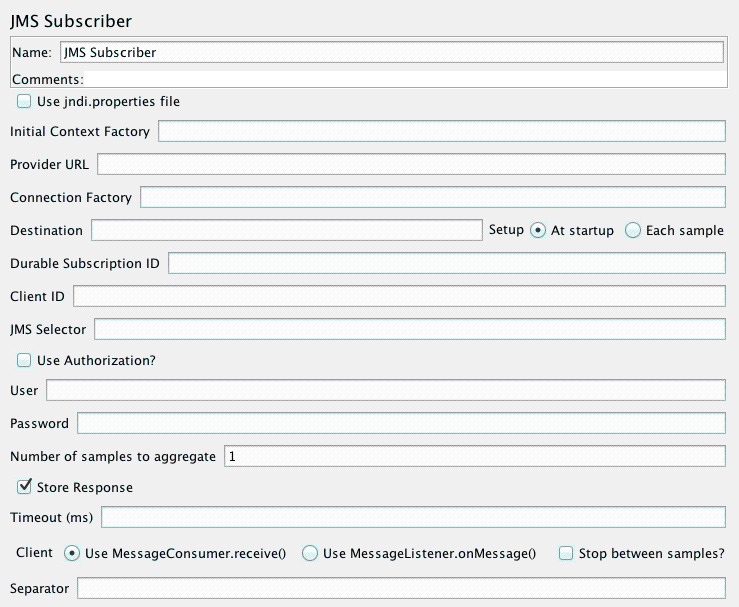
JMS Subscriber will subscribe to messages in a given destination (topic or queue). For those not familiar with JMS, it is the J2EE specification for messaging. There are numerous JMS servers on the market and several open source options.
| Name | Required | Description |
|---|---|---|
| Name | No | Descriptive name for this element that is shown in the tree. |
| use JNDI properties file | Yes | use jndi.properties. Note that the file must be on the classpath - e.g. by updating the user.classpath JMeter property. If this option is not selected, JMeter uses the “JNDI Initial Context Factory” and “Provider URL” fields to create the connection. |
| JNDI Initial Context Factory | No | Name of the context factory |
| Provider URL | No | The URL for the JMS provider |
| Destination | Yes | the message destination (topic or queue name) |
| Durable Subscription ID | No | The ID to use for a durable subscription. On first use the respective queue will automatically be generated by the JMS provider if it does not exist yet. |
| Client ID | No | The Client ID to use when you use a durable subscription. Be sure to add a variable like \${__threadNum} when you have more than one Thread. |
| JMS Selector | No | Message Selector as defined by JMS specification to extract only messages that respect the Selector condition. Syntax uses subpart of SQL 92. |
| Setup | Yes | The destination setup type. With At startup, the destination name is static (i.e. always same name during the test), with Each sample, the destination name is dynamic and is evaluated at each sample (i.e. the destination name may be a variable) |
| Authentication | Yes | Authentication requirement for the JMS provider |
| User | No | User Name |
| Password | No | Password (N.B. this is stored unencrypted in the test plan) |
| Number of samples to aggregate | Yes | number of samples to aggregate |
| Save response | Yes | should the sampler store the response. If not, only the response length is returned. |
| Timeout | Yes | Specify the timeout to be applied, in milliseconds. 0=none. This is the overall aggregate timeout, not per sample. |
| Client | Yes | Which client implementation to use. Both of them create connections which can read messages. However they use a different strategy, as described below: MessageConsumer.receive() : calls receive() for every requested message. Retains the connection between samples, but does not fetch messages unless the sampler is active. This is best suited to Queue subscriptions. MessageListener.onMessage() : establishes a Listener that stores all incoming messages on a queue. The listener remains active after the sampler completes. This is best suited to Topic subscriptions. |
| Stop between samples | Yes | If selected, then JMeter calls Connection.stop() at the end of each sample (and calls start() before each sample). This may be useful in some cases where multiple samples/threads have connections to the same queue. If not selected, JMeter calls Connection.start() at the start of the thread, and does not call stop() until the end of the thread. |
| Separator | No | Separator used to separate messages when there is more than one (related to setting Number of samples to aggregate). Note that \n, \r, \t are accepted. |
| Reconnect on error codes (regex) | No | Regular expression for JMSException error codes which force reconnection. If empty no reconnection will be done |
| Pause between errors (ms) | No | Pause in milliseconds that Subscriber will make when an error occurs |
Related
Section titled “Related”Was this page helpful?
Thanks for the feedback!Tell us what's missing on GitHub