

Configure the JMeter OS Process Sampler samplers: properties, defaults, and practical usage notes for building reliable load tests.
Part of the Samplers category. Also documented in context in the full Component Reference.
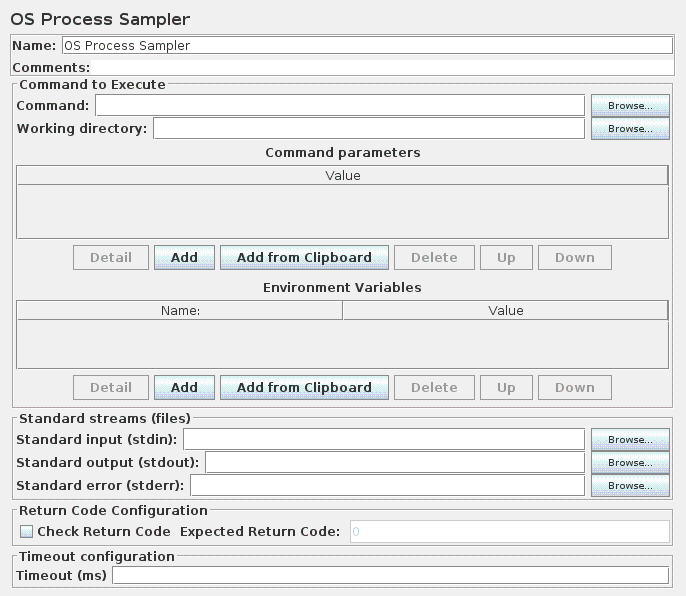
The OS Process Sampler is a sampler that can be used to execute commands on the local machine.
It should allow execution of any command that can be run from the command line.
Validation of the return code can be enabled, and the expected return code can be specified.
Note that OS shells generally provide command-line parsing. This varies between OSes, but generally the shell will split parameters on white-space. Some shells expand wild-card file names; some don’t. The quoting mechanism also varies between OSes. The sampler deliberately does not do any parsing or quote handling. The command and its parameters must be provided in the form expected by the executable. This means that the sampler settings will not be portable between OSes.
Many OSes have some built-in commands which are not provided as separate executables.
For example the Windows DIR command is part of the command interpreter (CMD.EXE).
These built-ins cannot be run as independent programs, but have to be provided as arguments to the appropriate command interpreter.
For example, the Windows command-line: DIR C:\TEMP needs to be specified as follows:
Command:
: CMD
Param 1:
: /C
Param 2:
: DIR
Param 3:
: C:\TEMP
| Name | Required | Description |
|---|---|---|
| Command | Yes | The program name to execute. |
| Working directory | No | Directory from which command will be executed, defaults to folder referenced by “user.dir” System property |
| Command Parameters | No | Parameters passed to the program name. |
| Environment Parameters | No | Key/Value pairs added to environment when running command. |
| Standard input (stdin) | No | Name of file from which input is to be taken (STDIN). |
| Standard output (stdout | No | Name of output file for standard output (STDOUT). If omitted, output is captured and returned as the response data. |
| Standard error (stderr) | No | Name of output file for standard error (STDERR). If omitted, output is captured and returned as the response data. |
| Check Return Code | No | If checked, sampler will compare return code with Expected Return Code. |
| Expected Return Code | No | Expected return code for System Call, required if “Check Return Code” is checked. Note 500 is used as an error indicator in JMeter so you should not use it. |
| Timeout | No | Timeout for command in milliseconds, defaults to 0, which means no timeout. If the timeout expires before the command finishes, JMeter will attempt to kill the OS process. |