

Configure the JMeter TCP Sampler samplers: properties, defaults, and practical usage notes for building reliable load tests.
Part of the Samplers category. Also documented in context in the full Component Reference.
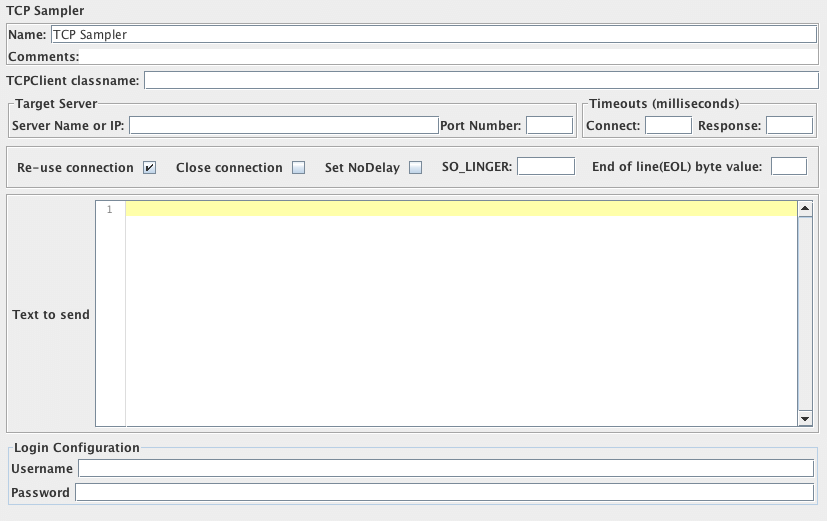
The TCP Sampler opens a TCP/IP connection to the specified server. It then sends the text, and waits for a response.
If “Re-use connection” is selected, connections are shared between Samplers in the same thread,
provided that the exact same host name string and port are used.
Different hosts/port combinations will use different connections, as will different threads.
If both of “Re-use connection” and “Close connection” are selected, the socket will be closed after running the sampler.
On the next sampler, another socket will be created. You may want to close a socket at the end of each thread loop.
If an error is detected - or “Re-use connection” is not selected - the socket is closed.
Another socket will be reopened on the next sample.
The following properties can be used to control its operation:
tcp.status.prefix
: text that precedes a status number
tcp.status.suffix
: text that follows a status number
tcp.status.properties
: name of property file to convert status codes to messages
tcp.handler
: Name of TCP Handler class (default TCPClientImpl) - only used if not specified on the GUI
The class that handles the connection is defined by the GUI, failing that the property tcp.handler.
If not found, the class is then searched for in the package org.apache.jmeter.protocol.tcp.sampler.
Users can provide their own implementation.
The class must extend org.apache.jmeter.protocol.tcp.sampler.TCPClient.
The following implementations are currently provided.
-
TCPClientImpl -
BinaryTCPClientImpl -
LengthPrefixedBinaryTCPClientImplThe implementations behave as follows:
TCPClientImpl
: This implementation is fairly basic.
When reading the response, it reads until the end of line byte, if this is defined
by setting the property tcp.eolByte, otherwise until the end of the input stream.
You can control charset encoding by setting tcp.charset, which will default to Platform default encoding.
BinaryTCPClientImpl
: This implementation converts the GUI input, which must be a hex-encoded string, into binary,
and performs the reverse when reading the response.
When reading the response, it reads until the end of message byte, if this is defined
by setting the property tcp.BinaryTCPClient.eomByte, otherwise until the end of the input stream.
LengthPrefixedBinaryTCPClientImpl
: This implementation extends BinaryTCPClientImpl by prefixing the binary message data with a binary length byte.
The length prefix defaults to 2 bytes.
This can be changed by setting the property tcp.binarylength.prefix.length.
Timeout handling
: If the timeout is set, the read will be terminated when this expires.
So if you are using an eolByte/eomByte, make sure the timeout is sufficiently long,
otherwise the read will be terminated early.
Response handling
: If tcp.status.prefix is defined, then the response message is searched for the text following
that up to the suffix. If any such text is found, it is used to set the response code.
The response message is then fetched from the properties file (if provided).
Usage of pre- and suffix
Section titled “Usage of pre- and suffix”For example, if the prefix = “[” and the suffix = “]”, then the following response:
[J28] XI123,23,GBP,CRwould have the response code J28.
Response codes in the range “400”-“499” and “500”-“599” are currently regarded as failures;
all others are successful. [This needs to be made configurable!]
Sockets are disconnected at the end of a test run.
| Name | Required | Description |
|---|---|---|
| Name | No | Descriptive name for this element that is shown in the tree. |
| TCPClient classname | No | Name of the TCPClient class. Defaults to the property tcp.handler, failing that TCPClientImpl. |
| ServerName or IP | Yes | Name or IP of TCP server |
| Port Number | Yes | Port to be used |
| Re-use connection | Yes | If selected, the connection is kept open. Otherwise it is closed when the data has been read. |
| Close connection | Yes | If selected, the connection will be closed after running the sampler. |
| SO_LINGER | No | Enable/disable SO_LINGER with the specified linger time in seconds when a socket is created. If you set “SO_LINGER” value as 0, you may prevent large numbers of sockets sitting around with a TIME_WAIT status. |
| End of line(EOL) byte value | No | Byte value for end of line, set this to a value outside the range -128 to +127 to skip eol checking. You may set this in jmeter.properties file as well with eolByte property. If you set this in TCP Sampler Config and in jmeter.properties file at the same time, the setting value in the TCP Sampler Config will be used. |
| Connect Timeout | No | Connect Timeout (milliseconds, 0 disables). |
| Response Timeout | No | Response Timeout (milliseconds, 0 disables). |
| Set NoDelay | Yes | See java.net.Socket.setTcpNoDelay(). If selected, this will disable Nagle’s algorithm, otherwise Nagle’s algorithm will be used. |
| Text to Send | Yes | Text to be sent |
| Login User | No | User Name - not used by default implementation |
| Password | No | Password - not used by default implementation (N.B. this is stored unencrypted in the test plan) |