

Configure the JMeter Regular Expression Extractor post-processors: properties, defaults, and practical usage notes for building reliable load tests.
Part of the Post-Processors category. Also documented in context in the full Component Reference.
TL;DR: the Regular Expression Extractor pulls a value out of any response body (HTML, JSON, plain text, headers) using a regex with capture groups. Use it when the response isn’t clean JSON, or when a JSON extractor’s JSONPath would be more fragile than a targeted regex.
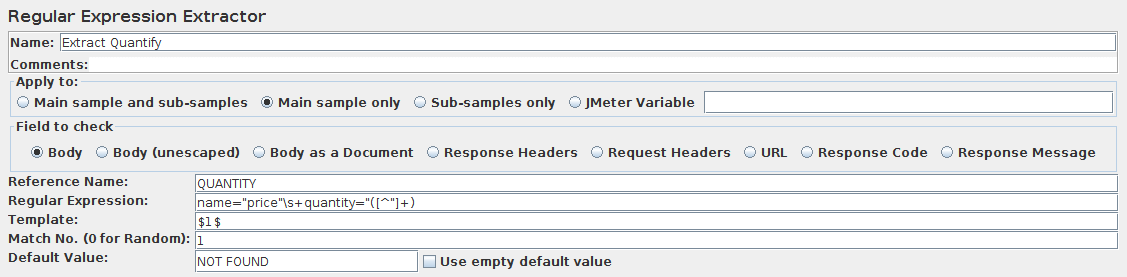
Allows the user to extract values from a server response using a Perl-type regular expression. As a post-processor, this element will execute after each Sample request in its scope, applying the regular expression, extracting the requested values, generate the template string, and store the result into the given variable name.
| Name | Required | Description |
|---|---|---|
| Name | No | Descriptive name for this element that is shown in the tree. |
| Apply to: | Yes | This is for use with samplers that can generate sub-samples, e.g. HTTP Sampler with embedded resources, Mail Reader or samples generated by the Transaction Controller. - Main sample only - only applies to the main sample - Sub-samples only - only applies to the sub-samples - Main sample and sub-samples - applies to both. - JMeter Variable Name to use - extraction is to be applied to the contents of the named variable Matching is applied to all qualifying samples in turn. For example if there is a main sample and 3 sub-samples, each of which contains a single match for the regex, (i.e. 4 matches in total). For match number = 3, Sub-samples only, the extractor will match the 3rd sub-sample. For match number = 3, Main sample and sub-samples, the extractor will match the 2nd sub-sample (1st match is main sample). For match number = 0 or negative, all qualifying samples will be processed. For match number > 0, matching will stop as soon as enough matches have been found. |
| Field to check | Yes | The following fields can be checked: - Body - the body of the response, e.g. the content of a web-page (excluding headers) - Body (unescaped) - the body of the response, with all Html escape codes replaced. Note that Html escapes are processed without regard to context, so some incorrect substitutions may be made. :::note Note that this option highly impacts performances, so use it only when absolutely necessary and be aware of its impacts ::: - Body as a Document - the extract text from various type of documents via Apache Tika (see View Results Tree Document view section). :::note Note that the Body as a Document option can impact performances, so ensure it is OK for your test ::: - Request Headers - may not be present for non-HTTP samples - Response Headers - may not be present for non-HTTP samples - URL - Response Code - e.g. 200 - Response Message - e.g. OK Headers can be useful for HTTP samples; it may not be present for other sample types. |
| Name of created variable | Yes | The name of the JMeter variable in which to store the result. Also note that each group is stored as [refname]_g#, where [refname] is the string you entered as the reference name, and # is the group number, where group 0 is the entire match, group 1 is the match from the first set of parentheses, etc. |
| Regular Expression | Yes | The regular expression used to parse the response data. This must contain at least one set of parentheses “()” to capture a portion of the string, unless using the group $0$. Do not enclose the expression in / / - unless of course you want to match these characters as well. |
| Template | Yes | The template used to create a string from the matches found. This is an arbitrary string with special elements to refer to groups within the regular expression. The syntax to refer to a group is: ‘$1$’ to refer to group 1, ‘$2$’ to refer to group 2, etc. $0$ refers to whatever the entire expression matches. |
| Match No. (0 for Random) | Yes | Indicates which match to use. The regular expression may match multiple times. - Use a value of zero to indicate JMeter should choose a match at random. - A positive number N means to select the nth match. - Negative numbers are used in conjunction with the ForEach Controller - see below. |
| Default Value | No, but recommended | If the regular expression does not match, then the reference variable will be set to the default value. This is particularly useful for debugging tests. If no default is provided, then it is difficult to tell whether the regular expression did not match, or the RE element was not processed or maybe the wrong variable is being used. However, if you have several test elements that set the same variable, you may wish to leave the variable unchanged if the expression does not match. In this case, remove the default value once debugging is complete. |
| Use empty default value | No | If the checkbox is checked and Default Value is empty, then JMeter will set the variable to empty string instead of not setting it. Thus when you will for example use \${var} (if Reference Name is var) in your Test Plan, if the extracted value is not found then \${var} will be equal to empty string instead of containing \${var} which may be useful if extracted value is optional. |
If the match number is set to a non-negative number, and a match occurs, the variables are set as follows:
-
refName- the value of the template -
refName_g_n_, wheren=0,1,2- the groups for the match -
refName_g- the number of groups in the Regex (excluding0)If no match occurs, then the
refNamevariable is set to the default (unless this is absent). Also, the following variables are removed: -
refName_g0 -
refName_g1 -
refName_gIf the match number is set to a negative number, then all the possible matches in the sampler data are processed. The variables are set as follows:
-
refName_matchNr- the number of matches found; could be0 -
refName__n_, wheren=1,2,3etc. - the strings as generated by the template -
refName__n__g_m_, wherem=0,1,2- the groups for matchn -
refName- always set to the default value -
refName_g_n_- not setNote that the
refNamevariable is always set to the default value in this case, and the associated group variables are not set.See also Response Assertion for some examples of how to specify modifiers, and for further information on JMeter regular expressions.
Common gotchas
Section titled “Common gotchas”- Always set a Default Value, otherwise a non-match leaves the variable undefined rather than failing the sample — see the Extractor Default Value playbook.
- Template
$1$refers to capture group 1;$0$is the whole match. Forgetting the group number is the single most common cause of “it extracts nothing.” - The Match No. field behaves the same as in the JSON Extractor:
0= random match,-1= capture all matches with_matchNrsuffix. - For structured JSON, prefer the JSON Extractor — regex against JSON is brittle the moment whitespace or key order changes upstream.