

Configure the JMeter JSR223 Sampler samplers: properties, defaults, and practical usage notes for building reliable load tests.
Part of the Samplers category. Also documented in context in the full Component Reference.
TL;DR: the JSR223 Sampler runs arbitrary Groovy (or other JSR223) code as the sample itself — useful for protocols JMeter has no built-in sampler for, or for generating a sample result around custom logic (crypto handshakes, SDK calls, batch simulation).
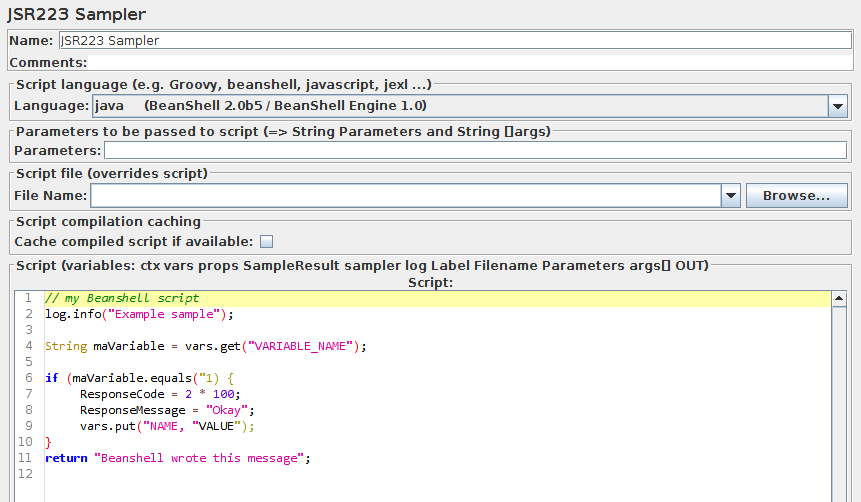
The JSR223 Sampler allows JSR223 script code to be used to perform a sample or some computation required to create/update variables.
The JSR223 test elements have a feature (compilation) that can significantly increase performance. To benefit from this feature:
- Use Script files instead of inlining them. This will make JMeter compile them if this feature is available on ScriptEngine and cache them.
- Or Use Script Text and check
Cache compiled script if availableproperty. :::note When using this feature, ensure your script code does not use JMeter variables or JMeter function calls directly in script code as caching would only cache first replacement. Instead use script parameters. ::: :::note To benefit from caching and compilation, the language engine used for scripting must implement JSR223[Compilable](https://docs.oracle.com/javase/8/docs/api/javax/script/Compilable.html)interface (Groovy is one of these, java, beanshell and javascript are not) ::: :::note When using Groovy as scripting language and not checkingCache compiled script if available(while caching is recommended), you should set this JVM Property-Dgroovy.use.classvalue=truedue to a Groovy Memory leak as of version 2.4.6, see: - GROOVY-7683 - GROOVY-7591 - JDK-8136353 :::
Cache size is controlled by the following JMeter property (jmeter.properties):
jsr223.compiled_scripts_cache_size=100| Name | Required | Description |
|---|---|---|
| Name | No | Descriptive name for this sampler that is shown in the tree. |
| Scripting Language | Yes | Name of the JSR223 scripting language to be used. :::note There are other languages supported than those that appear in the drop-down list. Others may be available if the appropriate jar is installed in the JMeter lib directory. Notice that some languages such as Velocity may use a different syntax for JSR223 variables, e.g. bash $log.debug("Hello " + $vars.get("a")); for Velocity. ::: |
| Script File | No | Name of a file to be used as a JSR223 script, if a relative file path is used, then it will be relative to directory referenced by “user.dir” System property |
| Parameters | No | List of parameters to be passed to the script file or the script. |
| Cache compiled script if available | No | If checked (advised) and the language used supports [Compilable](https://docs.oracle.com/javase/8/docs/api/javax/script/Compilable.html) interface (Groovy is one of these, java, beanshell and javascript are not), JMeter will compile the Script and cache it using its MD5 hash as unique cache key |
| Script | Yes (unless script file is provided) | Script to be passed to JSR223 language |
If a script file is supplied, that will be used, otherwise the script will be used.
Before invoking the script, some variables are set up. Note that these are JSR223 variables - i.e. they can be used directly in the script.
log- the LoggerLabel- the Sampler labelFileName- the file name, if anyParameters- text from the Parameters fieldargs- the parameters, split as described aboveSampleResult- pointer to the current SampleResultsampler- (Sampler) - pointer to current Samplerctx- JMeterContextvars- JMeterVariables - e.g.vars.get("VAR1"); vars.put("VAR2","value"); vars.remove("VAR3"); vars.putObject("OBJ1",new Object());props- JMeterProperties (classjava.util.Properties) - e.g.props.get("START.HMS"); props.put("PROP1","1234");OUT- System.out - e.g.OUT.println("message")
The SampleResult ResponseData is set from the return value of the script.
If the script returns null, it can set the response directly, by using the method
SampleResult.setResponseData(data), where data is either a String or a byte array.
The data type defaults to “text”, but can be set to binary by using the method
SampleResult.setDataType(SampleResult.BINARY).
The SampleResult variable gives the script full access to all the fields and
methods in the SampleResult. For example, the script has access to the methods
setStopThread(boolean) and setStopTest(boolean).
Unlike the BeanShell Sampler, the JSR223 Sampler does not set the ResponseCode, ResponseMessage and sample status via script variables.
Currently the only way to changes these is via the SampleResult methods:
SampleResult.setSuccessful(true/false)SampleResult.setResponseCode("code")SampleResult.setResponseMessage("message")
Common gotchas
Section titled “Common gotchas”- Always use Groovy, never BeanShell — Groovy is compiled and cached, BeanShell is interpreted fresh every iteration and is dramatically slower under load.
- Set
SampleResult.setSuccessful(false)explicitly on failure paths; an uncaught exception marks the sample an error, but logic errors that don’t throw won’t fail the sample unless you say so. - Cache expensive setup (compiled patterns, HTTP clients, parsed config) in a
bsh.sharedalternative — for Groovy, prefer aPre-Processor-level one-time init or a static field, not per-iteration work. - For full recipes (JWT decoding, HMAC signing, dynamic headers), see the JSR223 Groovy Scripting Guide and the MCP
get_jsr223_recipetool.