

Configure the JMeter XPath Assertion assertions: properties, defaults, and practical usage notes for building reliable load tests.
Part of the Assertions category. Also documented in context in the full Component Reference.
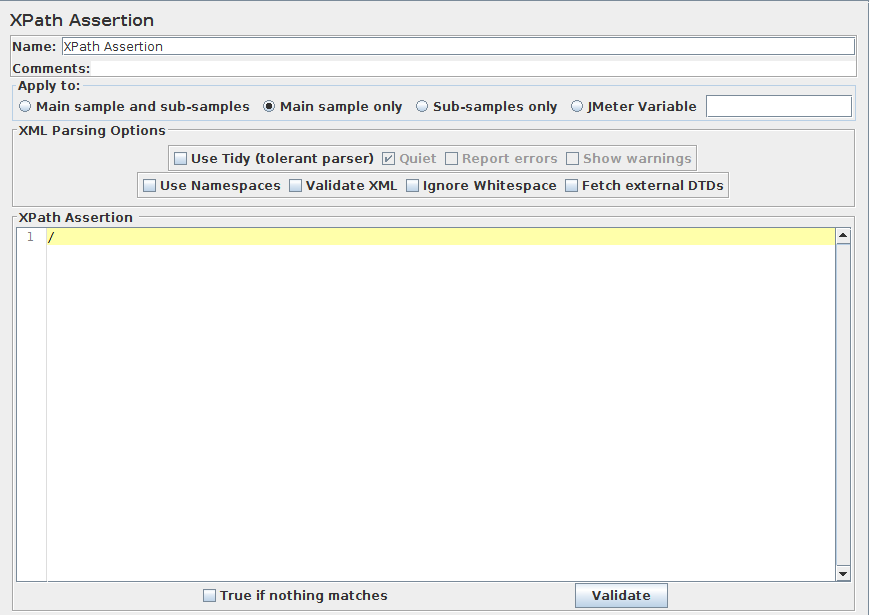
The XPath Assertion tests a document for well formedness, has the option
of validating against a DTD, or putting the document through JTidy and testing for an
XPath. If that XPath exists, the Assertion is true. Using “/” will match any well-formed
document, and is the default XPath Expression.
The assertion also supports boolean expressions, such as “count(//*error)=2”.
See http://www.w3.org/TR/xpath for more information
on XPath.
Some sample expressions:
//title[text()='Text to match']- matches<title>Text to match</title>anywhere in the response/title[text()='Text to match']- matches<title>Text to match</title>at root level in the response
| Name | Required | Description |
|---|---|---|
| Name | No | Descriptive name for this element that is shown in the tree. |
| Use Tidy (tolerant parser) | Yes | Use Tidy, i.e. be tolerant of XML/HTML errors |
| Quiet | If Tidy is selected | Sets the Tidy Quiet flag |
| Report Errors | If Tidy is selected | If a Tidy error occurs, then set the Assertion accordingly |
| Show warnings | If Tidy is selected | Sets the Tidy showWarnings option |
| Use Namespaces | If Tidy is not selected | Should namespaces be honoured? (see note below on NAMESPACES) |
| Validate XML | If Tidy is not selected | Check the document against its schema. |
| Ignore Whitespace | If Tidy is not selected | Ignore Element Whitespace. |
| Fetch External DTDs | If Tidy is not selected | If selected, external DTDs are fetched. |
| XPath Assertion | Yes | XPath to match in the document. |
| Invert assertion(will fail if above conditions met) | No | True if a XPath expression is not matched or returns false |
Related
Section titled “Related”Was this page helpful?
Thanks for the feedback!Tell us what's missing on GitHub