

Configure the JMeter JSON Extractor post-processors: properties, defaults, and practical usage notes for building reliable load tests.
Part of the Post-Processors category. Also documented in context in the full Component Reference.
TL;DR: the JSON Extractor pulls a value out of a JSON response using JSONPath, so a later request can reuse it (auth tokens, IDs, pagination cursors). It’s the modern replacement for regex-scraping JSON bodies.
The JSON PostProcessor enables you extract data from JSON responses using JSON-PATH syntax. This post processor is very similar to Regular expression extractor. It must be placed as a child of HTTP Sampler or any other sampler that has responses. It will allow you to extract in a very easy way text content, see JSON Path syntax.
| Name | Required | Description |
|---|---|---|
| Name | No | Descriptive name for this element that is shown in the tree. |
| Apply to: | Yes | This is for use with samplers that can generate sub-samples, e.g. HTTP Sampler with embedded resources, Mail Reader or samples generated by the Transaction Controller. Main sample only : only applies to the main sample Sub-samples only : only applies to the sub-samples Main sample and sub-samples : applies to both. JMeter Variable Name to use : extraction is to be applied to the contents of the named variable |
| Names of created variables | Yes | Semicolon separated names of variables that will contain the results of JSON-PATH expressions (must match number of JSON-PATH expressions) |
| JSON Path Expressions | Yes | Semicolon separated JSON-PATH expressions (must match number of variables) |
| Default Values | No | Semicolon separated default values if JSON-PATH expressions do not return any result(must match number of variables) |
| Match Numbers | No | For each JSON Path Expression, if the JSON Path query leads to many results, you can choose which one(s) to extract as Variables: - 0: means random (Default Value) - -1 means extract all results, they will be named as _<variable name>__N (where N goes from 1 to Number of results) - X: means extract the _X_th result. If this _X_th is greater than number of matches, then nothing is returned. Default value will be used The numbers have to be given as a Semicolon separated list. The number of elements in that list have to match the number of given JSON Path Expressions. If left empty, the value 0 will be used as default for every expression. |
| Compute concatenation var | No | If many results are found, plugin will concatenate them using ‘,’ separator and store it in a var named _<variable name>__ALL |
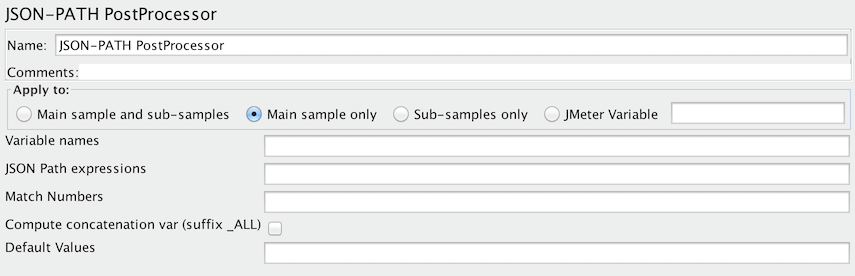 JSON PostProcessor
Common gotchas
Section titled “Common gotchas”- Set a Default Value (e.g.
NOT_FOUND) for every extraction. Without one, a failed match silently leaves the variable unset instead of failing loudly — see the Extractor Default Value playbook. - Match No.
0means “random match”; use-1to capture every match intovar_1,var_2, … andvar_matchNrfor the count. - JSONPath here is Jayway JsonPath syntax (
$.data.items[0].id), not the same dialect as some online JSONPath testers — verify against actual JMeter behavior before assuming a path is wrong. - For deeply nested or highly dynamic payloads, a JSR223 PostProcessor with a JSON library is sometimes more maintainable than a long JSONPath expression.