

Configure the JMeter While Controller logic controllers: properties, defaults, and practical usage notes for building reliable load tests.
Part of the Logic Controllers category. Also documented in context in the full Component Reference.
TL;DR: the While Controller repeats its children as long as a condition stays true (or forever, if left blank, until the enclosing loop/thread stops) — the standard element for polling patterns like “keep checking job status until it’s done.”
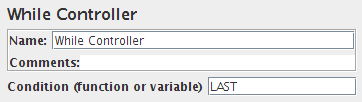
The While Controller runs its children until the condition is “false”.
Possible condition values:
- blank - exit loop when last sample in loop fails
LAST- exit loop when last sample in loop fails. If the last sample just before the loop failed, don’t enter loop.- Otherwise - exit (or don’t enter) the loop when the condition is equal to the string “
false”
For example:
\${VAR}- whereVARis set to false by some other test element\${__jexl3(\${C}==10)}\${__jexl3("\${VAR2}"=="abcd")}\${_P(property)}- where property is set to “false” somewhere else
| Name | Required | Description |
|---|---|---|
| Name | No | Descriptive name for this controller that is shown in the tree, and used to name the transaction. |
| Condition | No | blank, LAST, or variable/function |
Common gotchas
Section titled “Common gotchas”- A blank condition means loop forever (until the thread is told to stop) — a very common way to accidentally hang a test plan; always set an explicit exit condition or a max-iteration guard variable.
- The condition is re-evaluated after each pass through the children, so the loop always runs at least once — model that if your logic assumes a “check first, then maybe run” pattern.
- Same JavaScript-expression syntax as If Controller (
"${done}" != "true"), including the same quoting pitfalls. - For polling with a bounded wait, pair with a Constant Timer inside the loop (see Timers, Think Time & Pacing) so you’re not hammering the endpoint every iteration.
Related
Section titled “Related”Was this page helpful?
Thanks for the feedback!Tell us what's missing on GitHub