

Configure the JMeter Debug PostProcessor miscellaneous features: properties, defaults, and practical usage notes for building reliable load tests.
Part of the Miscellaneous Features category. Also documented in context in the full Component Reference.
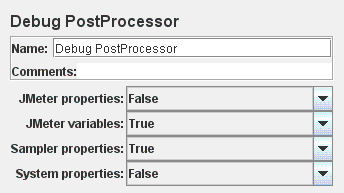
The Debug PostProcessor creates a subSample with the details of the previous Sampler properties, JMeter variables, properties and/or System Properties.
The values can be seen in the View Results Tree Listener Response Data pane.
| Name | Required | Description |
|---|---|---|
| Name | No | Descriptive name for this element that is shown in the tree. |
| JMeter Properties | Yes | Whether to show JMeter properties (default false). |
| JMeter Variables | Yes | Whether to show JMeter variables (default false). |
| Sampler Properties | Yes | Whether to show Sampler properties (default true). |
| System Properties | Yes | Whether to show System properties (default false). |
Related
Section titled “Related”Was this page helpful?
Thanks for the feedback!Tell us what's missing on GitHub