

Configure the JMeter FTP Request samplers: properties, defaults, and practical usage notes for building reliable load tests.
Part of the Samplers category. Also documented in context in the full Component Reference.
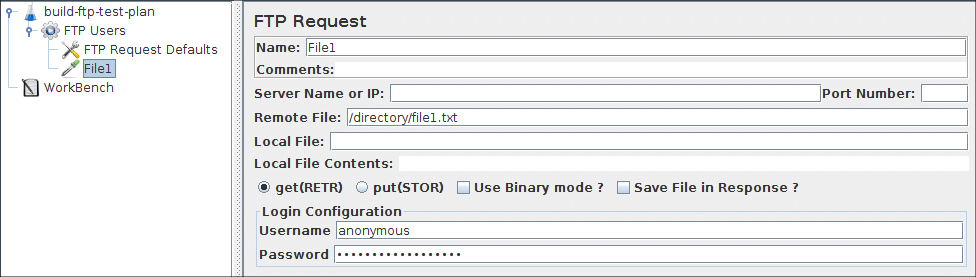
This controller lets you send an FTP “retrieve file” or “upload file” request to an FTP server. If you are going to send multiple requests to the same FTP server, consider using a FTP Request Defaults Configuration Element so you do not have to enter the same information for each FTP Request Generative Controller. When downloading a file, it can be stored on disk (Local File) or in the Response Data, or both.
Latency is set to the time it takes to login.
| Name | Required | Description |
|---|---|---|
| Name | No | Descriptive name for this sampler that is shown in the tree. |
| Server Name or IP | Yes | Domain name or IP address of the FTP server. |
| Port | No | Port to use. If this is >0, then this specific port is used, otherwise JMeter uses the default FTP port. |
| Remote File: | Yes | File to retrieve or name of destination file to upload. |
| Local File: | Yes, if uploading (*) | File to upload, or destination for downloads (defaults to remote file name). |
| Local File Contents: | Yes, if uploading (*) | Provides the contents for the upload, overrides the Local File property. |
| get(RETR) / put(STOR) | Yes | Whether to retrieve or upload a file. |
| Use Binary mode | Yes | Check this to use Binary mode (default ASCII) |
| Save File in Response | Yes, if downloading | Whether to store contents of retrieved file in response data. If the mode is ASCII, then the contents will be visible in the View Results Tree. |
| Username | Usually | FTP account username. |
| Password | Usually | FTP account password. N.B. This will be visible in the test plan. |
Related
Section titled “Related”Was this page helpful?
Thanks for the feedback!Tell us what's missing on GitHub