

Configure the JMeter LDAP Request samplers: properties, defaults, and practical usage notes for building reliable load tests.
Part of the Samplers category. Also documented in context in the full Component Reference.
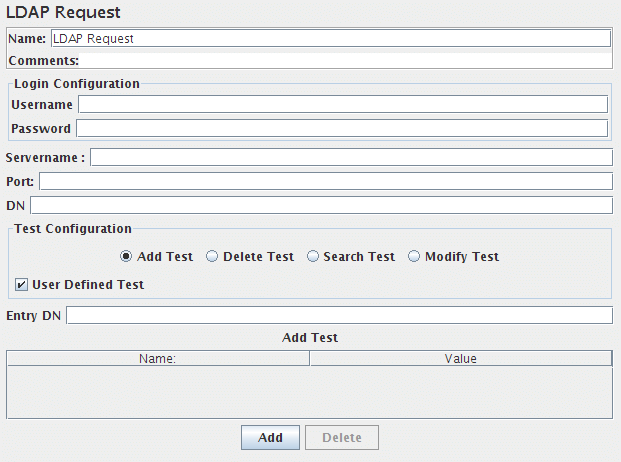
This Sampler lets you send a different LDAP request(Add, Modify, Delete and Search) to an LDAP server.
If you are going to send multiple requests to the same LDAP server, consider
using an LDAP Request Defaults
Configuration Element so you do not have to enter the same information for each
LDAP Request.
The same way the Login Config Element also using for Login and password.
There are two ways to create test cases for testing an LDAP Server.
- Inbuilt Test cases.
- User defined Test cases.
There are four test scenarios of testing LDAP. The tests are given below:
- Add Test 1. Inbuilt test: This will add a pre-defined entry in the LDAP Server and calculate the execution time. After execution of the test, the created entry will be deleted from the LDAP Server. 2. User defined test: This will add the entry in the LDAP Server. User has to enter all the attributes in the table.The entries are collected from the table to add. The execution time is calculated. The created entry will not be deleted after the test.
- Modify Test 1. Inbuilt test: This will create a pre-defined entry first, then will modify the created entry in the LDAP Server.And calculate the execution time. After execution of the test, the created entry will be deleted from the LDAP Server. 2. User defined test: This will modify the entry in the LDAP Server. User has to enter all the attributes in the table. The entries are collected from the table to modify. The execution time is calculated. The entry will not be deleted from the LDAP Server.
- Search Test 1. Inbuilt test: This will create the entry first, then will search if the attributes are available. It calculates the execution time of the search query. At the end of the execution,created entry will be deleted from the LDAP Server. 2. User defined test: This will search the user defined entry(Search filter) in the Search base (again, defined by the user). The entries should be available in the LDAP Server. The execution time is calculated.
- Delete Test 1. Inbuilt test: This will create a pre-defined entry first, then it will be deleted from the LDAP Server. The execution time is calculated. 2. User defined test: This will delete the user-defined entry in the LDAP Server. The entries should be available in the LDAP Server. The execution time is calculated.
| Name | Required | Description |
|---|---|---|
| Name | No | Descriptive name for this sampler that is shown in the tree. |
| Server Name or IP | Yes | Domain name or IP address of the LDAP server. JMeter assumes the LDAP server is listening on the default port (389). |
| Port | Yes | Port to connect to (default is 389). |
| root DN | Yes | Base DN to use for LDAP operations |
| Username | Usually | LDAP server username. |
| Password | Usually | LDAP server password. (N.B. this is stored unencrypted in the test plan) |
| Entry DN | Yes, if User Defined Test and Add Test or Modify Test is selected | the name of the context to create or Modify; may not be empty. :::note You have to set the right attributes of the object yourself. So if you want to add cn=apache,ou=test you have to add in the table name and value to cn and apache. ::: |
| Delete | Yes, if User Defined Test and Delete Test is selected | the name of the context to Delete; may not be empty |
| Search base | Yes, if User Defined Test and Search Test is selected | the name of the context or object to search |
| Search filter | Yes, if User Defined Test and Search Test is selected | the filter expression to use for the search; may not be null |
| add test | Yes, if User Defined Test and add Test is selected | Use these name, value pairs for creation of the new object in the given context |
| modify test | Yes, if User Defined Test and Modify Test is selected | Use these name, value pairs for modification of the given context object |
Related
Section titled “Related”Was this page helpful?
Thanks for the feedback!Tell us what's missing on GitHub